PDF Editor & Sign – VeloPDF
Category: Productivity Date:2026-04-15
Rating: 4
Introduction
PDF Editor & Sign – VeloPDF is a compact PDF utility for viewing, editing, and signing documents on Android. PDF Editor & Sign – VeloPDF lets you add annotations, edit text fields, fill forms, and apply secure signatures with straightforward export and sharing options.
Key functions
- Annotate and mark up PDFs: highlight, underline, add comments, and draw.
- Edit text and page order: modify text fields, add or remove pages, merge and split documents.
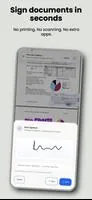
- Forms and signatures: fill interactive forms and insert a signature to approve documents.
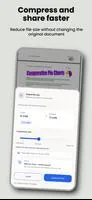
- File management: compress files, convert images to PDF, and protect documents with a password.
- Sharing and backup: export to common formats and connect to cloud storage for backup.
How to use
- Open a document from device storage or cloud and choose an editing tool.
- Make annotations or edits, then save a new copy or overwrite the original.
- Use the signature tool to draw or insert a saved signature and share the final file.
PDF Editor & Sign – VeloPDF works offline for basic edits and also offers cloud sync options to keep files available across devices.
- No virus
- No advertising
- User protection
Information
- File size: 75.30 M
- Language: English
- Latest Version: 1.1.5
- Requirements: Android
- Votes: 356
- Package ID: com.alvintra.veloreadpdf
- Developer: Alvintra
Screenshots