Introduction
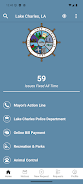
OneLC Action Line brings Lake Charles city services to your phone, making it easy for residents and business owners to report non-emergency issues and follow local responses from submission to resolution. The OneLC Action Line app pairs a straightforward reporting flow with practical tools so you can document potholes, damaged sidewalks, overgrown lots and other neighborhood concerns quickly and reliably, attaching photos, notes and precise location data in moments.
Key features and controls
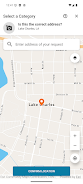
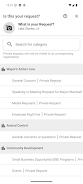
The app’s interaction mechanics focus on simplicity and speed: a guided form leads you through category selection, location selection and photo attachment with minimal steps. Controls are large and clearly labeled so camera, gallery and GPS functions are accessible even on smaller devices. Photo handling supports quick cropping and basic rotation so images accurately communicate the issue, while contextual form fields display only relevant inputs to reduce typing. Submission confirmation provides a reference number and an estimated timeline for initial review, and you can save common addresses or templates to accelerate repeat reports.
How requests progress
Progression is designed to be transparent and predictable, not game-like: each report moves through defined status stages such as Received, Under Review, Assigned, In Progress and Completed so you always know where a request stands. The timeline view shows timestamps and any staff comments, and push notifications can alert you at key milestones. If follow-up photos or additional details are needed, the app lets you append information to an existing report so the record remains continuous and accessible for future reference.
Visual style and navigation
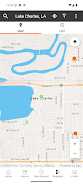
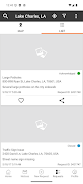
The visual design centers on a clean map interface that highlights neighborhoods and reported locations with readable markers and clear contrast. Map and list views work together; the map gives geographic context while list view offers compact sorting by date or status. Navigation emphasizes discoverability: category and subtype groupings make it straightforward to find the right reason for a report, and search or filter controls help you locate past submissions or nearby open requests without unnecessary steps.
Personalization, accessibility and offline behavior
OneLC Action Line includes practical personalization such as notification preferences, a saved address list and a default photo source setting to match how you prefer to work. Accessibility considerations are built into the interface with options for larger text, high-contrast color choices and clear iconography to support users with varying needs. Drafts are cached locally so you can compose a report while offline and submit it when connectivity returns, and contextual help messages guide you if required fields are missing or location accuracy is low. These features aim to make the app usable across devices and network conditions.
Replay value and ongoing engagement
Although the app is not a game, it provides lasting utility through repeated use: tracking neighborhood improvements, monitoring the outcomes of past reports and staying informed about community programs. The archive of resolved requests serves as an informal record of municipal activity in your area and can be a useful research tool when you want to see what has changed over time. Saved templates, favorite addresses and the ability to reopen or update prior reports reduce friction for frequent users and encourage continued engagement.
User experience and challenge handling
The app balances ease of use with practical controls to reduce user friction. Error states are handled with friendly messages that explain how to correct issues such as weak GPS signals or missing photos. Where location data is ambiguous, the interface invites manual pin adjustment and offers a thumbnail preview to confirm the site before submission. These design choices reduce accidental reports and help municipal crews receive higher-quality information for faster assessment.
Advantages and limitations
OneLC Action Line centralizes requests and community updates so residents have a single place to report problems and check status, improving accountability and minimizing redundant phone calls. By combining photographic evidence, precise location tagging and concise descriptions, the app helps city staff triage and respond more efficiently. Limitations include the app’s focus on non-emergency services in the City of Lake Charles, so it is not intended for situations requiring immediate police, fire or medical response. A smartphone and internet connection are generally required to submit and view live updates, though draft functionality supports offline composition. Response times ultimately reflect municipal resources and priorities rather than the app itself.
- No virus
- No advertising
- User protection
Information
- File size: 207.70 M
- Language: English
- Latest Version: 7.9.1
- Requirements: Android
- Votes: 342
- Package ID: com.cityoflakecharles.seeclickfix
- Developer: SeeClickFix
Screenshots



















Explore More
Streamline operations and maximize productivity with our innovative business apps. Manage contacts, schedule meetings, and route calls seamlessly. Collaborate on documents and projects in real-time. Track inventory, finances, and analytics to inform smart decisions. Build customized proposals, invoices, and contracts to win clients. Stay on top of emails, tasks, and passwords for efficient work.
View more