Introduction
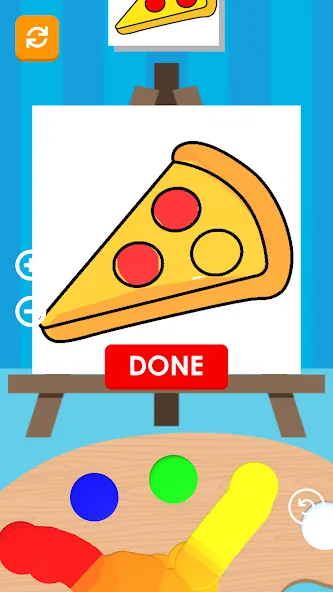
Mix & Paint is a mobile painting and color-mixing studio that turns your device into a portable palette. It combines realistic color blending, layered brush tools, and easy export options so users can create, experiment with tones, and produce polished illustrations or simple sketches wherever they are.
What Mix & Paint Offers
Designed for hobbyists and creatives who prefer a lightweight, fast tool, Mix & Paint focuses on intuitive controls and accurate color behavior. The interface keeps core tools within reach while offering depth through adjustable brushes, opacity controls, and a dynamic color wheel that reacts like physical pigments.
Key Tools and Workflow
The app arranges its toolkit to support both quick studies and more deliberate pieces. A typical workflow in Mix & Paint moves from selecting a canvas size to blocking in large shapes, mixing custom palettes, and refining details through layers and blending modes.
- Brush variety: Soft, hard, texture, and specialty brushes with pressure sensitivity support.
- Layer system: Multiple layers with rename, lock, merge, and opacity adjustments for non-destructive editing.
- Color mixing: A simulation-based mixer that creates intermediate tones as if blending real paint.
- Undo/Redo: Robust history support to experiment without losing progress.
Interface and Controls
Mix & Paint keeps an uncluttered workspace. Tool panels can be collapsed to maximize canvas area, while gesture controls enable zooming, rotating, and two-finger panning. Brush settings are presented in a compact slider layout for quick adjustments, and contextual menus appear only when needed to avoid distractions.
Performance and Compatibility
Optimized for a broad range of Android devices, Mix & Paint balances visual fidelity with responsiveness. The rendering engine handles large canvases and multiple layers without excessive battery drain. Compatibility extends to common stylus input and varied screen sizes so the app remains usable on phones and tablets alike.
Exporting and Sharing Options
Users can export projects in popular formats such as PNG and JPEG, or save layered files for future edits. Share functions are built in, allowing direct uploads to social platforms or cloud storage. Mix & Paint also supports high-resolution export for printing or professional presentation.
Customization and Personalization
Customization is central to the experience. Artists can build and save custom brushes, store palette swatches for recurring color themes, and set default canvas sizes and units. Interface themes offer light and dark modes to match working environments and reduce eye strain during long sessions.
Tips for Better Results
To get the most from Mix & Paint, start by calibrating brush pressure if using a stylus, and create a small set of favorite swatches to speed up color selection. Work with multiple layers to isolate adjustments, and use low-opacity brushes to build depth gradually instead of applying high-opacity strokes at once.
Who Should Install It
Mix & Paint appeals to sketchers, concept artists, and anyone who enjoys experimenting with color without the complexity of desktop software. Beginners will appreciate the simple layout and guided tools, while more experienced users benefit from the advanced brush engine and export options.
Getting Set Up
Installation is straightforward: download, grant storage permissions for saving projects, and optionally enable stylus support for pressure-sensitive drawing. The first-time tutorial walks through basic tools and the layer system so new users can start a project within minutes.
Support and Updates
Regular updates add new brushes, performance tweaks, and file format improvements. Built-in help covers common questions, and a feedback channel lets users suggest features or report bugs. Mix & Paint maintains a stable update cadence to respond to user needs and device changes.
Whether you want a compact sketchbook or a capable portable studio, Mix & Paint delivers a focused set of painting tools, realistic mixing behavior, and export flexibility. The app strikes a practical balance between simplicity and creative control, making it a useful addition to any mobile creator's toolkit.
- No virus
- No advertising
- User protection
Information
- File size: 71.90 M
- Language: English
- Latest Version: 3.0.13
- Requirements: Android
- Votes: 349
- Package ID: com.mix.color.paint.game
- Developer: Geisha Tokyo, Inc.
Screenshots
















Explore More
Experience nonstop thrills with our newest edge-of-your-seat action game! With console-quality graphics and intuitive touchscreen controls, you'll be drawn into high-octane combat and stunt-driven gameplay. Choose from an arsenal of upgradable weapons and vehicles to blaze through enemy bases, post-apocalyptic cities, and more. Physics-based action packed with explosions and destructible environments make every level more intense than the last.

FC888 v2.1.6

SL888 v12.6

Rpvip1 v9.8

Tank Sniper Mod
GOGO REJEKI v1.0.4
6svip v6.0

CUANKUY v12.5

JOYit Mod