
Introduction
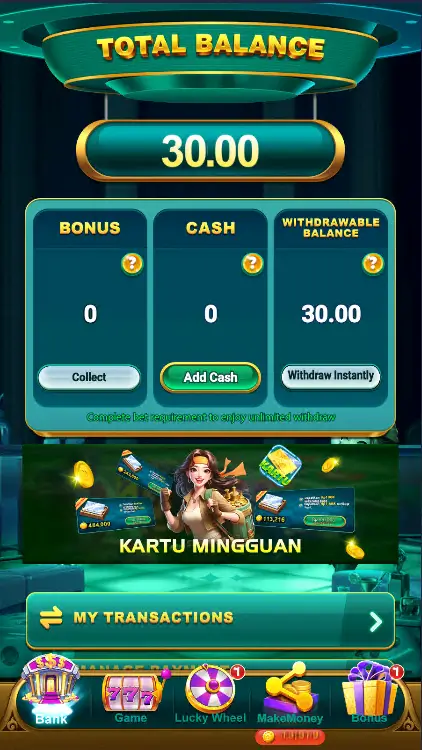
Win IDN is a compact Android app that centralizes financial tools, user accounts, and secure transfers for Indonesian users. It combines a clean dashboard with fast authentication, transaction history, and customizable alerts so users can manage payments and balances from one place without switching between multiple services or cluttered interfaces.
Key features at a glance
Win IDN organizes core functions into an approachable toolkit designed for everyday tasks. The app highlights quick balance overviews, one-tap transfers, and an activity log that makes it easy to trace recent transactions. Notifications are configurable so you only receive updates that matter.
- Unified dashboard – see balances, pending actions, and recent payments in a single view.
- Fast transfers – streamlined flow for local transfers and saved recipients.
- Robust history – searchable transaction records with export options.
- Custom alerts – set thresholds for low balance, large payments, and scheduled reminders.
Interface and navigation
The interface favors clarity and speed. Navigation uses a simple bottom bar and contextual menus so common actions require no more than two taps. Visual cues and concise labels reduce cognitive load, letting users complete routine tasks without digging through nested screens. Visual themes and font scaling improve readability on smaller devices.
How the workflow supports daily use
Workflows in Win IDN focus on typical user journeys: checking balances, sending a payment, and reviewing recent activity. Each step includes brief inline guidance to reduce setup friction. Saved templates accelerate repetitive transactions and a favorites list reduces errors by avoiding repeated manual entry.
- Quick pay flow – select recipient, confirm amount, authenticate; a progress indicator shows completion status.
- Scheduled transactions – plan recurring transfers and view upcoming payments in a calendar-style list.
- Template management – create, edit, and delete frequently used payment templates.
Security and privacy controls
Security is integral to Win IDN's design. The app supports biometric unlocking and strong passcodes for access control. Sensitive data is protected using standard mobile encryption practices, and the app offers session timeouts and optional two-factor authentication to strengthen account safety. Privacy settings let users manage data sharing and notification visibility.
Performance and device compatibility
Win IDN is optimized to run smoothly on a wide range of Android devices. The app footprint is modest, minimizing battery and memory impact while keeping animations responsive. Background sync is tuned to preserve data usage but remain timely. Compatibility details are provided in the app listing, and the development team issues regular updates to address performance improvements and bug fixes.
Practical tools and integrations
Beyond core money management, the app includes practical add-ons for productivity. Built-in QR scanning simplifies invoice payments, while import/export options help migrate data from other services. Local language support and regional payment methods make the app practical for users in Indonesia and nearby markets.
- QR invoice support – scan and pay bills directly within the app.
- Data export – CSV and PDF options for expense tracking and record-keeping.
- Local payment methods – compatibility with popular regional providers and banks.
Getting started with Win IDN
Onboarding is straightforward: install, register with an email or phone number, verify identity where required, and set up authentication preferences. The app includes a short setup wizard that helps link bank accounts or wallets and demonstrates the most-used features. For added peace of mind, backup settings and recovery options are clearly presented during signup.
Tips for smoother use
Enable biometric login for faster access and set notification thresholds to avoid unnecessary alerts. Regularly review saved templates to reduce mistakes, and export transaction history monthly if you keep external records. If you encounter issues, the support section offers guided troubleshooting steps and contact options.
Win IDN blends convenience with essential safety and efficiency features to streamline daily financial tasks. Its focus on practical workflows, clear navigation, and regional compatibility makes it a solid choice for users who want a lightweight yet capable account management app on Android.
- No virus
- No advertising
- User protection
Information
- File size: 45.50 M
- Language: English
- Latest Version: 1.1.0
- Requirements: Android
- Votes: 90
- Package ID: com.winidn.fun.games
- Developer: lamislot
Screenshots



















Explore More
Gather around for game night anytime, anywhere with our new mobile board game. Play digital versions of classics like chess, checkers, backgammon and more against friends or AI opponents. With smooth online multiplayer, you can challenge players worldwide or create private games. Customizable boards, pieces, and house rules allow you to tailor the experience. Compete in daily tournaments or just play for fun.
View more