Introduction
Free Demo VR Quest Standalone offers a lightweight virtual reality demonstration for standalone headsets, delivering a curated set of scenes and interactions to test hardware and spatial tracking. This demo showcases core features, quick setup, and performance metrics, ideal for users exploring VR capabilities before committing to full applications.
What the Demo Includes
The Free Demo VR Quest Standalone bundles compact environments designed to evaluate headset tracking, controller input, and rendering performance. Users encounter a series of short scenes — from a minimal gallery to an interactive room — that highlight latency, frame stability, and audio spatialization. Each module is intentionally limited in scope to prioritize smooth operation on mid-range standalone devices.
Key Functionality
- Hardware Diagnostics: Built-in overlays report framerate, tracking fidelity, and CPU/GPU load to help diagnose performance bottlenecks.
- Input Validation: Test gestures, button mapping, haptics, and controller latency across common interaction patterns.
- Environmental Checks: Simple scenes emphasize occlusion, lighting response, and spatial audio to confirm headset calibration.
- Quick Reset: Restart scenes or recalibrate tracking without exiting the demo for rapid iteration.
User Interface and Controls
The interface is designed for clarity and speed. Floating menus appear in-world, reachable with either hand, and controls mirror standard standalone conventions. Visual cues help new users locate menus and focal points, while advanced panels reveal telemetry for developers and testers. The control scheme avoids deep menus and keeps the most commonly used actions one or two steps away.
Workflow: From Setup to Testing
Getting started with Free Demo VR Quest Standalone is fast. Install the demo, allow required permissions, and follow the on-screen calibration guide. A short guided tutorial introduces locomotion options, object interaction, and the diagnostics overlay. After initial calibration, users can cycle through test scenes, capture logs, and export performance snapshots for further analysis.
Performance and Compatibility
This demo targets standalone headsets with limited resources. Optimization strategies include simplified shaders, level-of-detail meshes, and culling techniques to preserve consistent frame rates. The app supports a range of device profiles and adjusts render resolution dynamically to maintain responsiveness. Compatibility notes and recommended settings appear in the settings panel to help users tune visuals and battery usage.
Practical Uses
- Developers: Validate tracking and input before deploying larger builds, compare performance across firmware versions, and collect telemetry for bug reports.
- Hardware Testers: Run rapid diagnostics on multiple units to ensure consistent behavior and identify hardware-related issues.
- Curious Users: Experience a compact taste of VR features and confirm that a headset meets personal comfort and performance expectations.
Customization and Advanced Options
While the demo remains intentionally lightweight, it includes adjustable parameters for developers: toggles for ambient occlusion, shadow detail, and physics fidelity. An advanced log view exposes raw sensor data and sampling rates so technical users can correlate perceived behaviors with telemetry. These options allow precise comparisons without altering the core demo content.
Tips for Reliable Testing
- Ensure the headset firmware is up to date and charge levels are adequate for consistent results.
- Test in the same physical environment when comparing runs to minimize external tracking variance.
- Use the diagnostics overlay while reproducing an issue to capture key metrics for later review.
- Recalibrate the guardian or play area between sessions if you move the testing location.
Why Choose This Demo
Free Demo VR Quest Standalone is a practical, no-frills tool designed to reveal the essentials of standalone VR behavior. It balances user-friendly presentation with technical depth, making it useful for hobbyists and professionals who need a quick, reliable way to assess device performance without the overhead of larger applications.
Download the demo to validate headset performance, explore input responsiveness, and capture diagnostics quickly. The compact nature of the package keeps iteration cycles short and helps teams make informed decisions about hardware and software adjustments.
- No virus
- No advertising
- User protection
Information
- File size: 364.62 M
- Language: English
- Latest Version: 1.0
- Requirements: Android
- Votes: 132
- Package ID: com.vrecstasy.demohentai
- Developer: vrecstasy
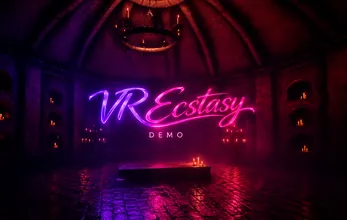
Screenshots
















Explore More
Experience nonstop thrills with our newest edge-of-your-seat action game! With console-quality graphics and intuitive touchscreen controls, you'll be drawn into high-octane combat and stunt-driven gameplay. Choose from an arsenal of upgradable weapons and vehicles to blaze through enemy bases, post-apocalyptic cities, and more. Physics-based action packed with explosions and destructible environments make every level more intense than the last.
Bioasshard Arena

Private Dancer

Chirpy Sort: Bird Color Puzzle

NPC Tales: The Adventurer Demo

Chill Life

Tiny Legends

Lust Hunter: Male edition 0.135

Nemurimouto v0.11b