Introduction
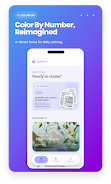
ColorFun is a calming color-by-number app designed for people who want a quick creative reset or a focused unwind session. In ColorFun you step into a small studio of curated artworks, choose pieces that match your mood, and bring each image to life one color at a time with a smooth, low-friction flow that stays accessible whether you have five minutes or an hour.
Gameplay and controls
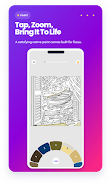
The core gameplay uses simple tap-to-fill controls: tap a marked region to apply the assigned color, pinch to zoom and pan to reach small details, and use a hint function to reveal color areas when you need a nudge. Touch targets and gesture responses are tuned to feel responsive on phones and tablets; long-press previews and an undo option help correct slips without interrupting the relaxing pace. These mechanics keep interaction effortless while letting the artwork itself be the focus.
Progression and level structure
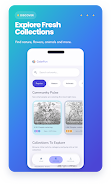
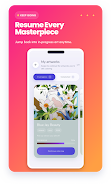
Artwork is organized into collections and individual canvases rather than traditional levels. Each piece shows a completion percentage and progress is tracked across your studio so you can resume unfinished work at any time. Pieces vary in complexity—some are quick single-session images, others have many color regions for longer sessions—allowing a natural progression from short warm-ups to more involved projects without forcing a linear path.
Visual style and customization
ColorFun presents artworks across a range of themes with a clean, low-distraction interface that emphasizes the illustration. You can personalize the experience by adjusting the app appearance, turning sounds and haptic feedback on or off, and choosing display options that suit your eyes and device. Finished images can be saved to your device in standard image formats and shared with friends or stored for a personal gallery.
Progress and motivation systems
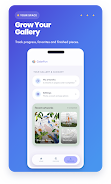
Progress tracking records completed pieces and works in progress, so you can see how much of a collection you’ve finished and revisit favorites. A Daily Pick offers a fresh suggestion each day to encourage routine creative breaks; completing the Daily Pick becomes a simple, optional habit rather than a competitive task. Gentle reminders are available to help keep a daily habit, but they can be disabled if you prefer uninterrupted time.
Replay value and user experience
Replay value comes from a large and growing studio of artwork and the ability to return to favorites, refine completed images, or work through more detailed pieces. The app is intentionally low-pressure: there are no timers, leaderboards, or required goals, so the experience stays suitable for short mindful breaks or longer, deliberate coloring sessions. Image preparation is handled efficiently so that loading and coloring feel consistent across a variety of devices.
Accessibility and device support
ColorFun includes options to improve accessibility: adjustable display contrast, larger touch targets, and configurable haptic/sound settings help users tailor the experience. The interface is structured to be navigable with simple gestures and minimal menus, which helps users who prefer a straightforward, distraction-free creative tool.
Offline play and data handling
Many artworks can be prepared for offline use after their first load on the device; this lets you color without an internet connection once the piece is ready locally. Some artworks require an initial download the first time they are prepared, which means you may need network access at that moment, but afterward the files remain available for offline coloring. Saved images and progress are stored locally on the device so you retain access even when you’re not online.
Limitations and compatibility
ColorFun focuses on color-by-number mechanics, which makes it less suitable for users seeking free-form drawing, advanced photo editing, or vector tools. If you prefer unrestricted drawing or complex layer-based editing, those workflows are outside the app’s scope. Additionally, a small number of artworks may need that initial connection to prepare assets on older devices.
Overall, ColorFun aims to provide a low-friction, restorative coloring experience that fits into daily routines, supports steady progress, and preserves finished work for sharing or personal archiving. The app’s straightforward controls, curated studio, and personalization options make it easy to pick up and enjoy immediately while still offering depth through varied artwork and progress tracking.
- No virus
- No advertising
- User protection
Information
- File size: 43.56 M
- Language: English
- Latest Version: 1.0.3
- Requirements: Android
- Votes: 298
- Package ID: com.thesoft.app.colorfun
- Developer: TheSoft JSC
Screenshots
















Explore More
Gather around for game night anytime, anywhere with our new mobile board game. Play digital versions of classics like chess, checkers, backgammon and more against friends or AI opponents. With smooth online multiplayer, you can challenge players worldwide or create private games. Customizable boards, pieces, and house rules allow you to tailor the experience. Compete in daily tournaments or just play for fun.
View more