

Click Deity - Rerolling Guide and Tips
2023-08-11 15:45:58Source:JuxiaAuthor:Juxia
Click Deity is an exceptional RPG developed by DH-Games that revolves around Greek mythology. Players will collaborate with various Greek Heroes and Deities to save the Roman Empire from the wrath of the old gods. Our Click Deity reroll guide aims to assist players in starting their journey with the most valuable characters. Let's delve into this comprehensive guide to learn about the rerolling process and obtain the most powerful character in the realm of deities.
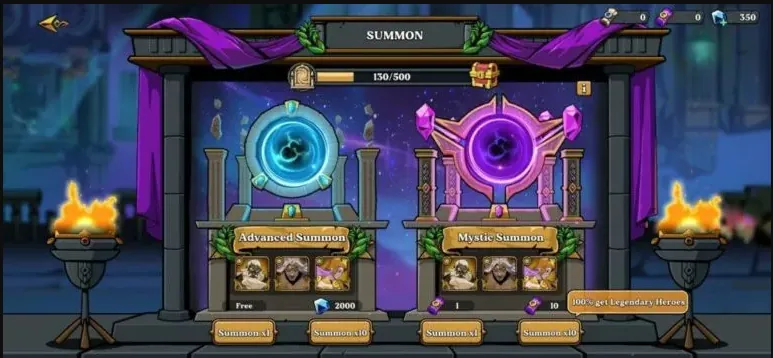
Efficient Rerolling in Click Deity
In Click Deity, every player has the opportunity to roll for the best character in the game after completing a brief tutorial provided by the developers. The game encourages players to acquire their desired hero from the available collection of Greek heroes during the rolling process. Therefore, it is crucial for players to summon characters in order to obtain their preferred hero.
Players can sign in to Click Deity using either their Google or Facebook accounts. By utilizing different email IDs, they can create multiple accounts simultaneously. This provides an advantage as players can reroll with different accounts until they obtain their desired hero.
Click Deity Reroll Guide for Android Devices
Follow these simple steps to reroll if you are playing on an Android device:
1. Open the game on your Android device and sign in with either your Google or Facebook account.
2. Start the game and complete the full tutorial.
3. After completing the tutorial, the game will direct you to the Summon section where you can have a chance to summon a hero for free.
4. Summon a hero using the free roll option provided in Click Deity.
5. If you do not get your desired characters, you can create multiple accounts using different IDs.
6. Repeat the steps until you obtain your preferred character and embark on your adventure against the monsters.
Click Deity Reroll Guide for iOS Devices
The rerolling process for iOS devices is the same as that for Android devices. Therefore, follow the detailed reroll guide mentioned above to obtain your desired hero.
Binding a Game Account in Click Deity
Click Deity offers a simple method for binding your game accounts. The game provides options for account binding through Google and Facebook. Follow these steps to bind your account and secure your game progression:
1. Open Click Deity on your device.
2. On the screen that appears, you will see two options: sign up with Google and sign up with Facebook.
3. Select one of these options based on your preference to securely save your game progression. Complete all the required verifications.
4. Players can repeat this process by logging out from the avatar section in the top-left corner and signing in again with a different email ID to create a separate account in the game.
Make sure to carefully follow each step mentioned in the guide above and enjoy a seamless rerolling experience in Click Deity.
Related Articles
-

Juxia Figure Review - Hatsune Miku 100th Adventure Ver Preorder Now!
2025-11-27
-

Juxia Game Review – WoW Midnight Deep Dive: Release Date, Player Housing, and Prey System!
2025-11-27
-

Juxia Anime Review - 'The Demon King’s Daughter Is Too Kind!!' Anime Upcoming Adaptation!
2025-11-27
-

Juxia Anime Review - OSHI NO KO Season 3 Release Date, Trailer, and Story Predictions!
2025-11-26
-

Juxia Game Review - Koei Tecmo’s Atelier Ryza ASMR Hits DLsite!
2025-11-26
-

Juxia Game Review - Elon Musk Just Challenged LoL Pros With Grok 5, and the Internet Is Losing It!
2025-11-26
-

Juxia Game Review - The Ultimate Final Fantasy VII Remake Intergrade Switch 2 & Xbox Breakdown
2025-11-26
-

Juxia Figure Review – 15th Anniversary Junko Enoshima Figure Every Fan Needs!
2025-11-25
-

Juxia Movie Review - The Legend of Zelda Live-Action Movie Coming Soon!
2025-11-18
-

Juxia Game Review - Where Winds Meet Surged Past 2 Million Players on Day One!
2025-11-17
