


Introduction
PRIME Agrotecnologia is a specialist mobile application designed for Prime Agrotecnologia clients that brings precision agriculture tools to technicians and rural producers. The app centralizes georeferenced field data, remote sensing layers and lab results to support decisions on soil fertility and plant nutrition, helping teams allocate inputs and investments more efficiently. Intended for authorized users, PRIME Agrotecnologia runs on Android devices that meet minimum requirements (4GB RAM, an octa-core processor and Android 9.0 or higher) and is optimized to perform smoothly when handling large spatial datasets.
Key features
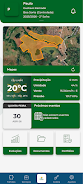
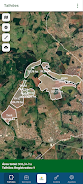
The app combines mapping, analytics and reporting in a single workflow so technicians can capture sample points, attach photos and notes, and overlay satellite or drone-derived indices to visualize spatial variability. Interactive maps allow users to pan, zoom and toggle layers, while built-in geostatistics calculate interpolations and variance maps that feed into practical recommendations. Data export and PDF reporting streamline handover to producers or agronomy teams, and configurable alerts can flag trends such as declining productivity or nutrient imbalances that need attention.
How it works
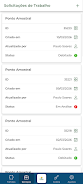
Workflows in PRIME Agrotecnologia reflect real-world field operations: create a project for a farm or block, import geometry or draw field boundaries, collect georeferenced samples, and attach laboratory results. The app processes spatial inputs to produce recommendation maps and suggested management zones. Progression through a project is modular: initial mapping and sampling, analysis and prescription, then monitoring and revision. Each stage preserves a record so users can compare seasonal trends and evaluate the effectiveness of interventions.
User experience and controls
The user interface is built for technical users and field staff, with clear map controls, layer visibility toggles and simple forms for point-based sampling. Touch controls support pinch-to-zoom and long-press for detail, while contextual menus guide users through importing CSV or shapefiles and assigning attribute metadata. Onboarding and in-app help explain common tasks so new technicians can follow standard operating procedures consistently, reducing variation between operators.
Progression, customization and repeatability
Progression in the application is based on project maturity rather than arbitrary levels: early-stage projects focus on data collection, mid-stage on analysis and prescriptions, and later-stage on monitoring outputs and outcomes. Users can create custom templates for sampling campaigns, name and save map styles, and set thresholds used by alerts and reports. These customization options increase repeatability and make it straightforward to run comparable campaigns across seasons or locations, improving longitudinal insights and farm-level decision-making.
Visualization, reports and replay value
Visualization is centered on layered maps and time-series charts that reveal productivity trends and treatment responses. The app produces concise reports that combine maps, charts and textual observations to support adviser-client conversations. Replay value comes from iterative monitoring: technicians return to fields, re-sample, and update models to see how recommendations affected yields, creating a practical feedback loop rather than one-off analyses.
Offline capability and data resilience
Recognizing connectivity limits in rural areas, the app supports local caching of map tiles and offline collection of georeferenced points and photos. Data synchronizes when a reliable connection is available, and the app maintains a local copy of recent projects for continued field access. These features reduce the risk of lost measurements and enable consistent workflows even in low-coverage zones.
Accessibility and challenge handling
The design emphasizes clear typography and high-contrast map layers to improve readability in bright outdoor conditions. Error handling guides users through common challenges such as duplicate samples, missing coordinates or incompatible import formats, offering corrective suggestions that keep projects on track. The app also supports role-based access to protect sensitive farm data and ensure only authorized users can edit critical records.
Compatibility and support
PRIME Agrotecnologia is developed by Bentevi, a team focused on soil fertility management and plant nutrition with an emphasis on practical technology, innovation and objectivity. Supported devices should meet the stated hardware requirements for the best experience; users can consult the support channel for troubleshooting, data migration guidance and best-practice templates to accelerate setup and adoption.
- No virus
- No advertising
- User protection
Information
- File size: 66.94 M
- Language: English
- Latest Version: 1.0.0
- Requirements: Android
- Votes: 303
- Package ID: br.com.geodata.prime
- Developer: Agricultura de Informação
Screenshots

















Explore More
Equip yourself with our all-in-one toolbox app for everyday tasks and projects. Instantly convert between units, calculate tips, scan documents, manage files, and more with handy productivity tools. Includes a level, compass, QR code reader, ruler, speedometer, decibel meter, and flashlight. Save frequently used tools to your customizable dashboard for one-tap access. Track billable hours, wages, budgets, and invoices. Annotate screenshots, magnify labels, and sign PDFs on the go.

MEXC Global: BTC, ETH, Gamefi

Text Art - Write Text On Photo

MERA PROXY PRO

Domino's Pizza Sri Lanka

Halloween Photo Editor -Makeup

Connecting - Friends Near Me

Cartola

HFonts - font & emoji manager





























