

Introduction
With Screen Recorder+Video Recorder, you can easily capture high-definition videos, live broadcasts, gameplays, meetings, and more with just one tap. This powerful screen recording app allows you to customize your recording settings, such as resolution, frame rate, and bit rate, to ensure top-notch quality. You can also turn on the face camera, use a brush tool, and schedule recordings for convenience. Plus, you can reduce noise by recording only internal sound and choose the desired screen area to record. With the ability to save videos to your SD card and support for both vertical and horizontal screens, this app is a must-have for anyone looking to capture their favorite moments.
Features of Screen Recorder+Video Recorder:
* Professional Screen Recording
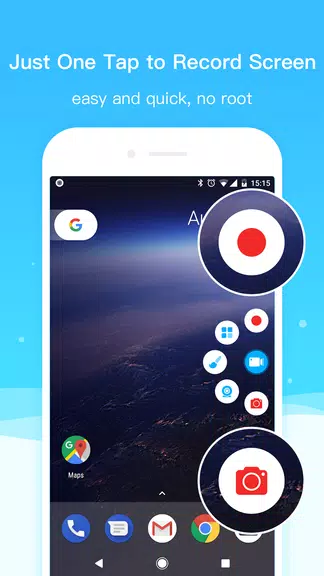
With our app, you can record high-definition videos without needing to root your device. This makes it easy to capture your screen for gaming, live streaming, educational purposes, and more.
* Easy to Use
Our screen recording app features a user-friendly interface that makes it simple for anyone to start recording their screen with just a few taps. You can easily select the resolution, frame rate, and bit rate to customize your recording settings.
* Multiple Recording Options
Whether you want to capture a video with your face camera, turn on a brush for annotations, or record the internal sound of your device, our app offers a variety of recording options to suit your needs.
* Scheduled Recording
You can schedule screen recordings in advance, so you never miss an important moment. This feature is perfect for recording live streams, webinars, or any other event that you want to capture.
FAQs
* Is there a watermark on the recorded videos?
No, our screen recording app does not add any watermarks to your videos, giving you a clean and professional result.
* Can I save videos to an SD card?
Yes, you can save your recorded videos directly to your SD card for easy access and sharing.
* Does the app support vertical and horizontal screen recording?
Yes, our app supports both vertical and horizontal screen recording, allowing you to capture videos in the orientation that best suits your needs.
Conclusion
With our professional screen recording app Screen Recorder+Video Recorder, you can easily capture high-quality videos for gaming, live streaming, educational purposes, and more. The user-friendly interface, customizable recording options, and scheduled recording feature make it a must-have tool for anyone looking to record their screen. Download our app Screen Recorder+Video Recorder now to start recording your screen with ease and precision.
- No virus
- No advertising
- User protection
Information
- File size: 41.80 M
- Language: English
- Latest Version: 5.0.8.3
- Requirements: Android
- Votes: 495
- Package ID: com.tianxingjian.screenshot
- Developer: Video Screen Recorder, Voice Audio Editor, Cut MP3
Screenshots
















Explore More
Unlock your greatest potential with our innovative education apps. From early learning to college prep, we offer tools for students of all ages. Young learners can build skills through interactive games and stories. Older students can strengthen expertise in math, science, writing, and more with our targeted training. Test prep students can access thousands of practice questions and simulations. Manage assignments, take notes, and stay organized with our productivity tools.

Bloomberg Connects

Аудиосказки для детей

DailyBreath

Fintual
ANTON

Entergy

Old Egyptian Calendar

Human Anatomy Atlas 2024








You May Also Like





Comment
-
I personally think having the phone's microphone be the free audio option and putting recording the internal audio behind a paywall has to be the most backwards decision you can make for a screen recorder. No one downloads a screen recording app to capture stuff without audio. Absolute waste of time.2025-08-16 14:24:13
-
First of all this was probably the worst app I have ever used it glitched up my phone and took up all my storage and if I had to say something I would say wow to the creators of this I am normally not a criticizing person but this app was really bad and what I recommend for it is that they need to add where it doesn't glitch up your phone and it doesn't make my phone like blow up so please take my recommendations and maybe add where you don't have to buy a whole bunch of stuff to make your video2025-08-15 20:41:36
-
Sometimes the app keeps recording in 1088x496p resolution even when 720p or 1080p is selected. You have to delete(clear) the app data, and even then: only half of the times this app become reable to record in HD quality.2025-08-15 15:02:51
-
Works GREAT! I just started using it, I give it 4 **** because I don't like to be pushed to rate.2025-08-15 10:48:03
-
Worst app ever constantly kerp slowing down the video. Made them look choppy2025-08-15 09:27:21
-
This app Is very good. I'm glad to get this app. It make my work very easy2025-08-14 05:59:16
