


Introduction
PDF Compressor helps you reduce PDF file size quickly and reliably. The app is designed to shrink PDFs while keeping text and images readable, making it easier to share documents by email or upload. PDF Compressor supports batch compression and preserves original files unless you choose to overwrite them.
How it works
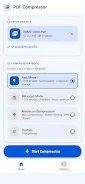
PDF Compressor analyzes each document and applies optimized compression to images, fonts, and objects. You can select compression levels to prioritize quality or size. Processing occurs on your device unless you enable cloud options, so you control when files are sent off-device.
Key features
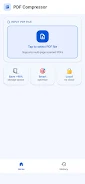
- Batch compression for handling multiple PDFs at once
- Compression presets to choose the balance between quality and file size
- Preview and compare to check output before saving
- Save options to keep originals or overwrite
- Supports common PDF files from scanners, email attachments, and downloads
Privacy and compatibility
PDF Compressor keeps your workflow simple and respects privacy. Local processing is available, and supported Android versions are listed on the download page. If cloud processing is used, files are transmitted only with your consent. For best results, update the app and use recent Android releases.
- No virus
- No advertising
- User protection
Information
- File size: 14.00 M
- Language: English
- Latest Version: 1.0.3
- Requirements: Android
- Votes: 132
- Package ID: com.vdnstudio.vietduc.pdfcompressor
- Developer: VDN Studio
Screenshots


















Explore More
Elevate your digital designs with our powerful creative apps. Access thousands of fonts, templates, and assets to enhance any project. Create mockups, prototypes, and proofs in seconds. Collaborate in real-time on logos, graphics, websites and more. Learn principles and techniques through interactive tutorials led by industry experts. Take your career to the next level by building a stunning portfolio.

Talking Cat Vs. Mouse

TVSMILES

Text Art - Write Text On Photo

New Friday Night Funkin FNF Tips 2021

ScanPro

Starbucks Turkey

Domino's Pizza Sri Lanka

Hatekhori Shongkha





