


Introduction
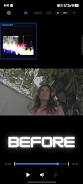
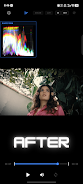
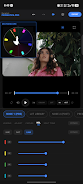
Prismatica Pro turns your phone into a professional color grading tool, letting mobile filmmakers and videographers craft cinematic, color-accurate video without a desktop. Built as a native C++ color-grading engine, Prismatica Pro processes high-resolution footage quickly and includes real-time 4K/60 playback, broadcast-standard scopes, and a color-managed workflow that preserves dynamic range from popular log formats. If you want precise color control, custom looks, and clean exports for client work, this app gives desktop-class tools in a mobile interface with a freemium model and a single one-time purchase to remove watermarks.
Key Features
⭐ Native C++ color engine and OpenGL ES 3.1 rendering pipeline for fast, efficient processing and butter-smooth playback even on demanding clips.
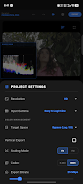
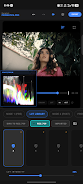
⭐ True Color Managed Workflow with support for industry log formats including ACES, Apple Log variants, Arri Alexa Log, BMD Film, Canon C-Log, Cineon, DaVinci Wide Gamut, Fujifilm F-Log variants, HLG/PQ (HDR10), Red Log, Samsung S-Log and Sony S-Log3 before transforming to Rec.709.
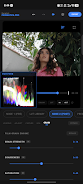
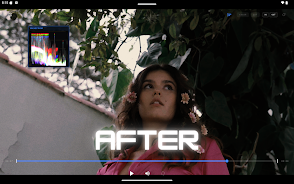
⭐ Broadcast-standard scopes including luma waveform for accurate exposure reading and a vectorscope with a mathematically accurate graticule plus a dedicated skin-tone indicator.
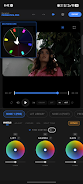
⭐ Cinematic primary controls with Lift, Gamma, Gain and Offset plus a filmic soft-clipping luminance engine that preserves highlight shoulder and shadow toe for natural roll-offs.
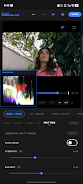
⭐ Advanced Hollywood effects: cinematic split toning with Luma Pivot and Skin Protect to keep faces natural, and organic 35mm-style procedural film grain with controls for saturation and coarseness.
⭐ LUT library and preset management: import .cube LUTs, organize custom collections and save grading node presets to apply consistent looks across projects.
Advantages
✅ Desktop-class grading on mobile thanks to Prismatica Pro's optimized math and rendering pipeline.
✅ Real-time 4K/60 processing combined with an efficient renderer that minimizes battery drain and overheating.
✅ Broadcast-accurate scopes and a color-managed workflow help protect dynamic range and produce consistent, repeatable results across camera formats.
✅ Flexible LUT and preset tools speed up grading and let you build a signature visual style.
✅ Try every feature for free and unlock clean, watermark-free exports with a single one-time in-app purchase—no subscriptions.
Disadvantages
❎ Free exports include a Prismatica Pro watermark until you purchase the unlock.
❎ The professional color-management features and scopes have a learning curve for users new to grading.
❎ Many tools are geared toward filmmakers and colorists, which may be more than casual users need.
- No virus
- No advertising
- User protection
Information
- File size: 84.75 M
- Language: English
- Latest Version: 1.2.0
- Requirements: Android
- Votes: 88
- Package ID: com.harwin.prismatica
- Developer: Harwin Popat
Screenshots

















Explore More
Equip yourself with our all-in-one toolbox app for everyday tasks and projects. Instantly convert between units, calculate tips, scan documents, manage files, and more with handy productivity tools. Includes a level, compass, QR code reader, ruler, speedometer, decibel meter, and flashlight. Save frequently used tools to your customizable dashboard for one-tap access. Track billable hours, wages, budgets, and invoices. Annotate screenshots, magnify labels, and sign PDFs on the go.

وهشام سماتي- عشقنا راه في خطر

Mazetools Soniface Pro

Oldies But Goldies Radio App

Enrique Iglesias - El Perdón

Stream on Screen for Price Tag

荐片播放器

抖爸爸

TBS FREE TV(テレビ)番組の見逃し配信動画が見放題





