


Introduction
Radio Belgium - FM Radio delivers a simple, reliable way to listen to Belgian stations on Android. The app aggregates live FM streams, local news, and talk radio with an uncluttered interface, station search and background playback—ideal for commuters, expatriates, and anyone who wants quick access to Belgium's radio landscape.
What the app offers
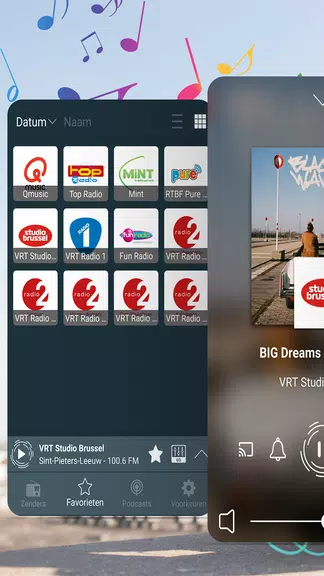
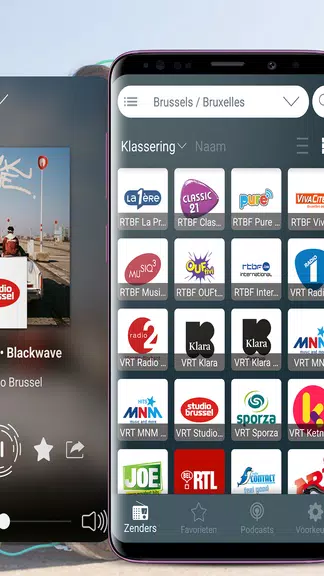
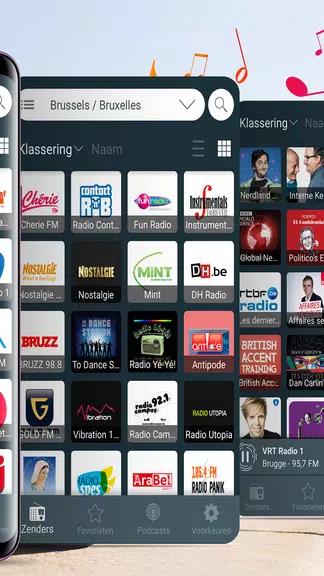
Radio Belgium - FM Radio presents a curated directory of Belgian stations spanning music, news, sports and regional talk. Users can browse by city, genre or language, save favorites for one-tap listening and use an integrated search to find shows or presenters. A simple preset list speeds tuning during commutes.
Key features
- Live streaming: Stable FM streams with automatic reconnect and metadata for song titles.
- Background playback: Continue listening while using other apps or with the device screen off.
- Favorites and presets: Build a personalized list to jump to preferred stations.
- Sleep timer and alarm: Fall asleep to radio or wake up to a chosen station.
- Offline-friendly settings: Control data usage and set low-bandwidth mode for mobile connections.
User interface and navigation
The interface emphasizes clarity: large station tiles, accessible controls and a compact player bar. Radio Belgium - FM Radio keeps the most-used functions within reach — play, pause, skip and favorite — while offering quick access to station details such as broadcast location and streaming bitrate. Search filters let you narrow results fast.
Audio quality and performance
Expect consistent playback with adaptive streaming that balances quality against connection strength. The app reports stream bitrates and supports common audio codecs to preserve clarity. Optimizations reduce buffering on moderate networks, and the player caches small buffers so short interruptions do not stop the stream.
Battery, data and compatibility
Designed to run efficiently on a wide range of Android devices, Radio Belgium - FM Radio includes settings to limit background activity and restrict streaming to Wi‑Fi. A lightweight footprint helps conserve battery during long listening sessions. The app supports modern Android versions and adjusts layout to phones and tablets.
Practical use cases
- Commute: Save time with quick access to traffic updates and morning shows.
- Working from home: Play background music or live news during the day.
- Expatriates and travelers: Connect to hometown stations to stay informed.
- Language practice: Use regional talk radio to improve listening comprehension.
Customization and controls
Customization options let you tailor the experience: set the default start-up station, choose a low-data stream, enable dark mode and configure notification controls. The sleep timer and alarm provide additional control over when audio plays, which is handy for nighttime and morning routines.
Tips for best results
For reliable playback, prefer Wi‑Fi when available and enable the app's low-bandwidth mode on cellular networks. If a station fails to load, clear the app cache or switch to a different stream listed in the station details. Use the favorites list to avoid repeated searches for frequently played channels.
Advanced settings and integrations
Advanced settings allow fine-grained control over stream behavior and notifications. You can prioritize Wi‑Fi only streaming, adjust buffer size for unstable connections and toggle metadata updates to reduce background data. Integration with third-party car apps or Bluetooth devices is straightforward; the app exposes standard media controls so in-car head units, smart speakers and wearable devices can manage playback without opening the main interface.
Support, updates and privacy
The developer maintains active updates and a simple support channel. Radio Belgium - FM Radio includes in-app feedback, crash reporting (optional) and a link to changelogs so users see when stations or codecs are updated. Privacy settings are transparent: the app requests only necessary permissions for network and audio, and personal data storage is limited to locally saved favorites unless you opt into cloud sync. Regular updates address new streams and playback improvements; users can opt into beta releases for early access to enhancements.
Why try it
Radio Belgium - FM Radio offers a focused experience for anyone who wants easy, dependable access to Belgium's radio landscape. With performance-minded features, practical customization and a straightforward interface, the app is suited for daily listeners who value quick tuning and stable streams.
- No virus
- No advertising
- User protection
Information
- File size: 54.70 M
- Language: English
- Latest Version: 4.0.7
- Requirements: Android
- Votes: 238
- Package ID: com.appmind.radios.be
- Developer: AppMind-Radio FM, Radio Online
Screenshots
















Explore More
Make your house a home with our suite of helpful home apps. Discover clever tools to organize closets, streamline chores, and simplify cooking. Take the stress out of cleaning and maintenance with handy checklists and schedules. Enhance security and control appliances and lighting with our smart home integrations. Design, visualize, and renovate like a pro using our 3D planning software.

Metro Micro

All Recovery - Photos & Videos

Tax Calculator India 2024-2025

ClassPass: Fitness, Spa, Salon

OnDjoss

Park4Me

Scary sound effects

Home Workouts - Lose Weight





























