Introduction
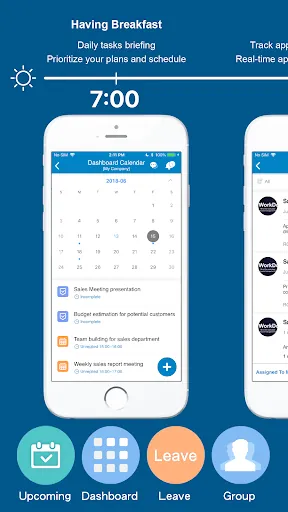
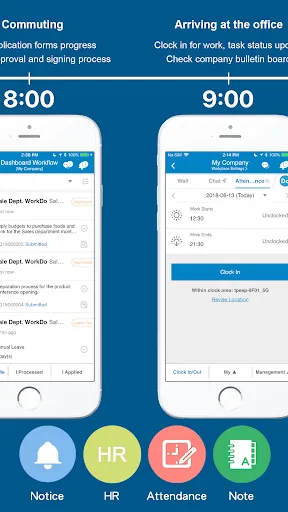
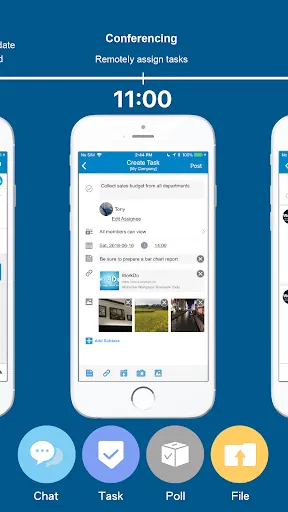
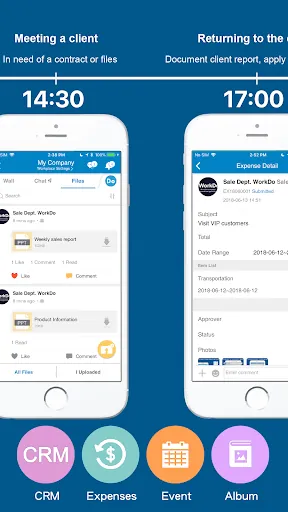
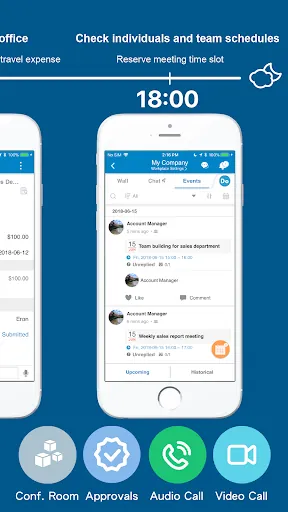
WorkDo - All-in-One Work App is a unified productivity platform that centralizes messaging, task boards, shared calendars and file access so teams can reduce app switching and keep work organized across devices. Built around persistent conversations linked to work items, WorkDo - All-in-One Work App blends threaded chat, Kanban-style boards, a team calendar and centralized attachments so context, progress and decisions stay connected no matter who on the team needs them.
Core tools and how they work together
Messaging threads are searchable and can be linked directly to tasks or calendar events so decisions remain attached to the relevant work. Boards use columns, priorities, deadlines and subtasks to represent stages of a workflow; cards move visually as work progresses and can include inline previews for attachments to avoid bouncing between cloud services. This tight coupling between chat, tasks and events helps teams trace the history of a deliverable from initial discussion to completion.
Controls and navigation
The interface emphasizes simple, discoverable controls: a persistent left-hand navigation groups workspaces and projects while primary actions appear in-context on boards and message views. Drag-and-drop gestures move cards between columns; inline editors let you change titles, due dates and assignees without leaving the board; and notification controls provide fine-grained rules so individuals see critical updates without constant noise. On tablets and phones the layout favors larger tap targets and swipe gestures; on laptops keyboard navigation and shortcuts speed repetitive tasks.
Progression, workflows and challenge systems
Progression is expressed through board structure and automation rather than artificial scoring. Teams model their process as a sequence of columns and use rules to advance work automatically as conditions are met. Deadlines, priority flags and milestone checklists create a clear challenge structure for capacity planning: recurring tasks keep routine work visible, while templates and subtasks break larger milestones into manageable steps that make progress measurable and predictable.
Customization, templates and reuse
Workflows are adaptable to different team needs: project templates let you start with predefined boards, fields and automations that you can clone or refine. Notification filters, column layouts and custom fields allow users to tailor their views without changing the shared workspace. This flexibility increases replay value because the same workspace can serve short sprints, long-term programs or recurring operations with minimal setup and consistent governance.
Visual style and level structure
The visual approach prioritizes clarity over embellishment: information appears in labeled cards and compact lists with color accents for priorities and consistent spacing for attachments and comments. The structural model is organizational rather than gamified — workspaces contain projects, projects contain boards, and boards contain cards — which mirrors typical team hierarchies and makes it straightforward to scale from a single pilot project to departmental use while keeping navigation predictable.
Offline access and syncing
Offline support lets you review tasks, comments and attachments when connectivity is limited; edits made while offline sync automatically when the device reconnects. Conflict handling favors the most recent edits with clear indicators of sync status so field teams and travelers can continue productive work without worrying that their updates will be lost when connectivity returns.
Integrations and automation
Built-in integrations connect calendars, email and popular cloud storage so events, messages and files flow into a single workspace. Automation rules can move tasks between stages, set reminders or update fields based on due dates and status changes, reducing repetitive upkeep while keeping boards current. These connectors preserve a single source of truth for schedules and deliverables without forcing teams to abandon other tools they rely on.
Security, administration and accessibility
Administrators have role-based permissions, controls for public channels and audit logs to monitor activity. Data encryption in transit and at rest, single sign-on options and two-factor authentication help align the app with organizational security policies. Accessibility features include scalable text sizes, contrast choices and keyboard navigation on larger screens so more team members can use the application comfortably and efficiently.
Getting started and practical tips
Onboarding is practical and iterative: start with a small pilot, invite a handful of collaborators and use a template to seed your first boards. Link messages to tasks to preserve context, set concise notification rules to reduce interruptions, and run brief weekly housekeeping to archive finished projects and prune unused channels. For teams consolidating multiple point tools into one hub, WorkDo - All-in-One Work App provides a predictable, controllable path from scattered conversations to coordinated delivery while keeping administrative control and user experience straightforward.
- No virus
- No advertising
- User protection
Information
- File size: 277.20 M
- Language: English
- Latest Version: 7.1.28
- Requirements: Android
- Votes: 111
- Package ID: com.workdo.bdd
- Developer: BuddyDo Inc
Screenshots
















Explore More
Make your house a home with our selection of innovative apps. Discover programs to simplify cleaning, organize closets, and manage home maintenance. Take the hassle out of chores and keep your space running smoothly. Design, visualize, and renovate like a pro using our augmented reality and 3D modeling tools. Enhance security and monitor your property 24/7 with our connected home tech.

Scary sound effects

カウシェ

Baby songs free Nursery rhymes

Kaspersky Password Manager

Kidcare – Parental Control App

OTT Navigator IPTV

MTS Link

Origin Energy Gas Internet LPG