


Introduction
OTT Navigator IPTV is a powerful Android application for organizing, playing and managing IPTV streams. It lets users load playlists, browse channel groups, and customize playback settings for live TV and VOD. The app focuses on stability, flexible playlist support and a clean, touch-friendly interface for mobile and set-top devices.
What OTT Navigator IPTV Offers
Designed for viewers who want granular control over internet television, OTT Navigator IPTV supports M3U, XSPF and other common playlist formats. The app parses channel lists, builds a navigable grid and supports electronic program guide (EPG) imports. Users can attach logos, sort channels into favorites and create multiple custom lists for different viewing contexts.
Playback and Stream Handling
Stream compatibility is broad: HLS, MPEG-TS and other formats are handled smoothly. Playback options include hardware acceleration toggles, buffer size adjustments and a choice between internal and external players. OTT Navigator IPTV also offers adaptive stream switching for networks with variable bandwidth, minimizing interruptions during live broadcasts.
User Interface and Navigation
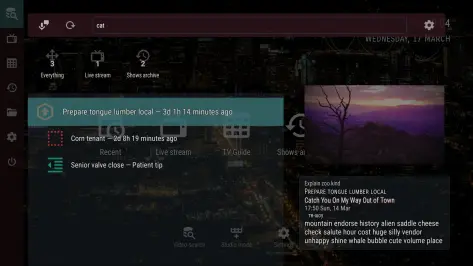
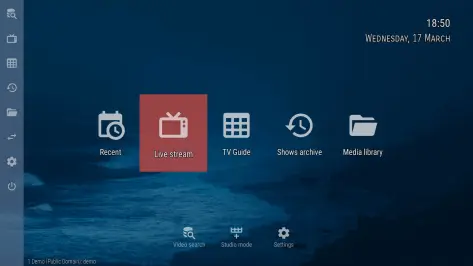
The interface emphasizes usability on both touchscreens and remote controls. Channel browsing, search and quick-favorites access are available from a unified home screen. A customizable grid layout and several skin options allow users to prioritize information like bitrate, resolution and program titles while keeping navigation responsive on lower-end devices.
Advanced Features
Power users will appreciate features such as network diagnostics, channel timeshift, and URL testing tools. The app supports scheduled recording if the device and playlist source allow it, and it can maintain multiple EPG sources for better program matching. Conditional channel visibility and PIN-protected folders help manage access for families.
Playlist Management
Managing content in OTT Navigator IPTV is straightforward. Playlists can be added via URL or local file, and the built-in editor helps rename channels, assign categories and remove duplicates. Automatic playlist refresh and conflict detection keep lists up to date without manual intervention, while import/export options make it easy to back up configurations.
EPG and Program Guides
EPG support is robust, with flexible mapping between guide entries and channels. Users can import XMLTV data, apply time-shift adjustments and merge guides from different providers. The app displays program durations, descriptions and episode details when available, providing a more complete live-TV experience.
Performance and Compatibility
OTT Navigator IPTV is optimized for Android phones, tablets and Android TV boxes. Resource usage is moderate, and the app allows users to tweak decoder settings to match device capabilities. Frequent updates address codec compatibility and security, making it suitable for a wide range of hardware from low-power sticks to powerful media centers.
Customization and Personalization
Personalization options include channel grouping, custom skins, and detailed playback presets. Users can assign remote-key shortcuts, enable a night mode for low-light viewing, and pick preferred audio tracks or subtitles where the stream provides them. Profiles allow different household members to keep separate favorites and parental settings.
Setup Tips and Best Practices
- Verify playlist URLs before adding them to avoid broken entries.
- Use external player integration for special codec support not available in the internal player.
- Enable hardware acceleration on modern devices for smoother playback.
- Import a matching EPG file to improve program alignment and guide accuracy.
Security and Privacy Considerations
The app does not host content itself; it requires user-provided playlists and EPG sources. Because of this, users should verify the legality and trustworthiness of their stream sources. OTT Navigator IPTV includes options for credentials and secure playlist retrieval over HTTPS where supported by the playlist provider.
Who Should Use It
OTT Navigator IPTV suits users who need fine-grained control over how IPTV streams are organized and played. It is especially useful for enthusiasts managing large channel lists, installers setting up Android TV boxes, and anyone who values EPG accuracy and playback flexibility. Casual viewers will also find the basic features accessible after a short setup.
Getting Started
To start, download and launch the app, add a playlist URL or file, and let the app scan for channels and EPG data. Use the built-in editor to tidy channel names and assign categories. For best results, test playback on a few channels and adjust buffer and decoder settings to match your network and device.
- No virus
- No advertising
- User protection
Information
- File size: 19.69 M
- Language: English
- Latest Version: 1.7.0.2.4
- Requirements: Android
- Votes: 385
- Package ID: studio.scillarium.ottnavigator
- Developer: SIA Scillarium Studio
Screenshots
















Explore More
Make your house a home with our selection of innovative apps. Discover programs to simplify cleaning, organize closets, and manage home maintenance. Take the hassle out of chores and keep your space running smoothly. Design, visualize, and renovate like a pro using our augmented reality and 3D modeling tools. Enhance security and monitor your property 24/7 with our connected home tech.

カウシェ

Baby songs free Nursery rhymes

Kaspersky Password Manager

Kidcare – Parental Control App

MTS Link

Origin Energy Gas Internet LPG

Starbucks México

Госуслуги Дом





























