Introduction
KB Pay is a streamlined mobile wallet that simplifies everyday payments, transfers and account management in a single app. Designed for speed and security, KB Pay connects bank accounts, supports QR and NFC payments, and offers bill scheduling so users can manage finances with minimal effort and clear visibility.
Core Features You’ll Use Daily
KB Pay brings essential financial tools together with an uncluttered interface. Send and receive money instantly, split bills with contacts, and top up prepaid services without leaving the app. A unified search and transaction history makes it easy to find receipts, while customizable notifications help you track outgoing and incoming funds in real time.
Security and Privacy Controls
Security is a primary focus for KB Pay. Multi-factor authentication and biometric unlock protect access, while encrypted storage safeguards sensitive information. Users can set spending limits, freeze linked cards, and review permissioned devices. Regular security checks and automatic session timeouts reduce risk when managing accounts on shared devices.
How Transactions Work
Payments in KB Pay are designed to be fast and intuitive. Choose a contact or scan a merchant QR code to pay instantly. Bank transfers use secure rails with clear estimated delivery times. For recurring obligations, schedule payments ahead of time to avoid missed bills. A built-in confirmation step summarizes fees and recipient details so you can confirm before sending.
Interface and Workflow
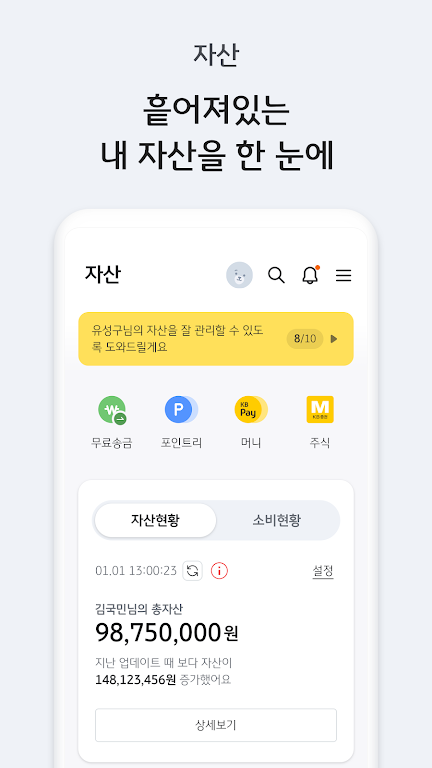
KB Pay’s interface focuses on simplicity: the home screen highlights balances, pending items and quick actions like send, receive, and pay. The onboarding flow walks new users through linking accounts and verifying identity in a few guided steps. For frequent tasks, the app offers shortcuts and templates that reduce time spent entering the same information repeatedly.
Tools for Budgeting and Insights
The app includes basic budgeting tools that categorize your spend automatically and present monthly summaries. Visual charts show where money is going, and custom labels help group transactions for tax or personal planning. Alerts warn when spending approaches predefined budgets, making it practical to keep day-to-day finances under control without additional apps.
Merchant and Business Support
Small merchants can accept payments through KB Pay using QR codes or invoices generated from the app. Reports list daily settlements and provide simple export options for accounting. For businesses, a separate dashboard streamlines transaction reconciliation, refunds and customer receipts.
Performance and Compatibility
KB Pay is optimized for modern Android devices, delivering smooth navigation and fast load times even on mid-range phones. Offline caching enables viewing recent transactions without constant connectivity, and background synchronization updates balances when a network is available. The app is compatible with a wide range of Android versions and adapts to different screen sizes, including tablets.
Rewards and Promotions
Regular promotions and merchant partnerships are built into KB Pay to encourage usage. Cashback offers, limited-time discounts and referral bonuses are displayed in an offers section so users can easily redeem deals at checkout. Reward tracking summarizes earned benefits and estimated redemption value.
Customer Support and Troubleshooting
KB Pay provides in-app support tools such as chat, FAQs and guided workflows for common tasks like refund requests or lost device procedures. Transaction disputes are logged and tracked through the app with status updates. Clear contact options and step-by-step troubleshooting reduce friction when issues arise.
Getting Started Quickly
- Download and install: Follow the guided setup and grant the minimal permissions needed.
- Link accounts: Connect bank accounts or cards through a secure verification process.
- Set preferences: Enable biometrics, configure notifications, and create spending limits.
- Explore offers: Check the promotions section for instant savings on initial transactions.
With a focus on practical tools, responsive performance and layered security, KB Pay aims to be a reliable companion for everyday financial tasks. Its combination of payment convenience, budgeting aids and merchant support makes it suitable for individual users and small businesses seeking a single app to handle multiple money-management needs.
- No virus
- No advertising
- User protection
Information
- File size: 200.80 M
- Language: English
- Latest Version: 5.5.0
- Requirements: Android
- Votes: 364
- Package ID: com.kbcard.cxh.appcard
- Developer: KB국민카드
Screenshots


















Explore More
Make your house a home with our suite of helpful home apps. Discover clever tools to organize closets, streamline chores, and simplify cooking. Take the stress out of cleaning and maintenance with handy checklists and schedules. Enhance security and control appliances and lighting with our smart home integrations. Design, visualize, and renovate like a pro using our 3D planning software.

Metro Micro

All Recovery - Photos & Videos

ClassPass: Fitness, Spa, Salon

OnDjoss

Park4Me

Scary sound effects

Home Workouts - Lose Weight

Juice Recipes