


Introduction
TANTRI : QR Menu & POS delivers a compact solution for restaurants, cafes, and small retailers to publish QR-driven menus, accept orders and process payments from a single Android device. The app combines menu management, table and order tracking, and point-of-sale functions to streamline daily service and reduce manual tasks.
What TANTRI : QR Menu & POS Does
The core idea behind TANTRI : QR Menu & POS is to replace printed menus and fragmented systems with a single platform that teams can use on phones and tablets. Staff can publish menus instantly, track incoming orders, assign items to tables, and close bills without switching apps. Customers scan QR codes to browse items, place orders and pay if enabled.
Key Features
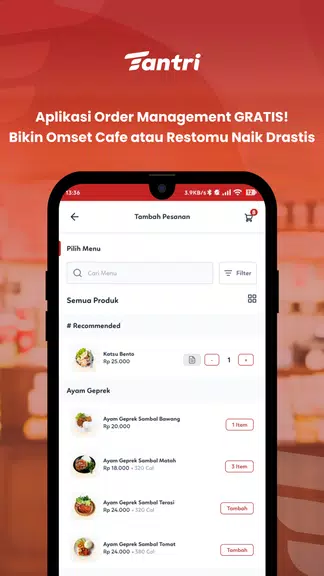
- QR menu creation: Build multi-category, photo-rich menus with descriptions, prices and modifiers. Generate QR codes per table or shared zones for quick access.
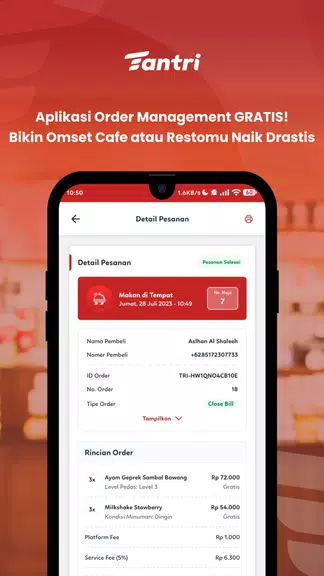
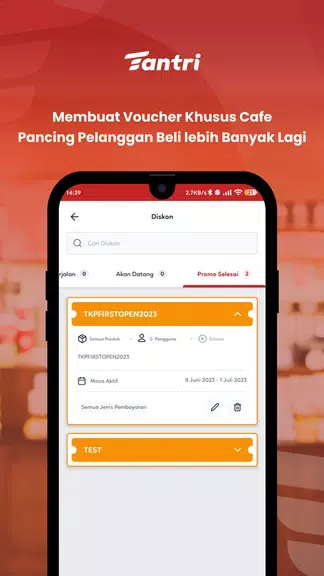
- Integrated POS: Ring up orders, apply discounts, split bills and print receipts through supported thermal printers.
- Order routing: Send tickets to kitchen display systems (KDS) or remote prep stations to organize workflow.
- Payment options: Accept card terminals, mobile wallets or mark for cash, with a configurable checkout flow.
- Inventory hints: Track stock levels and receive low-stock alerts to avoid selling unavailable items.
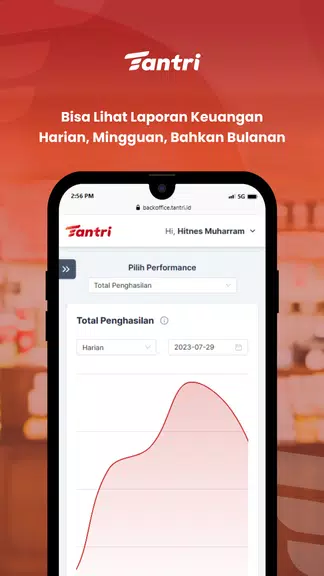
- Reports and analytics: Daily sales summaries, item performance and staff activity logs help managers make informed decisions.
How the Workflow Looks
A typical service starts by assigning QR codes to tables or sharing a digital link. When customers scan the code, the menu loads instantly in their browser; they can add items, request extras and choose to send the order to the kitchen. On the staff side, the POS view collects those orders, lets staff preview modifiers, and print or transmit tickets for preparation. When items are ready, servers can mark them delivered and handle payment or split bills at the table.
Interface and Usability
The interface is optimized for fast-paced hospitality environments. Large buttons, clear category navigation and inline modifiers reduce mistakes during ordering. Managers access a dashboard with sales figures and order histories, while staff can switch tables or take payment with a few taps. The app is designed to be learnable in minutes for new employees.
Customization and Branding
TANTRI : QR Menu & POS supports visual customization so establishments can match the digital menu to their brand. Upload logos, choose color accents, and select how item images are displayed. Pricing and tax rules are configurable per outlet, and you can set language preferences to accommodate diverse customer bases.
Performance and Compatibility
Built for Android devices, the app runs well on phones and tablets used throughout dining areas and service counters. Offline caching ensures the menu remains available if connectivity drops, and queued orders sync automatically when the connection returns. Integration support includes common thermal printers, payment terminals and kitchen display solutions for a full-service setup.
Security and Data Handling
Data encryption safeguards payment tokens and account credentials, while role-based access controls let owners restrict sensitive settings to managers. Regular backups can be scheduled to preserve menu changes, sales records and customer preferences. The app prioritizes minimal data collection on guest devices since the customer view opens in a browser session.
Getting Started
Set up is straightforward: install the app on a primary device, create your menu categories and items, and generate QR codes for each table or zone. Connect printers or card terminals if needed, then train staff on order acceptance and checkout. Ongoing support is typically available through in-app help or a vendor support channel.
Who Benefits Most
Small to medium restaurants, bars, food trucks and cafes that want a modern, contactless ordering experience will find TANTRI : QR Menu & POS particularly useful. It reduces printing costs, speeds up service, and centralizes sales tracking without requiring complex hardware investments.
Final Notes on Adoption
Adopting TANTRI : QR Menu & POS can shorten order-to-serve times, reduce errors and deliver clearer sales insights. For operations looking to modernize quickly while keeping costs manageable, the app offers a pragmatic balance of features and usability that supports day-to-day hospitality needs.
- No virus
- No advertising
- User protection
Information
- File size: 53.20 M
- Language: English
- Latest Version: 1.77.7
- Requirements: Android
- Votes: 282
- Package ID: com.tantriapp
- Developer: PT. Sasana Solusi Digital
Screenshots
















Explore More
Discover the joy of cooking with our revolutionary food apps. Find and save recipes for every taste and diet with our intuitive recipe managers. Meal plan for the week ahead using our meal calendar planners. Streamline grocery shopping with synced shopping lists. Develop skills in the kitchen through step-by-step video tutorials. Enhance flavor with our database of spices and aromatics. Learn fun food facts and wine pairings.

カウシェ

DWP Fitness - Diet & Workout

데일리샷 - 위스키·와인·맥주 주류 스마트오더 앱

Calorie

Starbucks México

Grab - Taxi & Food Delivery

Uber Eats
PPOMPPU





























