


Introduction
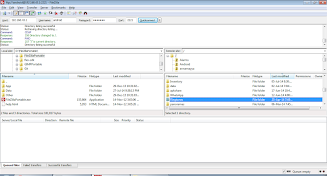
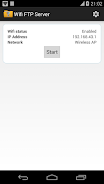
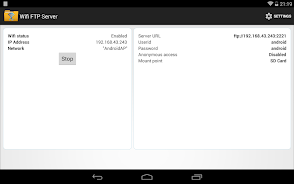
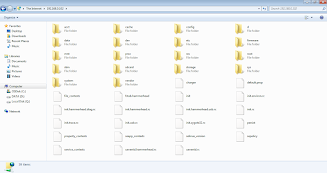
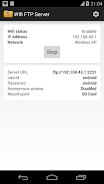
WiFi FTP Server App is a free application for Android 5.0 and higher that allows you to easily convert your Android phone or tablet into an FTP server. With this app, you can host your own FTP server and transfer files, photos, movies, and songs to and from your Android device using an FTP client like FileZilla. The app features a complete FTP server with a configurable port number, supports FTP over TLS/SSL (FTPS), and allows for configurable anonymous access and home folder. You can transfer files without using USB cables over WiFi, and it works in both WiFi and WiFi tethering mode. Simply connect to a WiFi network, open the app, click the start button, and use the server URL in an FTP client or Windows Explorer to transfer files. If you have any feedback or encounter bugs, please email the support team. Please note that SFTP is not supported by this app, and the default port number is 2221 but can be changed in the settings screen.
Features of this App:
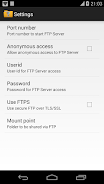
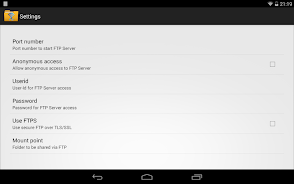
- Complete FTP server with configurable port number
- Supports FTP over TLS/SSL (FTPS)
- Configurable anonymous access
- Configurable home folder (mountpoint)
- Configurable user-name/password
- Avoid using USB cables for file transfer and copy/backup files over WiFi
Conclusion:
With this WiFi FTP Server app, users can easily convert their Android phone or tablet into a FTP server. The app allows users to transfer files, photos, movies, songs, and more to/from their Android device using a FTP client like FileZilla. It offers a range of features, such as configuring port number, enabling FTP over TLS/SSL, anonymous access, and setting a home folder. Additionally, the app allows users to transfer files over WiFi without the need for USB cables. It works both over WiFi and WiFi tethering mode (hotspot mode), providing flexibility for users. By following a few simple steps, users can connect to a WiFi network, open the app, and start transferring files. The app also mentions that SFTPsupport will be added soon. To ensure secure connections, it advises users to use the server URL beginning with "ftps://" instead of "ftp://". It's important to note that FTPS and SFTP are not the same, and SFTP is not supported by this app. For non-rooted phones, the port numbers should be greater than - as binding to ports like 21 will not be possible. The app includes a default port number (2221), which can be changed from the settings screen. Lastly, anonymous access is not enabled by default for security reasons, but it can be enabled from the settings screen. For any feedback or bug reports, users are encouraged to email the support email-id provided.
- No virus
- No advertising
- User protection
Information
- File size: 5.00 M
- Language: English
- Latest Version: v2.2.4
- Requirements: Android
- Votes: 35
- Package ID: com.medhaapps.wififtpserver
Screenshots
















Explore More
Make your house a home with our suite of helpful home apps. Discover clever tools to organize closets, streamline chores, and simplify cooking. Take the stress out of cleaning and maintenance with handy checklists and schedules. Enhance security and control appliances and lighting with our smart home integrations. Design, visualize, and renovate like a pro using our 3D planning software.

Metro Micro

Tax Calculator India 2024-2025

ClassPass: Fitness, Spa, Salon

OnDjoss

Park4Me

Scary sound effects

Home Workouts - Lose Weight

Juice Recipes








You May Also Like





Comment
-
I think this is one of the best app, I found for files transfer. Love this app, but one problem. I can't view the photos, videos in my phone folder. I have to transfer the files first then only I can see these files this is a little drawback. Hope it will also be resolve.2024-01-10 13:28:58
-
It's broken! I thought that finally I've got FTP server what I was looking for. But, SSL is not working and even without SSL it does not let me connect FileZilla. Also, with the web browser (without SSL), it asks for password everytime I enter into a new directory or refresh a page. Seems like this doesn't use websession! Needs to improve security and fixes bugs!2024-01-09 21:05:03
-
Gives you a solid FTP server and is very configurable. ads are not very intrusive as they are only shown at the bottom of the screen. unless you have a big problem with ads (I definitely do) then don't get the pro version since all it does is remove them.2024-01-06 12:22:15
-
Rally a good app and very easy to use, but connect lost frequently I mean not getting detected when passord is enable. Again need to turn off password and go with Anymomus mode then it works fine. App is upto date but issue exists...2024-01-01 10:25:39
-
Love this app. I found 2 bugs: 1. Every time I try to copy a .m4b files to the phone they are corrupted. I am sure it's this app only as when I copy same file over the cable or GDrive all is good. 2. When I copy a bunch of photos from the phone to my mac some of them will fail to copy. But when I copy same ones one-by-one they copy just fine.2023-12-18 06:30:04
-
It works, and is very easy. I love the encryption options, even better when sftp will be available. I just miss some security options: 1) the max connections limit 2) A whitelist of allowed IP Then I'll buy it. Anyway, it is currently the best ftp server. It is very small, fast and doesn't require extra permissions. Congratulations!2023-12-18 02:18:13
