
Introduction
MOVO HR is a cloud-based human resources management app built for small and midsize businesses that need a simple, visual way to track staff, time and requests. MOVO HR places holiday scheduling, attendance records, leave requests and team contact information into a single, easy-to-scan dashboard so managers can reduce administrative overhead and spot potential conflicts quickly. The first-time setup guides administrators through adding teams and basic settings, and the interface emphasizes clarity over complexity so new users can begin managing schedules and requests with minimal training.
Overview and core functionality
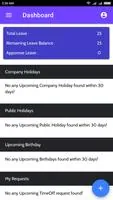
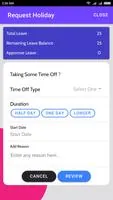
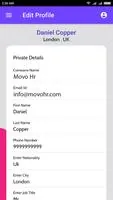
The core of the app is a visual dashboard that summarizes upcoming absences, current attendance status and open leave requests. MOVO HR centralizes employee details and individual attendance histories so managers can review a consolidated record for each team member without switching between screens or spreadsheets. Holiday and leave workflows are simple: staff submit requests, managers review and approve or decline, and the dashboard updates to reflect confirmed time off. The app keeps everything synced to its cloud service so authorized users across the organization see the same information in near real time.
Navigation, controls and daily use
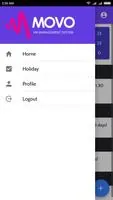
Navigation is intentionally straightforward. Primary functions are accessible from the main dashboard and use common mobile controls such as tapping to open details, swiping to move between calendar views and simple form fields for leave requests. Administrators can add or edit employee records with a few taps, review attendance entries and respond to requests from the same screen. Notifications and in-app alerts guide managers to pending approvals and highlight scheduling overlaps, reducing the time spent on routine administrative tasks.
Progression, roles and onboarding
Although MOVO HR does not include complex role hierarchies, it supports basic role separation so administrators, managers and staff see the appropriate level of information. The onboarding progression is practical: set up company-wide working days and holidays, add teams and staff contacts, then begin processing leave and attendance. This stepwise approach helps smaller organizations adopt the system incrementally as their needs grow, and repeated daily use reinforces routine tasks like approving recurring requests and checking for conflicts.
Modules, customization and visual style
The app is organized into clear modules for holidays, attendance and contacts rather than forcing a single monolithic view. Customization options include defining the company workweek, local public holidays, allowable leave types and simple display preferences such as compact or expanded calendar views. Visually, MOVO HR favors a clean, uncluttered layout with color-coded calendar indicators and readable typography so managers can scan schedules quickly and identify issues at a glance.
Data handling, offline behavior and accessibility
Data is stored in the cloud and kept synchronized across devices, which means changes made on one device appear on others after syncing. Offline capabilities are limited to viewing cached information and creating requests that will upload when an internet connection is restored; this design prioritizes data consistency across the organization. Accessibility considerations include scalable text sizes and a high-contrast palette to help visibility; the interface avoids dense tables in favor of summary cards and clear labels to support users who prefer a simplified visual experience.
Reporting, conflict detection and repeatable workflows
MOVO HR focuses on practical, repeatable workflows rather than complex analytics. Managers can view consolidated attendance histories and leave logs for trend awareness and administrative record keeping. The system highlights scheduling conflicts and overlapping requests so teams can resolve clashes before they affect staffing. Because tasks such as approving leave and updating contacts are frequently repeated, the app is optimized for fast, predictable interactions that save time over manual processes.
Who should consider MOVO HR
MOVO HR is best suited to small and midsize teams that need a light, visual HR tool rather than a full enterprise HR suite. It reduces administrative burden for managers handling holiday scheduling and basic attendance tracking, and it keeps contact and leave information synchronized across the organization. Larger enterprises or HR departments requiring advanced payroll integration, deep analytics or extensive customization may find the feature set more basic, and the app relies on an internet connection to sync with its cloud service.
- No virus
- No advertising
- User protection
Information
- File size: 10.13 M
- Language: English
- Latest Version: 2.4.4
- Requirements: Android
- Votes: 156
- Package ID: com.movoholding
- Developer: seb gal
Screenshots
















Explore More
Discover meaningful connections with our personalized dating apps. Built with modern singles in mind, our software simplifies making authentic romantic matches. Get recommended profiles based on your preferences for streamlined browsing. Showcase your personality through engaging prompts and questions. Safely video chat to pre-screen potential partners. Meet up at curated events with other relationship-minded locals.

DATING SITES

Adoife - Free Teen dating site

Livestream TV - M3U Stream Player IPTV

Mein dm

Fake Live Location | GPS

Kaçamak Sevgili Bul, Flört Et

Bangla Newspaper

MX Player Codec (ARMv7 NEON)