Introduction
FT Video Downloader is a compact utility designed to make saving videos from social networks quick and straightforward. FT Video Downloader puts local playback and private archiving within reach without forcing you to create an account: download videos for offline viewing, keep reference clips for lessons, or collect creative material for personal projects while keeping your data on the device.
How it works
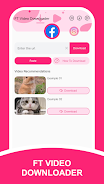
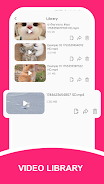
This app detects video content when you paste a source link or share media to the app from a browser or social client, then offers an easy save flow with clear on-screen controls. When a source provides multiple resolutions, FT Video Downloader presents the available quality options so you can choose smaller files for limited storage or higher-definition files when you need clarity for editing or viewing. Downloads appear in an in-app library and in your device's media folders, making playback with either the built-in viewer or your preferred video player seamless.
Key features
Save high-definition videos directly to local storage for offline access and personal use. The interface focuses on straightforward controls: copy a link, tap Save, and monitor a visible progress indicator while the file is written to your chosen folder. File naming follows a predictable pattern with timestamps and source labels to help you sort clips, and you can reorganize or remove items from the library as needed. Background downloading keeps transfers going while you switch to other apps, and a simple download queue shows active and pending tasks so you can pause or resume work-in-progress items.
User experience and accessibility
The design emphasizes clarity and minimal friction: large buttons for primary actions, readable text sizes, and descriptive labels for accessibility tools. The layout avoids clutter, so new users can save their first clip in seconds and return to an organized library without hunting for files. Settings let you select a default storage path and control whether downloads should appear in the public gallery or remain only in the app’s private folder, supporting different workflows for creators, educators, and casual users.
Organization, customization, and progression
FT Video Downloader helps you build a private archive gradually: create folders to group clips by topic, lesson, or inspiration source, and use the app's search and sort options to find material quickly as your collection grows. Customization choices include preferred resolution, default save location, and naming templates that use date or source identifiers. As you use the app, the progression from a scattered set of files to an orderly reference library becomes faster, thanks to batch rename and bulk-delete actions that simplify ongoing maintenance.
Offline play and replay value
Downloaded videos are stored on-device for reliable offline playback, which is useful for travel, classrooms, or situations with limited connectivity. The ability to rewatch saved clips without streaming preserves bandwidth and extends the usefulness of each saved item: educators can build lesson packs, creators can keep inspirational clips, and hobbyists can maintain a personal archive of favorites. Replay value increases organically as your collection becomes a curated resource.
Privacy, permissions, and legal notes
FT Video Downloader operates without account sign-in and does not track usage, keeping data local unless you choose to share a file. The app requires only the permissions necessary to access storage and detect shared links; it does not upload your content to external servers. Please respect copyright and the terms of service of content providers: you must have the legal right to download, store, and reuse media before saving it. FT Video Downloader is an independent tool and is not affiliated with any social service.
Advantages and limitations
There are practical advantages: low learning curve, privacy-first behavior, and predictable file management. Limitations are inherent to third-party download tools: availability and download options depend on how content is served by social platforms, and functionality can change if those services modify their delivery methods. The app does not validate ownership or licensing of content, so users remain responsible for compliance with legal and platform rules.
Tips for best results
For consistent quality, choose the highest available resolution when the intent is archival or reuse, and select a lower resolution for quick reference clips. Organize new downloads into folders right after saving to keep your library manageable. If a download fails, try copying the source link again or confirming that the content is publicly accessible; some private or restricted items cannot be saved by third-party tools.
- No virus
- No advertising
- User protection
Information
- File size: 20.60 M
- Language: English
- Latest Version: 1.0.2
- Requirements: Android
- Votes: 264
- Package ID: com.f.t.video.downloader.pro
- Developer: Gourd Yao
Screenshots



















Explore More
Watch your favorite movies and shows on the go with our powerful, intuitive video player app. Supporting nearly all file formats, simply open video files or paste URLs to begin watching. Our sleek, uncluttered interface lets you fully immerse yourself in the viewing experience. Adjust playback settings, zoom and aspect ratio, create bookmarks, and track watch history. Chromecast and Airplay support allow seamless viewing on other devices.

Mi Video - Video player

荐片播放器

Easy Player - Video Player All Format

GSEG Video Player Lite

Just (Video) Player

Video Player for Wear: Piley

Neel HD Video Player & Browser
Duno Download - Quick & Simple