

Introduction
OptimaVPN - Fast & Secure Prox is a compact VPN and proxy application designed to give you private, unrestricted access to the internet with a single tap. OptimaVPN - Fast & Secure Prox connects to a global network of high-speed servers to hide your IP address, protect your data on public Wi‑Fi, and remove data limits, while using AES-256 encryption and a clear no-logs stance to keep browsing activity private. This editor overview highlights how the app works in everyday use, what to expect from its interface, and which situations benefit most from its protections.
Key features and core functions
The app focuses on a concise set of capabilities: strong encryption, broad server coverage, unlimited bandwidth, and simplified connection flow. AES-256 encryption protects traffic on any network, giving an encrypted tunnel for banking, shopping, or messaging on shared hotspots. Servers are distributed across major regions including the USA, UK, Europe and Asia, providing options for bypassing regional restrictions and improving routing for streaming or downloads. A strict no-logs policy is emphasized to reduce the amount of retained metadata about sessions, and the one-tap connection and smart server selection are intended to make protection immediate without advanced setup.
How it works in daily use
Connecting is deliberately lightweight: open the app and tap the main button to establish a secure session. Smart server selection attempts to choose a nearby, low-latency server automatically for smooth performance, while a manual server list allows you to pick a region when you need a specific country IP. Because OptimaVPN - Fast & Secure Prox offers unlimited bandwidth, there are no data caps that interrupt long download sessions or extended streaming. The app is optimized for short setup time and predictable behavior, so routine tasks like checking email, streaming video, or using banking apps on an unfamiliar Wi‑Fi network require minimal interaction.
Interface, controls and customization
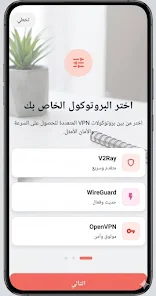
The user interface favors simplicity over complexity. Controls include a prominent connect/disconnect button, a server selector, and a small status area that shows current connection state and selected server location. Settings focus on practical choices rather than deep networking configuration, offering options to switch between automatic and manual server selection and to enable or disable proxy access when required. Visual design emphasizes clarity: readable labels, clear connection feedback, and straightforward prompts that guide users through first-time setup without jargon. These design decisions are aimed at users who prefer a set-and-forget tool rather than a technical utility loaded with advanced knobs.
Performance, progression and replay value
Performance is handled through geographically distributed servers and optimized routing intended to reduce buffering and latency. While actual throughput depends on your location and network conditions, consistent server performance is a priority to support common use cases like video playback and online gaming. Since there are no usage limits, the app’s value grows through repeated use: the more you rely on it for secure sessions, the more it becomes part of a regular privacy routine. There is no gamified progression or achievements; the progression here is practical—improving connection choices and identifying the best server nodes for your locations over time.
Accessibility, offline considerations and device compatibility
The app is designed for broad accessibility with large touch targets, clear contrast, and minimal text complexity to help users across different devices and literacy levels. It is intended for on-device use and does not require constant interaction; however, it cannot provide VPN protection when the device is completely offline. Basic diagnostic indicators such as connection status and simple error messages help users recognize network issues quickly. Compatibility extends to a wide range of Android devices, and the lightweight nature of the client minimizes battery and storage impact compared with heavier system utilities.
Privacy, limitations and realistic expectations
Privacy is central: encryption and a no-logs stance aim to protect browsing activity. Keep in mind that location, device settings, and the terms of any websites you use still influence what data can be exposed. Actual speed will vary by distance to servers and local network conditions, so users may notice differences across regions or at peak times. The app focuses on core VPN and proxy capabilities and does not list extensive audit certificates or advanced routing diagnostics in the public description. For users who want a straightforward secure tunnel with easy controls and broad regional coverage, the app provides a practical balance of privacy and convenience.
- No virus
- No advertising
- User protection
Information
- File size: 25.00 M
- Language: English
- Latest Version: 1.0.0
- Requirements: Android
- Votes: 181
- Package ID: com.dheyacode.optimavpn.app
- Developer: Gerdholmens Redovisning AB
Screenshots



















Explore More
Dive into an extraordinary shopping journey with our cutting-edge, globally-available mobile application. Tailored to your preferences, it offers a seamless, personalized shopping experience at your fingertips. Enjoy exclusive deals, compare prices, and check product reviews with ease. Secure, fast, and user-friendly, it's your ultimate shopping companion. Transform your shopping routine - download now!

MineTilbud

V3 Mobile Plus

Instacart

네일아트 필수앱 - 팔레트

Solar Super Clube

Saregama Mobile

Vocami Mobile App

Gift Aim Challenge





























