Introduction
Voixa is an AI-powered augmentative and alternative communication (AAC) app designed to help people who are speech-impaired, non-verbal, or hard of hearing take part in conversations with confidence. Voixa captures spoken language through speech-to-text, offers context-aware reply suggestions, and converts chosen messages into natural-sounding speech so users can respond quickly without typing. This introduction explains how Voixa works, what to expect in daily use, and which settings and controls give you the most reliable performance on Android devices.
Key features and interaction flow
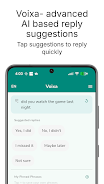
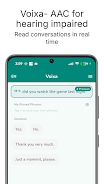
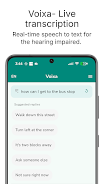
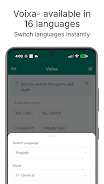
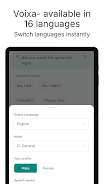
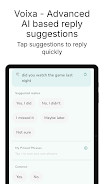
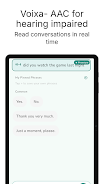
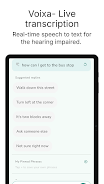
The core interaction in Voixa revolves around three steps: live capture, suggested replies, and spoken output. When someone speaks, the app transcribes audio into text in real time; the AI then proposes short, editable AAC-style replies that fit the conversation context. Users can tap to speak a suggestion immediately, edit a phrase before speaking, or pin frequently used lines for quick access later. The app supports multiple languages and includes natural text-to-speech voices so responses are clear in mixed-language conversations.
Controls, customization, and visual design
Voixa’s controls are tuned for accessibility and speed. Large touch targets, a simple bottom bar for primary actions, and an editable reply field make it easy to operate with one hand or assistive devices. You can customize the interface by adjusting font size, selecting voice gender and speed, and organizing pinned phrases into categories such as social, work, or medical. These visual and interaction choices help keep the app readable and responsive in noisy or fast-moving conversations.
Progression, personalization, and saved phrases
Rather than a game-style progression, Voixa offers practical personalization that improves day-to-day effectiveness. As you use the app you can build a personal library of pinned phrases and conversation modes; the suggestion engine tends to mirror frequently chosen replies and pinned items so common responses appear faster. This lightweight progression means the app becomes more efficient the more you use it without requiring complicated setup or training sessions.
Offline capability and reliability
Voixa provides offline speech-to-text recognition for private, local transcription when an internet connection is not available, which is useful for travel, low-connectivity areas, or confidential situations. AI-generated reply suggestions and some cloud-based voice options perform best online, so workflows that rely solely on offline features will use simpler transcription and saved replies. The app offers fallback behaviors and local caching of pinned phrases to keep conversations flowing even when network access is intermittent.
Accessibility and supported conditions
Built as an assistive tool, Voixa supports a broad range of communication needs including users with autism, ALS, aphasia, cerebral palsy, dysarthria, stroke recovery, and hearing loss. Accessibility considerations include adjustable audio levels, high-contrast display options, and simple navigation paths for caregivers or communication partners. Privacy is also emphasized: Voixa does not retain or store transcripts and is designed to minimize data leaving the device unless you opt into cloud features.
Use scenarios and everyday value
Typical scenarios where Voixa is valuable include one-on-one conversations, medical appointments, workplace interactions, and social settings. In each case the conversation modes help preselect vocabulary and phrasing suited to the situation, reducing cognitive load and speeding responses. Voixa’s quick suggestions and one-tap speak reduce the need for lengthy typing, which increases participation and makes daily interactions less fatiguing.
Limitations and technical requirements
Voixa requires Android 8.0 or newer and its AI reply suggestions depend on network access, so some advanced functionality is limited offline. Free daily usage is available, with an optional free trial and pay-as-you-go credit packs for heavier use rather than a mandatory subscription. Background noise, uncommon accents, or very rapid speech can affect transcription accuracy; using a headset or moving to a quieter environment can improve results.
Why it fits into an accessibility toolkit
For users seeking a fast, flexible AAC alternative to a dedicated hardware device, Voixa offers a compact, configurable solution that emphasizes privacy, speed, and adaptability. With editable replies, pinned phrase libraries, multi-language support, and offline transcription, the app aims to become a practical companion for everyday communication while remaining easy to set up and personalize.
- No virus
- No advertising
- User protection
Information
- File size: 34.20 M
- Language: English
- Latest Version: 2.3.2
- Requirements: Android
- Votes: 167
- Package ID: com.sairacreations.isl_companion
- Developer: Saira Creations LLC
Screenshots
















Explore More
Make travel planning effortless with our all-in-one trip companion app! Get insider tips from locals on top attractions, hidden gems, restaurants, and accommodations at your destination. Book flights, rental cars, and hotels at the lowest prices. Access maps offline; track bookings, itineraries, and reservations; create shared group trips; and auto-translate menus, signs, and conversations abroad. Our clever algorithms surface personalized recommendations everywhere you go.

Nhạc vàng

Musica Tayrone Cigano 2020

سورة فصلت - أحمد النفيس بدون ن

Stylish Name Maker

وصفات صحراوية سحرية

TCDC Digital Resource

French Turkish Dictionary

Estados do Brasil