Introduction
SaidRight is an AI writing assistant designed to help you rewrite any text into the tone you need for each situation, so you can say exactly what you mean with fewer drafts and fewer errors. Paste or type a message, choose from a wide set of tones and watch the app produce polished alternatives suitable for emails, chat, social posts or special messages. SaidRight focuses on practical daily communication and professional writing by combining tone control, translation and iterative refinement into a compact, mobile-friendly interface.
Key features
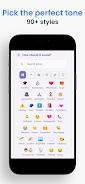
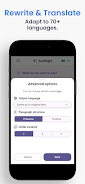
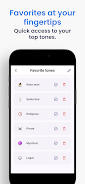
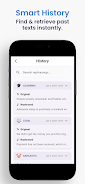
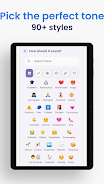
The app provides AI-powered rewriting across more than ninety distinct tones ranging from formal and professional to playful or intimate, along with translation that preserves tone across more than seventy languages. You can request up to three alternative rewrites at once to compare phrasings, and a side-by-side comparator helps you see differences in tone, length and word choice. Refinement controls let you shorten or expand text, tweak instructions, or apply small stylistic nudges until the output matches your intent. A complete history of rewrites is kept so you can revisit past drafts, and favorite tones can be saved for one-tap reuse. Preferences and saved items synchronize across devices so your library travels with you.
How it works
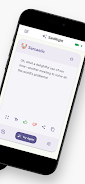
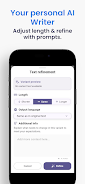
Working with SaidRight is straightforward: enter your source text, choose an intended audience and select a tone from the list, then accept one of the generated options or refine further. The app returns sensible rewrites in seconds and highlights changes so you can inspect edits before copying or sharing the final result. Translation maintains the chosen tone rather than producing a literal word-for-word conversion, which helps preserve nuance when you need to communicate across languages. Multiple output variants make it easy to test different levels of formality or persuasion without starting over.
Controls and user workflow
The interface emphasizes simple controls to speed up common tasks: a text input area accepts typing or paste actions, dropdowns and sliders adjust tone intensity and length, and refinement prompts allow you to give additional instructions. A compare view displays variants side by side and an edit mode lets you apply small manual changes to a chosen rewrite. History and favorites are organized for quick retrieval, and syncing ensures your recent items appear on other devices. These workflow elements create a clear progression from draft to finished message while keeping manual control available at every step.
Customization and progression
As you use the app, you build a personal library of tones and templates that reflect your voice and common scenarios. Saving favorites speeds repetitive tasks such as follow-up emails, short social captions, or particular greeting styles. The refinement process itself becomes a progression system: early rewrites teach the assistant your preferences, and saved examples make future results more consistent, so the tool feels progressively more tailored the more you use it. This gradual customization increases replay value for people who write similar messages frequently.
Visual style and accessibility
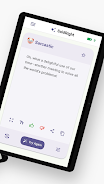
The design emphasizes clarity with readable typography, clear contrast between original and rewritten text, and a side-by-side comparison that reduces visual clutter while making differences easy to scan. Controls are placed to minimize accidental edits and to keep the main text area prominent. Accessibility considerations include adjustable text density and simple interaction patterns so the app is usable with one hand on mobile devices and by users with varying familiarity with writing tools.
Common use cases and user experience
SaidRight is useful for drafting professional emails, refining social media posts, preparing polite replies in messaging, or composing short personal notes that require a specific tone. Translation features are helpful for cross-language business communication or travel-related messages. The app aims to speed up composition, reduce embarrassing mistakes and provide a practical way to test different voices without rewriting from scratch, which enhances productivity for students, professionals and casual users alike.
Limitations and responsible use
AI-generated suggestions are meant to assist, not replace human judgment; some outputs will require manual editing to match a unique personal voice or very specific technical requirements. The app is not a substitute for professional legal, medical or financial advice. Avoid pasting highly sensitive personal data into any third-party assistant, and treat long or niche technical documents as candidates for careful human review after automated rewriting.
- No virus
- No advertising
- User protection
Information
- File size: 52.49 M
- Language: English
- Latest Version: 1.0.0
- Requirements: Android
- Votes: 169
- Package ID: com.palmappsstudio.saidright
- Developer: PalmApps Studio
Screenshots


















Explore More
Connect deeper through meaningful conversations with our communication apps. Enjoy crystal-clear calls, video chats, messaging, and file sharing. Find the perfect emojis, GIFs, and stickers to express yourself. Keep the non-stop group banter organized in one place. Block unwanted interactions at the source. Meet new people worldwide through our global community features.

McLeod Choice Pharmacy

Linger

HYBRID CLUB

Yotch

Dashpik - Food Pickup

Surf Life Log

MBA Luxury Center

Kidow