Introduction
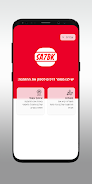
SA7BK is a practical mobile ordering app designed to simplify how you browse, customize and pay for food from local restaurants. SA7BK places frequently used tools — menu browsing, a persistent basket, favorites and a personal profile — within easy reach so the whole ordering process feels predictable and fast. The app combines a clean visual layout with clear inline controls, opt-in promotions, and account-based conveniences to reduce friction for repeat orders and occasional savings.
Key features
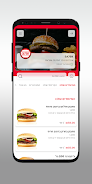
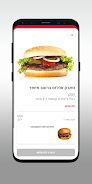
The app presents a searchable menu with item images and descriptions so you can compare choices without jumping between screens. Adding an item to the basket is a single tap, and each item shows inline controls to change quantity or apply short special instructions while you build the order. A favorites area stores items you use often for one-tap reorders, and the personal profile keeps addresses and order history to make checkout quicker. At the point of purchase you can choose between available delivery methods and the payment options offered by the provider. Opt-in notifications let you receive promotional offers and order updates when you want them.
How ordering works
Ordering in SA7BK follows a straightforward flow: browse the menu, add items to the basket, review and edit the contents, then select delivery and payment options at checkout. Each stage gives clear feedback so you always know what’s in the basket and which delivery choices are active. You can attach brief notes to individual items — for example allergy information or preparation requests — and the checkout review shows a compact summary of charges before you confirm your purchase.
User profile and progression
Building a profile in SA7BK speeds up future interactions. The profile stores order history, which you can use to repeat or slightly modify previous orders, and saves multiple shipping addresses for different delivery locations. Rather than a game-style progression, the app’s practical progression helps you create a tailored quick-order workflow: save a set of favorites, keep commonly used payment methods on file, and consolidate delivery addresses so reorders become faster and more predictable over time.
Controls and accessibility
SA7BK emphasizes simple touch-based controls: taps to add or remove items, inline quantity controls to adjust counts, and clear on-screen prompts for checkout steps. The interface uses readable typography and high-contrast elements to help visibility, and interactive areas are designed to be large enough for comfortable tapping. These choices make the app easier to use for people who prefer a straightforward ordering experience or who need larger touch targets.
Customization, visual style and user experience
The overall visual style is modern and minimal, reducing clutter so content such as menu items and basket details remain the focus. Customization comes through the ability to mark favorites, add special instructions to products, and manage multiple addresses and payment methods in your profile. This combination of design and practical options aims to reduce common decision points during ordering and provide a consistent experience across repeated sessions.
Replay value and practical benefits
Replay value in SA7BK is based on convenience rather than gameplay: the app rewards regular use by making reorders faster and keeping your most-used items and addresses accessible. Occasional promotions delivered via opt-in notifications provide added value without forcing alerts, and the order history gives a quick way to return to meals you enjoyed. Together, these elements encourage repeated, practical use rather than novelty.
Limitations and privacy notes
SA7BK requires you to opt in to notifications if you want promotional alerts; otherwise the app will function without push messages. Available delivery methods and payment options depend on the restaurants and services integrated on the platform, so choices may vary by location. The personal profile stores information such as addresses and payment methods to speed up checkout; you can review and remove saved details from your account settings if you prefer not to keep them long term. Overall, the app focuses on a clear, efficient ordering experience rather than introducing complex features that could complicate the flow.
- No virus
- No advertising
- User protection
Information
- File size: 27.90 M
- Language: English
- Latest Version: 1.0.2(2.0.115)
- Requirements: Android
- Votes: 425
- Package ID: il.co.myshop.sahbakburger
- Developer: My Shop Technologies
Screenshots

















Explore More
Equip yourself with our all-in-one toolbox app for everyday tasks and projects. Instantly convert between units, calculate tips, scan documents, manage files, and more with handy productivity tools. Includes a level, compass, QR code reader, ruler, speedometer, decibel meter, and flashlight. Save frequently used tools to your customizable dashboard for one-tap access. Track billable hours, wages, budgets, and invoices. Annotate screenshots, magnify labels, and sign PDFs on the go.

MEXC Global: BTC, ETH, Gamefi

Text Art - Write Text On Photo

MERA PROXY PRO

Domino's Pizza Sri Lanka

Hatekhori Shongkha

Halloween Photo Editor -Makeup

Connecting - Friends Near Me

Cartola