Introduction
SocialTech VPN is a lightweight, 100% free VPN utility built for users who want a simple, no-frills way to route their internet connection through a chosen remote server. SocialTech VPN puts straightforward controls front and center: pick a server from the available list, tap a single connect button, and begin browsing with a different apparent location. The app emphasizes fast setup and minimal configuration so casual users can access region-limited content or add a basic layer of network routing without subscriptions or lengthy onboarding.
Key features and interface
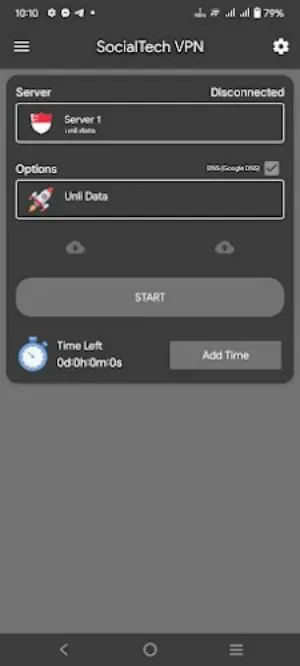
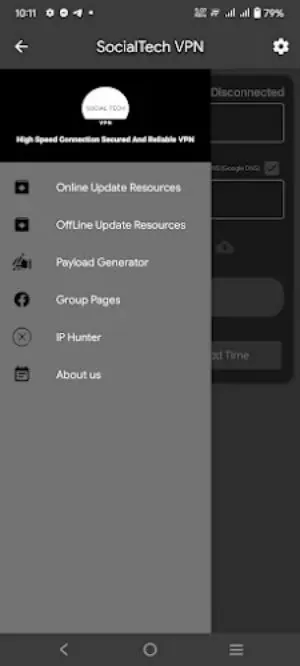
The interface in SocialTech VPN is intentionally compact and designed for quick interaction on phones and tablets. A single main screen displays the current connection status and a clear connect button, while a three-dot menu offers utilities like copy and share of the connection details. Server selection is presented as a simple list so you can choose the best option for your needs before connecting. Session time is managed inside the app and can be extended by watching short ad units, which are integrated into the same workflow rather than requiring separate navigation. These elements keep the controls familiar to anyone who has used basic network tools on Android.
User experience and controls
Controls are minimal: choose a server, press connect, and the app handles the rest. The app provides visual cues for connection status so you always know when traffic is routed through the selected server. For people who prefer fewer decisions, SocialTech VPN supports a quick-connect pattern that remembers the last server used and offers one-tap reconnection. The three-dot menu delivers small but useful extras, like copying a server address or sharing connection details by standard Android share sheets. All interface elements are sized and labeled for clarity to make access easier for a broad range of users.
Session progression and ad-based time extension
Instead of subscription tiers, SocialTech VPN uses an ad-based time-earning mechanism that lets you accumulate additional session minutes within the app. This acts as a simple progression model: initial free time is available, and when you need more, you can watch short ads to extend your session. The system is transparent about how much time each ad grants and when the next opportunity to earn time will be presented. This approach is intended to keep the core experience freely accessible while giving users control over whether and when to view ads for extended usage.
Practical use cases and limitations
SocialTech VPN is best suited for casual browsing, checking region-specific web pages, or quickly adjusting your apparent location for short sessions. It is not designed as a substitute for always-on, high-availability corporate solutions or long-term, uninterrupted connections; extended uninterrupted use may require a different type of service. Additionally, because session extensions depend on viewing ads, there can be brief interruptions if you choose to earn more time that way. Offline usage is not supported, as the app’s function requires an active internet connection to route traffic through the selected server.
Customization, accessibility, and visual style
The visual approach in SocialTech VPN favors simplicity: clear typography, straightforward status indicators, and a compact layout that keeps key actions within thumb reach. While advanced configuration options are intentionally limited to preserve ease of use, the app provides enough customization in server selection and session handling to satisfy users who want lightweight control. Attention to accessibility includes readable labels and high-contrast icons to help users with visibility needs navigate the app without deep technical knowledge.
Reliability, replay value, and suitability
Because SocialTech VPN is free and easy to operate, its replay value comes from convenience: users can quickly reconnect for a new short session whenever they need a different routing or to access content tied to another region. The app is reliable for short-term tasks, testing access from another location, or basic privacy-minded routing for everyday browsing. It is less appropriate for users who require long uninterrupted sessions or enterprise-grade guarantees. The reliance on ads for extra time means the overall experience balances free access with occasional interruptions related to ad viewing.
What to expect when you install
After installation, SocialTech VPN will request the permissions necessary to create a local network tunnel and manage the connection state. The setup process is short: open the app, select a server if desired, and tap connect. The app keeps the workflow simple so you can return to your usual apps quickly. If you prefer a subscription-free, minimal VPN tool that keeps decisions simple, SocialTech VPN is built to meet that need while clearly presenting the trade-offs involved with its ad-supported session model.
- No virus
- No advertising
- User protection
Information
- File size: 9.60 M
- Language: English
- Latest Version: 6.5
- Requirements: Android
- Votes: 328
- Package ID: ph.callos.socialtech
- Developer: Crazystem community
Screenshots

















Explore More
Equip yourself with our all-in-one toolbox app for everyday tasks and projects. Instantly convert between units, calculate tips, scan documents, manage files, and more with handy productivity tools. Includes a level, compass, QR code reader, ruler, speedometer, decibel meter, and flashlight. Save frequently used tools to your customizable dashboard for one-tap access. Track billable hours, wages, budgets, and invoices. Annotate screenshots, magnify labels, and sign PDFs on the go.

Board Game Stats

MEXC Global: BTC, ETH, Gamefi

Text Art - Write Text On Photo

Domino's Pizza Sri Lanka

Hatekhori Shongkha

Halloween Photo Editor -Makeup

Connecting - Friends Near Me

Cartola