Introduction
CoinWise is a personal finance and budgeting app designed to give Android users a single-pane view of spending, savings, bills and basic investment tracking. CoinWise combines account aggregation, automated transaction categorization and a customizable dashboard so you can quickly understand cash flow and progress toward financial goals without digging through multiple apps or spreadsheets.
Core capabilities
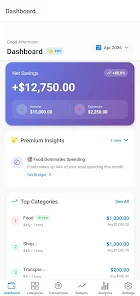
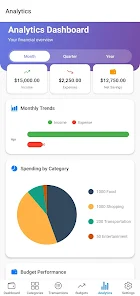
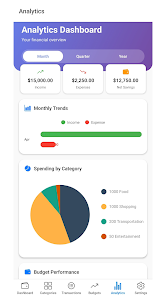
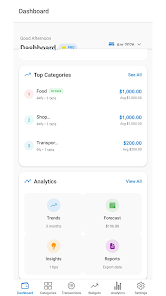
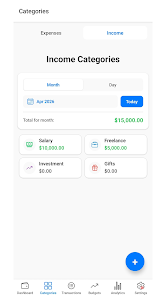
The app focuses on everyday money management: linking checking, savings, credit and investment accounts to present balances and recent transactions in one place. Automatic merchant matching and category rules reduce manual sorting, while bulk edit tools speed up reconciliation when you import statements. Built-in visualizations — cash flow graphs, category breakdowns and progress bars — help you spot trends at a glance and make small adjustments that compound over time.
How accounts and data are organized
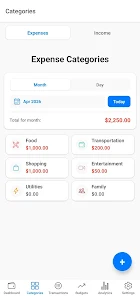
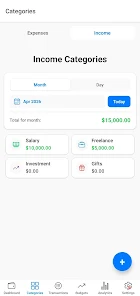
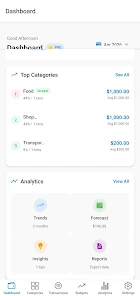
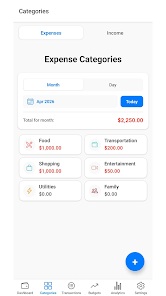
CoinWise groups transactions into meaningful categories using pattern recognition and merchant matching, and it lets you create custom rules to reclassify items or merge duplicates. Tagging supports project-based tracking and shared expenses, and scheduled bills and recurring transfers are surfaced so you can avoid surprises. A unified search and filtered views make it simple to locate past transactions by amount, merchant, tag or date range.
Controls and daily workflow
Navigation and input are optimized for touch: swipes move between accounts, tap targets are sized for one-handed use, and adding or editing a transaction is a single-tap flow with clear field labels. Bulk actions allow multi-select edits for faster reconciliation. Notifications are configurable so you receive alerts only for the events you care about, such as budget thresholds, upcoming bills, or large transactions. Adjustable sync intervals give you control over battery and data usage.
Progression systems and challenge tools
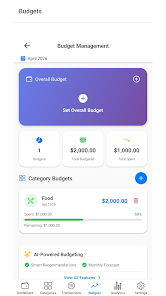
Rather than gamified rewards, CoinWise uses goal-based progression to keep users on track: set savings goals with visual milestones, assign target dates and watch progress bars update as transactions post. Budgets act as ongoing challenges — you can create weekly or monthly targets, enable gentle reminders, and review trends to see where recurring overspending occurs. Scenario modeling lets you simulate changes like cutting a subscription or increasing monthly contributions to see the timeline for reaching a goal.
Insights, planning and replay value
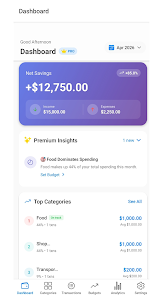
Beyond raw balances, CoinWise delivers actionable insights such as subscription overviews, categories that are trending upward, and personalized suggestions for reallocating funds toward priorities. Regularly reviewing these insights encourages ongoing engagement: adjusting budgets, refining rules, or importing historical statements creates a clearer long-term picture and increases the app’s utility over months and years.
Investment tracking and multi-currency support
For users who also hold investments, CoinWise provides lightweight portfolio views that summarize holdings by account and asset class and show performance across selectable periods. Multi-currency balances are consolidated using conversion rates so you can evaluate net worth in your chosen base currency. These features are aimed at basic tracking and do not replace a broker’s detailed analysis tools.
Privacy, security and data handling
Security is emphasized with strong encryption for stored data, secure channels for account connections, and support for two-factor authentication and biometric unlock where the device permits. Sensitive details are masked in previews and local device caching is minimized. Privacy controls let you choose what data to export, share or back up, and CoinWise is designed to reduce unnecessary exposure of personal financial information.
Performance, compatibility and offline access
Optimized for a wide range of Android devices, CoinWise aims to be responsive on both newer phones and older hardware. Background sync is throttled to conserve battery, and transfers are queued to manage network usage efficiently. Offline access lets you view recently synced transactions and work on drafts of manual entries when you have no connectivity; changes sync automatically once a connection is reestablished.
Customization and accessibility
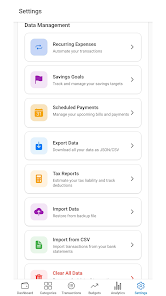
Users can personalize the experience with customizable dashboard tiles, adjustable font sizes and colorblind-friendly palettes. Themes and iconography help tailor readability and aesthetics. Export options for CSV and PDF support tax and accounting workflows, and import tools speed the initial setup by bringing in historical statements. Accessibility features and clear visual hierarchies make the app usable for a broad audience.
Getting started and who benefits most
Onboarding walks you through creating an account, linking institutions if desired, and reviewing automatically imported transactions. The checklist recommends creating at least one budget and a savings goal to begin receiving targeted recommendations. CoinWise is well suited to individuals and small households who want a consolidated view of finances, freelancers who manage multiple accounts, and anyone seeking a practical, low-friction tool for tracking spending and saving without complex bookkeeping.
- No virus
- No advertising
- User protection
Information
- File size: 88.00 M
- Language: English
- Latest Version: 1.0.14
- Requirements: Android
- Votes: 138
- Package ID: com.fajostech.expensetracker
- Developer: FajosTech
Screenshots

















Explore More
Make your house a home with our selection of innovative apps. Discover programs to simplify cleaning, organize closets, and manage home maintenance. Take the hassle out of chores and keep your space running smoothly. Design, visualize, and renovate like a pro using our augmented reality and 3D modeling tools. Enhance security and monitor your property 24/7 with our connected home tech.

Scary sound effects

カウシェ

Baby songs free Nursery rhymes

Kaspersky Password Manager

Kidcare – Parental Control App

OTT Navigator IPTV

MTS Link

Origin Energy Gas Internet LPG