
Introduction
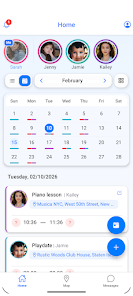
Kidow brings the whole family schedule into a single shared calendar that parents, grandparents, babysitters and activity coordinators can view and use to manage pickups, drop-offs and arrival confirmations. The app syncs events with personal calendars, sends automatic reminders and surfaces who is responsible for each task so plans are clearer and fewer messages or calls are needed to coordinate daily routines.
Key Features
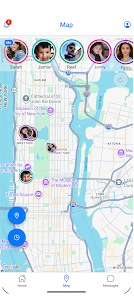
The core features include a shareable family calendar with color-coded events and role-based visibility, automatic reminders timed to departure and arrival, clear pickup assignments that show who is expected to collect children, one-tap SOS notifications to alert available caregivers, and optional location-based arrival alerts and a simple family map. Events can be annotated with details like meeting points, contact numbers and estimated travel time so caregivers have the information they need before they leave. Notifications are adjustable per person and per event so each family member receives only the reminders they want.
How it Works
Getting started is designed to be straightforward: one person creates a family group, adds members by phone number or email, and assigns basic roles such as parent, caregiver or guest. Shared events can be created from scratch or imported from supported calendars; each event can be assigned to one or more people and set with automatic lead-time reminders. Navigation relies on familiar touch interactions: tap to open details, swipe to move between days, long-press to quickly change a status (for example "I’m on my way"). Users progress from initial setup to daily use as they add recurring routines, enroll regular caregivers and configure notification preferences.
Design and Customization
The visual style is intentionally clean and utility-focused, using color coding and clear typography to make schedules readable at a glance. Families can customize event colors, notification tones and the information visible to different roles. For parents who manage complex schedules there are filters and search tools to view only the events relevant to a person or location. The app supports basic personalization such as profile photos and nicknames so members are quickly identifiable in lists and on the map view.
Reliability, Offline and Privacy
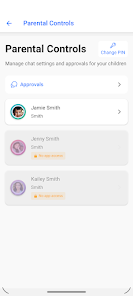
Kidow stores event data locally so basic viewing and recent updates remain available when a device is offline; changes made offline sync automatically when a connection is restored. Location and notification permissions are optional but required for features like arrival alerts and real-time positioning on the map. The app’s workflow emphasizes consent: users explicitly grant permissions and can change them later in device settings. Because family coordination often involves sensitive details, the app keeps sharing within the designated family group and provides simple controls to remove members or change access levels.
User Experience and Challenge Handling
The experience focuses on reducing friction: templates for recurring activities, one-tap confirm/decline responses, and suggested departure times based on event location help reduce scheduling conflicts. When two caregivers are marked as available for the same pickup, the app highlights the conflict and recommends confirming a single responsible person to avoid confusion. Daily use encourages short interactions—quick status updates, automatic "arrived safely" notifications when enabled, and compact event summaries—so managing family logistics does not become time-consuming.
Accessibility and Support
Kidow aims to be usable by a wide range of people: readable fonts, contrast-conscious color choices and support for system-level screen readers improve accessibility for users with visual impairments. Settings allow larger text sizes and simplified event views for users who prefer minimal information on screen. In-app help and clear permission explanations guide caregivers through setup and common tasks, and the app handles language fallbacks gracefully for multilingual households.
Limitations
The app is most effective when everyone who participates uses it, so families with some caregivers who do not have smartphones will still need backup communication. Location-based features and timely notifications require device permissions and a working internet or cellular connection to deliver real-time updates. Finally, while the app centralizes scheduling and alerts, success depends on members agreeing to the shared plan and responding to confirmations when requested.
- No virus
- No advertising
- User protection
Information
- File size: 120.00 M
- Language: English
- Latest Version: 1.1.9
- Requirements: Android
- Votes: 251
- Package ID: com.blueguru.activonme
- Developer: BlueGuru
Screenshots
















Explore More
Make your house a home with our selection of innovative apps. Discover programs to simplify cleaning, organize closets, and manage home maintenance. Take the hassle out of chores and keep your space running smoothly. Design, visualize, and renovate like a pro using our augmented reality and 3D modeling tools. Enhance security and monitor your property 24/7 with our connected home tech.

Scary sound effects

カウシェ

Baby songs free Nursery rhymes

Kaspersky Password Manager

Kidcare – Parental Control App

OTT Navigator IPTV

MTS Link

Origin Energy Gas Internet LPG