Introduction
What's Up is a compact productivity and communication tool designed to centralize notifications, quick messages, and daily reminders into a single, streamlined interface. It helps users manage time-sensitive tasks, prioritize conversations, and reduce notification overload using customizable channels, smart filters, and context-aware reminders for both personal and professional use.
What the app does
The core idea behind What's Up is to turn chaotic alerts into manageable, actionable items. Rather than bouncing between multiple messaging apps and calendars, this app collects incoming notifications and presents them in a prioritised view. That helps you focus on what matters now without losing track of background tasks.
Primary tools and controls
- Unified inbox: All messages and alerts appear in one list with quick actions for reply, snooze, or archive.
- Smart filters: Rules can be created to surface high-priority items automatically based on sender, keywords, or time of day.
- Context-aware reminders: Create reminders tied to location, device state, or calendar events so alerts trigger when they're most useful.
- Quick replies: Predefined responses and templates speed up replies without opening full apps.
- Privacy controls: Hide sensitive content on the lock screen and choose which apps can feed notifications into What's Up.
User interface and navigation
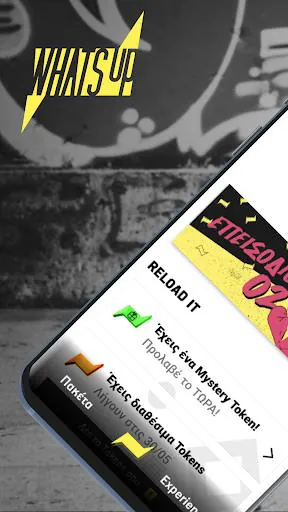
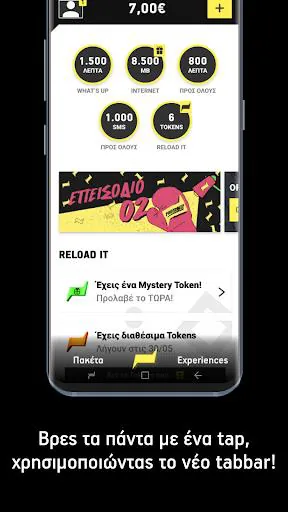
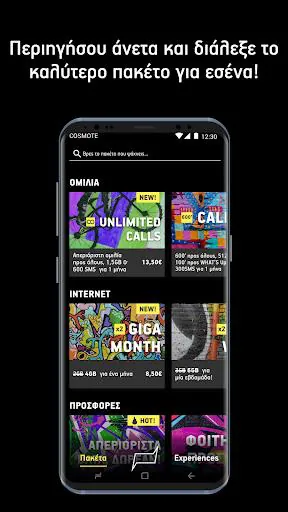
The interface is minimal and responsive. A main feed gives a chronological view with filters across the top and a persistent action bar for composing quick items. Icons and color-coding help identify message types at a glance, while swipe gestures allow fast triage of notifications. Settings are grouped by function, so personalization doesn't require digging through menus.
How it fits into daily workflow
People use What's Up as a lightweight hub between their home screen and full-featured apps. For example, triaging messages while commuting, creating a reminder that syncs to calendar, or muting low-priority channels during focused work. Integration options include system notifications, calendar access, and optional cloud sync so your configuration stays consistent across devices.
Customization and personalization
Customization is a highlight. Users can create channels for family, work, projects, or hobbies, each with its own alert settings and noise level. Themes and compact view options help conserve screen space. Advanced users will appreciate rule-based automations that can route, silence, or escalate alerts depending on conditions you define.
Performance and compatibility
What's Up is optimized to be light on battery and memory. Background services are kept to a minimum, and sync intervals can be adjusted to reduce power consumption. The app supports a wide range of Android versions and works with most third-party messaging and notification sources through standard APIs.
Privacy and security
Privacy is built into the permission flow. Notifications are processed locally unless you opt into cloud features. Sensitive snippets can be blurred on the lock screen, and an in-app passcode or biometric lock protects the full message archive. Permissions are requested incrementally, and the app explains why each one is needed.
Tips for new users
- Start by adding two or three channels to see how filters behave before expanding to more.
- Use the snooze feature to defer non-urgent messages until a specified time window.
- Create a few quick-reply templates for frequent responses and edit them as needed.
- Set up a silent schedule for deep work hours so only urgent alerts break through.
Why users recommend it
Reviewers praise What's Up for making notification management feel purposeful rather than intrusive. The combination of quick triage, flexible filters, and thoughtful privacy controls appeals to professionals juggling multiple communication streams and to anyone aiming to reduce digital clutter. Frequent updates keep the app compatible and introduce incremental improvements based on user feedback.
Installation and getting started
Installation is straightforward: download, grant the basic notification permission, and follow the onboarding steps to create your first channels. The initial setup offers suggested rules and templates that can be tweaked at any time. For those migrating from other tools, import options simplify the transition.
If you want a compact, configurable way to tame alerts and streamline short interactions, What's Up presents a balanced approach between control and simplicity. The app is particularly useful for people who handle diverse message sources and want faster, more organized daily routines without heavy overhead.
- No virus
- No advertising
- User protection
Information
- File size: 68.41 M
- Language: English
- Latest Version: 4.40.1
- Requirements: Android
- Votes: 199
- Package ID: gr.cosmote.whatsup
- Developer: COSMOTE GREECE
Screenshots

















Explore More
Make your house a home with our suite of helpful home apps. Discover clever tools to organize closets, streamline chores, and simplify cooking. Take the stress out of cleaning and maintenance with handy checklists and schedules. Enhance security and control appliances and lighting with our smart home integrations. Design, visualize, and renovate like a pro using our 3D planning software.

Metro Micro

Tax Calculator India 2024-2025

ClassPass: Fitness, Spa, Salon

OnDjoss

Park4Me

Scary sound effects

Home Workouts - Lose Weight

Juice Recipes