Introduction
Buysellee is a shopper-focused Android app that helps users discover deals, manage wishlists, and track prices across stores. It combines smart alerts, in-app coupons, and a clean product feed to streamline buying decisions. The app targets bargain hunters and organized shoppers who want faster price comparisons.
Quick overview
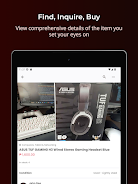
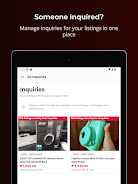
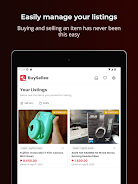
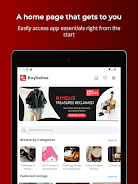
Designed for everyday shoppers and deal hunters, Buysellee organizes product discovery and purchasing into a compact workflow. It pulls listings from multiple retailers, surfaces discounts, and stores item history so you can see whether a price is worth waiting for. The app prioritizes clarity: product cards show the essential information first so decisions are quicker.
Core tools and capabilities
- Price tracking: Set alerts for specific items and receive notifications when an item drops to your target price.
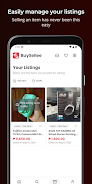
- Wishlist management: Create categorized lists, archive items, and share collections with friends or family.
- Coupon integration: Automatically detect coupons and apply them at checkout where supported.
- Cross-store comparisons: Side-by-side price and delivery comparisons highlight the best value without switching apps.
How the workflow unfolds
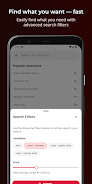
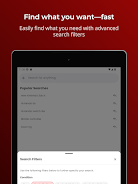
The interface guides you from discovery to checkout in three simple steps: browse the feed, pin items to a wishlist, and enable price alerts. Search filters narrow results by brand, rating, or shipping time. When an alert triggers, the app shows price history charts and a short explanation of the change, helping you decide whether to buy now or wait.
Interface and performance
Expect a minimal, touch-optimized layout with large thumbnails, readable typography, and fast-loading images. The navigation uses a bottom bar for quick access to home, search, lists, and profile. Performance is tuned for mid-range devices: background syncs occur on a schedule to minimize battery drain while keeping price information current.
Personalization and settings
Personalization is handled through simple toggles and thresholds. You can set global alert sensitivity, preferred stores, and currency. For privacy-conscious users, the app supports local-only wishlists and restricts data syncing. Notifications are grouped to reduce noise, and quiet hours can be scheduled.
Tips for new users
- Start with a focused wishlist: Add 5–10 items first to see how alerts and price history help you judge deals.
- Adjust alert sensitivity: Lower sensitivity to avoid minor price fluctuations; raise it when hunting time-limited sales.
- Use filters: Save filter presets for categories you shop often to speed up browsing.
- Enable coupon scanning: Turn on coupon detection in settings to automatically find applicable savings.
What sets it apart
Buysellee stands out through a combination of simple automation and transparent data. Price history charts are easy to read and rarely overloaded with labels. The app makes trade-offs visible — like choosing faster shipping over a slightly lower price — so you can make pragmatic purchases. Social sharing of wishlists also helps coordinate group gifts and shared shopping lists.
Security and compatibility
The app requests only essential permissions: network access for price checks, storage for cached images, and notifications. Data transfers are encrypted and account options include sign-in with email or third-party providers. Compatibility spans a wide range of Android versions, with smaller feature fallbacks available on older devices.
Getting started
Installation and initial setup take minutes. After granting the basic permissions, run a quick import or add items manually. Set one or two price alerts to validate notification behavior. If you shop frequently across retailers, link your preferred stores in settings for immediate tailored results.
The app balances automation with manual control, making it useful whether you’re casually browsing or actively hunting sales. For shoppers who want a clear, measurable path from discovery to purchase, Buysellee offers a practical toolkit without unnecessary complexity.
- No virus
- No advertising
- User protection
Information
- File size: 43.53 M
- Language: English
- Latest Version: 1.3.0
- Requirements: Android
- Votes: 373
- Package ID: com.adselle.buysellee
- Developer: Padtech Corp
Screenshots



















Explore More
Make your house a home with our suite of helpful home apps. Discover clever tools to organize closets, streamline chores, and simplify cooking. Take the stress out of cleaning and maintenance with handy checklists and schedules. Enhance security and control appliances and lighting with our smart home integrations. Design, visualize, and renovate like a pro using our 3D planning software.

Metro Micro

All Recovery - Photos & Videos

Tax Calculator India 2024-2025

ClassPass: Fitness, Spa, Salon

OnDjoss

Park4Me

Scary sound effects

Home Workouts - Lose Weight