Introduction
ShopogoliQ helps you organize shopping trips by turning errands into simple, shareable lists. ShopogoliQ is built as a lightweight utility that focuses on clarity and speed: create categorized shopping lists, add or remove items with a single tap, share lists with others, and protect your data with straightforward backup and restore tools. The app is designed for people who want to remember essentials, move through stores more efficiently, and keep their shopping information safe when they change phones or accidentally delete a list.
Key Features
The core of the app is its list builder. You can create multiple lists for different stores, events, or routines and place items under clear category headings. Adding an item is fast and direct, and clearing or removing items from a list takes only a tap, which keeps the interaction simple and fast when you’re on the go. Categories help you group items by aisle, type, or meal so you can plan a route through the store instead of wandering back and forth.
Sharing is handled through your device’s standard share options so you can send a list to family members or roommates using messaging, email, or other apps without extra accounts or complicated setup. The backup and restore function is intentional and low-friction: create backups of your lists and items so they survive device changes and accidental deletes, and move saved backup files between devices if you need to transfer your data.
Because the app emphasizes a small footprint, it uses minimal storage and requests only essential permissions. That keeps ShopogoliQ responsive on older or lower-end devices and reduces the amount of data the app stores on your phone. The combination of compact design and selective permissions makes the app a practical choice for users who value simplicity and privacy.
User experience and controls
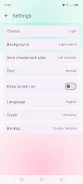
The user interface is deliberately uncluttered to make daily use straightforward. Typical controls are focused on single-step actions: a quick input field to add items, simple category selection to place them in the right group, and single-tap completion or removal when you pick an item from the shelf. The app avoids nested menus and deep settings so the most common tasks are accessible from the main screen. This keeps the learning curve low and supports quick, repeated use while shopping.
Organization, progression, and customization
Lists are organized in a predictable hierarchy: the app supports multiple lists that contain categorized items. Over time your lists can grow into reusable templates for recurring trips such as weekly groceries or holiday shopping. While ShopogoliQ is designed for simplicity rather than extensive customization, you can still manage and rename categories and keep lists for different stores or purposes to reflect how your shopping needs progress over weeks and months.
Visual design and accessibility
The visual style is clean and functional, emphasizing readable text and clear separation between categories and items. Fonts and spacing are chosen to minimize visual clutter, helping users scan a list quickly in-store. Accessibility considerations are part of the design focus: large touch targets, high-contrast text, and straightforward layouts make it easier to use the app with one hand or for users who prefer bigger interface elements. Because the interface keeps controls simple, it supports users with different familiarity levels with mobile apps.
Offline use, backups, and privacy
ShopogoliQ is fully usable without a network connection for everyday list creation and editing. Backups are handled locally so your lists do not depend on cloud services unless you choose to move backup files through your own means. This approach supports offline reliability and gives you explicit control over how and where your data is stored or transferred. Minimal permission requests further reduce the amount of personal data the app accesses, consistent with the app’s privacy-minded design.
Advantages
ShopogoliQ offers an easy-to-learn interface that lets you build and reuse categorized shopping lists quickly. The app’s focus on fast item entry, clear category organization, and simple sharing makes coordinating household purchases straightforward. Because it keeps a small storage footprint and limits permissions, the app is suited to users who want a practical, privacy-focused tool rather than a feature-heavy platform.
Disadvantages
Designed for simplicity, ShopogoliQ may not meet the needs of users who expect advanced automation, extensive customization, or seamless cloud-syncing built into the app. Those who want complex integrations or multiple automated reminders and cross-device syncing may find the feature set intentionally limited. If you need a lightweight, no-frills shopping list app that prioritizes speed and local control, ShopogoliQ is a solid fit; if you need deeper automation and cloud services, you may prefer a different tool.
- No virus
- No advertising
- User protection
Information
- File size: 10.51 M
- Language: English
- Latest Version: 1.3
- Requirements: Android
- Votes: 159
- Package ID: com.demig.shopogoliq
- Developer: Deminio Apps
Screenshots




















Explore More
Make your house a home with our selection of innovative apps. Discover programs to simplify cleaning, organize closets, and manage home maintenance. Take the hassle out of chores and keep your space running smoothly. Design, visualize, and renovate like a pro using our augmented reality and 3D modeling tools. Enhance security and monitor your property 24/7 with our connected home tech.

Scary sound effects

Baby songs free Nursery rhymes

Kaspersky Password Manager

Kidcare – Parental Control App

OTT Navigator IPTV

MTS Link

Origin Energy Gas Internet LPG

Starbucks México