


Introduction
C Launcher is a lightweight, highly customizable Android launcher that helps you reshape your home screen, organize apps, and apply thousands of themes and HD wallpapers. In everyday use the C Launcher experience centers on personalization: a DIY theme maker, a compact app drawer with automatic organization, gesture controls for fast access and privacy, plus widgets and a built-in theme store for extra visual options. The first impression is a clean, responsive interface that aims to be both visually flexible and power-efficient.
Key features and visual style
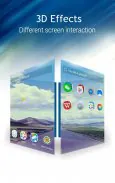
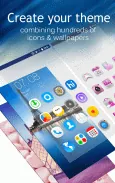
The feature set focuses on customization and practical tools. The DIY theme maker lets you combine wallpapers, icon packs and layout tweaks in a few steps and save or share your creations. The theme store contains categorized themes, 3D and live wallpapers, and HD backgrounds to change the look of your phone quickly. Visual options include adjustable icon sizes, grid layouts, and subtle transition effects so you can tune the home screen aesthetic without making performance trade-offs.
Home screen structure, controls and progression
Home screens act like levels in a design workflow: multiple panels can be added or removed, widgets placed, and app folders created to suit your routine. Controls are gesture-oriented—swipes, two-finger gestures and long-press actions open menus, hide apps or trigger the launcher’s cleaner widget. Progression is user-driven rather than game-like: as you experiment with themes and layouts you build a library of presets and saved themes that speed up future changes and let you revert to previous looks without redoing work.
App management, search and organization
App management in C Launcher emphasizes simplicity. The app drawer can generate automatic folders by detecting app categories and usage patterns, and unread counts appear on icons for instant notification summaries. A built-in search bar quickly locates installed apps and shortcuts, and installation or uninstallation can be initiated directly from the launcher interface. These tools reduce the time you spend hunting for apps and make the device feel more organized with minimal manual sorting.
Customization, replay value and offline behavior
Customization is the main replay value: frequent theme updates, seasonal packs in the theme store and the ability to tweak details like icon shape or wallpaper motion encourage regular refreshes. Most core launcher functions work offline—your layouts, saved themes and locally stored wallpapers remain available without a network connection. Only items obtained from the theme store (live wallpapers, certain 3D effects or large HD packs) require downloads, so you can use the launcher fully even with limited connectivity.
Privacy, accessibility and user experience
Privacy tools include app hiding and a gesture-based lock that requires an initial password setup; hiding an app removes it from the drawer until you re-enable it with the correct gesture and password. Accessibility options allow larger icons and text scaling to improve readability, as well as alternative triggers for key actions for users who prefer taps over gestures. The overall UX aims for low memory and battery impact while keeping daily actions straightforward—swipe to search, long-press to edit, pinch to manage pages.
Compatibility and performance
C Launcher is designed to run on a wide range of Android devices (Android 4.0+), with optimizations to reduce background resource use and keep animations smooth on older hardware. Performance-oriented features include a lightweight home process, selective widget loading, and the option to disable visual effects for maximum efficiency. Regular updates address compatibility and improve theme delivery without disrupting saved layouts.
Advantages
The main benefits of using C Launcher are its balance of personalization and practicality: extensive theme and icon options, a simple DIY theme maker, automatic app organization, and integrated widgets that speed common maintenance tasks like cleaning cache or checking the weather. Because the launcher stores your custom themes locally, you can experiment freely and return to previous designs without losing settings.
Disadvantages
There are a few trade-offs to consider. Learning the gesture set and setting up the initial password for hidden apps takes a short adjustment period. Advanced visual options such as 3D or live wallpapers are delivered through the theme store and may require additional downloads or storage space. Finally, devices running Android versions older than 4.0 are not supported, so older phones will not be able to install the app.
- No virus
- No advertising
- User protection
Information
- File size: 9.80 M
- Language: English
- Latest Version: 3.11.44c
- Requirements: Android
- Votes: 158
- Package ID: com.cma.launcher.lite
- Developer: Mobotap
Screenshots




















Explore More
Be prepared and plan your days better with our new weather app. Get real-time hyperlocal forecasts, customizable alerts and widgets, and detailed hourly projections. Beautiful photo backgrounds change dynamically based on conditions. Intuitive radar and satellite imagery help you visualize storms and patterns. Get humidity, precipitation probability, pollen count, and other useful data at a glance. Save favorite locations like home, work, or travel destinations for quick access.

Half Marathon Trainer 13.1 21K

RegenRadar

DragonDrive

Clock

Today's Weather

WLBT First Alert Weather
Weather Station FREE

El Mundo





























