


Introduction
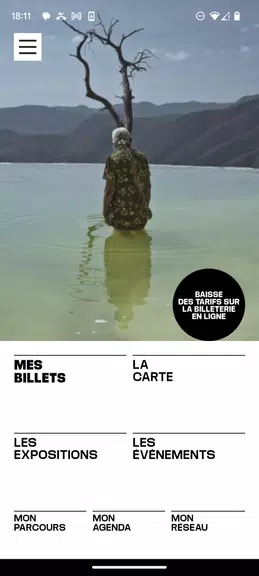
Les Rencontres d’Arles is the official mobile guide for the festival, designed to gather exhibitions, program videos, podcasts and practical visitor tools into one easy-to-use application. In the opening view you will find a clear calendar interface, venue maps and entry details so you can plan a day of visits, check a single exhibition on the go or manage press appointments. The app balances media playback, itinerary planning and ticket handling so both occasional visitors and cultural professionals can move through the festival program with confidence.
What the app offers
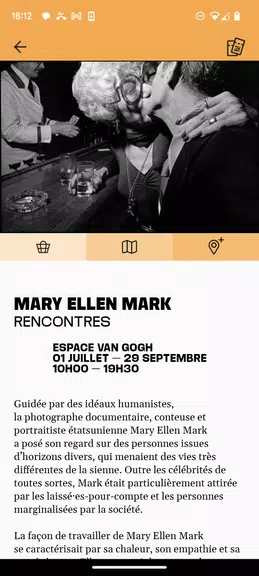
The app places schedules, descriptive texts, press images and program-related media at your fingertips and makes it straightforward to discover the right events for your interests. Searchable listings let you filter by date, venue, artist or medium and you can preview curated videos and podcasts associated with exhibitions. Purchased e-tickets are stored securely for entry, and clear metadata explains accessibility features, opening hours and any practical notes for each venue. Push notifications highlight curatorial updates and important schedule changes without overwhelming your device.
User experience and controls
Interaction mechanics emphasize direct manipulation: tap-to-open event cards, pinch-to-zoom maps, and swipe gestures to move between days in the calendar. A persistent search bar helps you jump to artists or locations, and map gestures reveal nearby venues and walking routes. Ticket viewing is optimized for quick scanning at checkpoints, while calendar integration lets you export events to your device schedule. The app supports standard system controls for volume and playback, and common accessibility settings such as adjustable text size and high-contrast display are available throughout the interface.
Planning, progression and personalization
Rather than a game, progression in Les Rencontres d’Arles is built around effective planning and personal discovery: you create itineraries, mark favorites, and track which events you have visited or intend to see. Suggested routes and estimated transit times help you sequence visits sensibly across different neighborhoods, and an agenda view highlights overlaps so you can avoid conflicts. Saved itineraries persist on your device between visits and can be refined as new exhibitions are announced, giving the app practical replay value across multiple festival editions.
Media, visual style and playback
The visual design mirrors the festival’s emphasis on photography and visual arts, with generous image galleries accompanying exhibition entries and embedded audio and video players for curator talks and artist interviews. Playback controls are familiar—play, pause, skip and scrub—so you can sample content before a visit, and the app indicates which items can be pre-downloaded for offline review. High-resolution images and clear captions help you assess exhibitions quickly, while consistent typography and spacing keep navigation readable in different lighting conditions.
Venue navigation and practical functionality
Interactive maps show venue addresses, opening hours and contact details alongside travel time estimates based on common modes of transport. Geolocation places nearby exhibitions on the map and guides you to each site with route highlights; when a connection is available the app can display live traffic context to help you make real-time decisions. For professionals, shared calendar entries and exportable appointment details streamline interview scheduling and press visits without requiring extra accounts or online collaboration tools.
Accessibility, offline use and limitations
Core program listings, saved itineraries and stored e-tickets remain available offline so you can consult essential information in areas with weak coverage. Streaming media, live traffic updates and cloud-synced sharing require an internet connection, and outside the festival dates the volume of new content decreases as the program becomes archival. The developers have focused on reliable, device-resident features and progressive enhancement so users with limited connectivity still benefit from primary scheduling and ticketing functions.
Who should install it
Visitors planning a focused, efficient visit, returning patrons who track exhibitions year to year, and cultural professionals arranging press and appointments will find Les Rencontres d’Arles a practical companion for festival attendance. The app is particularly useful on busy days when quick access to maps, itinerary details and multimedia context helps you make informed choices and get the most from the festival program.
- No virus
- No advertising
- User protection
Information
- File size: 85.10 M
- Language: English
- Latest Version: 1.7.13
- Requirements: Android
- Votes: 493
- Package ID: com.rencontresarles.app
- Developer: Les Rencontres d'Arles
Screenshots

















Explore More
Enjoy your favorite media anywhere with our sleek new all-in-one multimedia app! Stream video, music, and podcasts online or offline, downloaded directly to your device. Customize playlists and get smart recommendations based on your tastes. Adjust audio settings and enable bass boost for the ultimate listening experience. Easily cast and share to other devices. With a gorgeous, intuitive interface, media controls at your fingertips, and no distracting ads, this is the ultimate personal media hub.

All Recovery - Photos & Videos

MX Player Codec (ARMv6)

ASD Player
TriviaMaker

Billund Kommune Ældreområdet+

Estados do Brasil

Hitler Ki Wapsi Urdu Novel By Aleem Ul Haq Haqqi

Villa Club 29





























