

Introduction
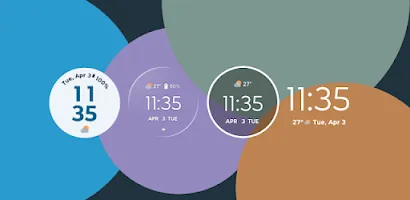
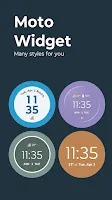
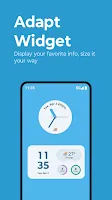
Welcome to the captivating world of Moto Widget, where your screen is transformed into a personalized playground of widgets that adapt to your every whim! Control your widgets with a flick of your finger, resizing them to your heart's content and customizing everything from opacity to clock style. Choose from a variety of classic widgets and view them in Moto's iconic circle style or keep it simple with plain text. And don't forget to tap on the weather info for detailed forecasts - it's like having a crystal ball in your pocket! So why wait? Dive into this widget wonderland today and let Moto Widget add some digital fairy dust to your device.
Features of Moto Widget:
Personalization Power: Moto Widget allows you to customize your screen with personalized widgets that adapt to your preferences with just a touch of your finger.
Variety of Widgets: Choose from a selection of classic widgets like Beyond, Battery Ring, and Clean Rectangle, each offering a unique style to suit your taste.
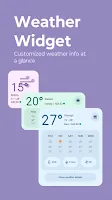
Weather Forecast: Tap on the weather info to unlock detailed forecasts and feel like you have a crystal ball in your pocket.
Easy Setup: Getting started is a breeze with simple steps to add Moto Widget to your Home screen and start enjoying the magic of widget customization.
FAQs:
How do I resize widgets on Moto Widget?
- Simply tap and drag the widget to resize it to your desired dimensions.
Can I change the style of the clock on Moto Widget?
- Yes, you can jazz up the clock style and customize it to match your screen's aesthetic.
Is Moto Widget compatible with all devices?
- Moto Widget is compatible with most Android devices running on the latest operating systems.
Conclusion:
Don't miss out on the opportunity to transform your screen into a personalized playground with Moto Widget. With its easy setup, variety of widgets, and weather forecast feature, this app is sure to sprinkle some digital fairy dust on your device. Unleash your inner widget guru and start enjoying the endless possibilities of widget customization today!
- No virus
- No advertising
- User protection
Information
- File size: 47.07 M
- Language: English
- Latest Version: 4.09.59
- Requirements: Android
- Votes: 320
- Package ID: com.motorola.timeweatherwidget
- Developer: Motorola Mobility LLC.
Screenshots
















Explore More
Be prepared and plan your days better with our new weather app. Get real-time hyperlocal forecasts, customizable alerts and widgets, and detailed hourly projections. Beautiful photo backgrounds change dynamically based on conditions. Intuitive radar and satellite imagery help you visualize storms and patterns. Get humidity, precipitation probability, pollen count, and other useful data at a glance. Save favorite locations like home, work, or travel destinations for quick access.

93.1 KISS-FM (KSII)

B106 (KOOC)

KUIC Mobile Music

Peloton

skateable

WITAL

Nature Path Guide

Park Ranger

















You May Also Like





Comment
-
I had a moto z play before I upgraded to a moto edge plus. I miss the power ring indicator on the lock screen and home screen. Such a quick way to see your battery life. Hopefully they can bring back that feature.2025-06-07 12:06:59
-
Probably not a moto widget problem, but rather the source from which they get the weather info. When we get heavy rains in the area, I get a warning for "Areal Flood Advisory" and it irks me. Also the AccuWeather site they use kinda sucks, it's kinda bulky and difficult to navigate.2025-06-07 11:23:09
-
Was the best till they removed the battery level indicator ring. What did they replace it with? Extra weather info. & details. Yet more sources for weather, can't escape every source these days. Internet, news, homepage, email, radio, etc, etc, etc.2025-06-07 11:03:50
-
The new update is horrible the widget are used for giving information at a glance the battery ring gave valuable information and now the new update just ruined it. Please give an option to change it or just roll back the update. It just ruined the classic simplistic design which looked awesome. Please get the usual one back.2025-06-06 10:51:40
-
The time font used in the old weather app before the Sept 2020 update looked much better than the new design. It was part of the advertising of the phone too and looked brilliant. Judging by a lot of the other reviews posted here others think the new design is poor too. Please motorola devs change it back!2025-06-06 01:55:58
-
This is terrible !!!!! The feature to show battery percentage ,weather, time , day , date in one widget only is not there after the update. That battery percentage is not showing now which was a very cool feature. Motorola please bring it back in the next update.2025-06-05 09:25:34
