
Introduction
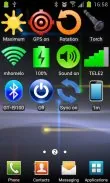
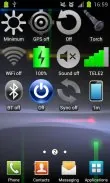
Introducing Bluetooth Control, the hassle-free widget that puts Bluetooth control right at your fingertips. With no annoying ads to distract you, this widget allows you to easily toggle your Bluetooth settings with just a single or double tap on your screen. Keep track of your device's Bluetooth status and quickly access system settings with this handy tool. Part of the GreenLogger widget collection, Bluetooth Control is just one of many widgets designed for simplicity, efficiency, and minimal resource consumption. Stay tuned for more widgets coming soon! Check out our developer profile for more GreenLogger widgets and enhance your home screen experience today.
Features of Widget Bluetooth:
Convenient Control: Widget Bluetooth offers a quick and easy way to control your Bluetooth directly from your home screen. No need to navigate through multiple menus, simply tap on the widget to toggle your Bluetooth on or off.
Minimalistic Design: With a clean and simple design, Widget Bluetooth seamlessly blends into your home screen without cluttering it up. Its small size and unobtrusive appearance make it a practical addition to any device.
Efficient Resource Usage: Enjoy the convenience of Widget Bluetooth without worrying about it draining your device's resources. This widget is designed to have low resource consumption, ensuring smooth performance even on older devices.
Playing Tips:
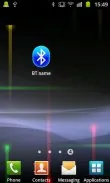
Customize Device Name: Make your device stand out by customizing its name within the widget. Simply tap on the widget and then tap on your device name to edit it to your liking.
Quick Access to Settings: Need to fine-tune your Bluetooth settings? Double-tap on the widget to instantly open your device's system Bluetooth settings. This shortcut saves you time and effort when adjusting Bluetooth preferences.
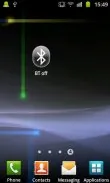
Stay Informed: Keep track of the status of your Bluetooth module with just a glance at the widget. Whether it's on, off, or in the process of switching, Widget Bluetooth provides you with real-time information at a glance.
Conclusion:
Widget Bluetooth is a must-have widget for anyone who frequently uses Bluetooth on their device. With its convenient controls, minimalistic design, and efficient resource usage, this widget offers a seamless Bluetooth experience without any unnecessary distractions. Download Widget Bluetooth today and simplify the way you manage your device's Bluetooth connectivity.
- No virus
- No advertising
- User protection
Information
- File size: 19.10 M
- Language: English
- Latest Version: 9.22.5.2
- Requirements: Android
- Votes: 182
- Package ID: cm.aptoide.pt
- Developer: GreenLogger
Screenshots
















Explore More
Make your house a home with our suite of helpful home apps. Discover clever tools to organize closets, streamline chores, and simplify cooking. Take the stress out of cleaning and maintenance with handy checklists and schedules. Enhance security and control appliances and lighting with our smart home integrations. Design, visualize, and renovate like a pro using our 3D planning software.

93.1 KISS-FM (KSII)

ISABEL ET SAUVEUR OFFICIAL

Por Tu Amor Alacranes Musical

Melodía FM Radio

Safire smart

RCX for TiVo (free)

أغاني افراح مصرية بدون نت

Movistar TV Colombia