

Introduction
Easily manage and back up all your social media photos and videos with this convenient app. Whether you're looking to transfer files from Instagram, Facebook, or Wechat to Google photos or Picasa albums, this tool has got you covered. Not only can you upload directly from your local app folders or running apps, but you can also explore the latest and most popular high-quality photos to download as wallpapers or share with friends. With the ability to view and edit your online albums, as well as easily upload batches of photos to Google photos, Photo Tool is a must-have for anyone looking to streamline their photo management process.
Features of Photo Tool:
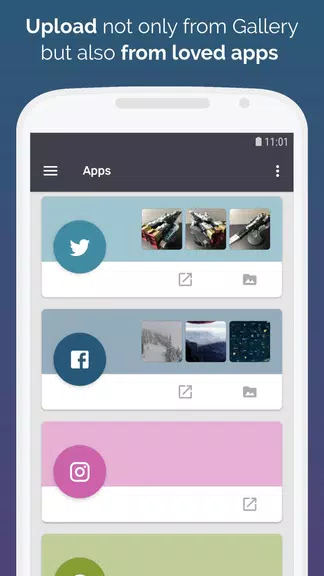
- Easy Backup and Transfer: Quickly back up your social photos and videos to Google photos or Picasa albums. Easily transfer files from popular social apps like Instagram, Facebook, and Wechat.
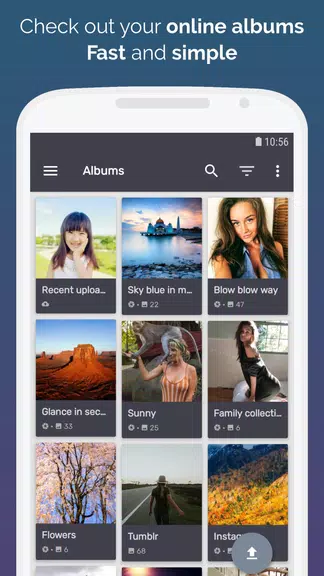
- Album Management: View and manage your online albums right from your device. Edit photos, view comments, and make changes that will sync across all your devices.
- Explore Popular Photos: Discover the latest high-quality, popular photos to download and set as wallpapers. Share these stunning images with your friends to brighten their day.
- Upload and Edit: Upload photos and videos from your social apps and camera roll to Google photos in bulk. Use the built-in photo editor to make quick edits before sharing.
FAQs:
- Is the app free to use?
- Yes, the app is free to download and use with optional in-app purchases for additional features.
- Can I upload photos from multiple social apps at once?
- Yes, you can upload photos and videos from various social apps all in one batch transfer.
- Are there any limitations on the number of photos I can back up?
- There are no limits on the number of photos or videos you can back up or transfer using the app.
- Is the app available on both Android and iOS devices?
- Yes, the app is available for download on both Android and iOS devices for easy access.
Conclusion:
With easy backup and transfer options, album management, popular photo exploration, and upload/edit features, this app is a must-have for anyone looking to organize and share their social app photos. Stay connected with your favorite memories and discover new wallpapers to refresh your device's look. Download Photo Tool today to streamline your photo management process and enjoy the latest features it has to offer.
- No virus
- No advertising
- User protection
Information
- File size: 24.30 M
- Language: English
- Latest Version: 10.8.2
- Requirements: Android
- Votes: 348
- Package ID: larry.zou.colorfullife
- Developer: COLIFER LAB
Screenshots


















Explore More
Explore an immersive world of entertainment with our media software. Watch, listen, and engage with your favorite shows, music, movies, and more. Access exclusive content, personalized recommendations, and innovative formats. Enhance your experience with our suite of cutting-edge applications. Discover hidden gems tailored to your unique tastes. Create, share, and connect over personalized playlists, reviews, and forums.

Best Phone Ringtones

اذكار الصباح والمساء-أذكارمسلم

Kids Learning games 4 toddlers

Free Fire help 2019

Glider Typing

CellSwipe

Pocket Golf

Dhol - The Indian Drum















You May Also Like





Comment
-
fake application . it's only galerie photo folders2025-08-02 14:37:10
-
old version is better than new one i was enjoying and like and also miss old version2025-08-02 09:51:15
-
Great app. Apart from the fact that I can't find a camera! Please tell me there is one2025-08-02 04:12:37
-
I couldnt find all my previous stored photos anymore......I crying right now.......why could Picasa treat me this way.....whyyyyyyyyyyyyyy2025-08-02 00:13:49
-
wrost app no delete and move option in app...... and download image not show in gallary2025-08-01 01:49:47
-
Wasn't what I was looking for. It didn't find all my gallery photos;2025-07-31 01:22:45
