


Introduction
AirPedal turns your Android phone into a Bluetooth HID keyboard and macro controller, letting you control a PC without installing drivers or desktop software. With a few on-screen buttons or your phone’s volume keys you can trigger shortcuts, run multi-key macros and control applications on Windows, macOS or Linux — ideal if you want a lightweight hardware macro pad alternative or a simple remote for editing, streaming or accessibility. AirPedal pairs as a standard HID device so setup is quick, inputs work even with the app in the background, and privacy is preserved because nothing is uploaded or stored externally.
Key Features
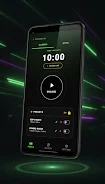
⭐ AirPedal acts as a Bluetooth HID keyboard to your computer, providing direct keystroke input on Windows, macOS and Linux.
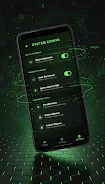
⭐ Assign single or multi-key shortcuts to on-screen buttons and trigger complex macros instantly.
⭐ Use your phone’s physical Volume Up/Volume Down keys as tactile triggers for pedal-like control.
⭐ Shortcuts continue to work when the app runs in the background or when the screen is off.
⭐ Privacy-focused design: no cloud sync, no personal data collection, and keystrokes are not recorded or transmitted.
⭐ Optimized Bluetooth connection for low-latency, responsive input.
Advantages
✅ AirPedal needs no drivers, desktop apps, or background services—your PC sees it as a standard keyboard.
✅ Works across major desktop operating systems, making it compatible with most computers.
✅ Practical for streamers, video editors and users who need quick access to shortcuts and macros.
✅ Strong privacy posture and simple pairing reduce security and maintenance overhead.
Disadvantages
❎ Requires a Bluetooth-capable computer and pairing; systems without Bluetooth support cannot use the app.
❎ Operates as a keyboard HID device, so it is limited to keyboard-style input and cannot emulate mouse or specialized controllers.
- No virus
- No advertising
- User protection
Information
- File size: 8.90 M
- Language: English
- Latest Version: 1.1.1
- Requirements: Android
- Votes: 342
- Package ID: com.airpedal.macro
- Developer: CoreX Dev
Screenshots





















Explore More
Unleash your inner filmmaker with our easy yet powerful mobile video editor! Trim, splice, and arrange clips with a simple drag-and-drop timeline. Easily apply stylish filters, text captions, transitions, visual effects, and audio tracks to customize your video. Built-in tools help stabilize shaky footage and adjust color and lighting. When your masterpiece is complete, export to popular formats and aspect ratios.

FlashShort

StoryLab

PolloAi: Video Editor Hints

Video maker

Tempo

Funimate Video Editor & Maker

Videoshop - Video Editor

Facetune AI Photo/Video Editor













