Introduction
VTX Proxy is a lightweight proxy app that provides safe, reliable access to the open internet by combining encrypted connections with a distributed network of servers worldwide. VTX Proxy is designed for people who want a quick way to protect data on public Wi-Fi, hide their device IP address, and reduce geo-restrictions for browsing and streaming without a complicated setup. The app emphasizes speed, stability and a one-tap connection model so you can get online securely in seconds and then return to whatever content or services you were using.
Key Features
VTX Proxy connects to a network of fast, stable servers located across multiple regions to help you reach content that might otherwise be restricted. The app uses encrypted tunnels to protect traffic when you browse, stream video, or send messages through public networks. A simple one-tap interface lets you connect and disconnect quickly; advanced users will appreciate that the design keeps configuration minimal while still offering useful options for choosing connection regions or letting the app pick the best server automatically. VTX Proxy aims to provide borderless internet access with a focus on low friction and predictable performance.
How it Works
The core operation is straightforward: when you enable VTX Proxy, your device’s network traffic is routed through an encrypted connection to one of the app’s remote servers. That server forwards requests to the destination site or service, which helps hide your original IP address and places your traffic behind a different network location. The app selects servers based on responsiveness and load to help maintain a stable connection; when conditions change, it can switch to alternate routes to reduce interruptions while you browse or stream.
User Interface and Controls
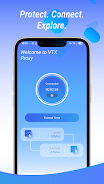
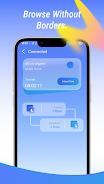
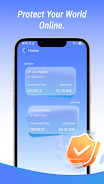
VTX Proxy keeps the user interface uncluttered so basic controls are obvious on first use. The primary action — connect or disconnect — is presented as a single control, and other settings are grouped logically for quick access. Typical controls allow you to enable automatic connection on untrusted networks, choose a preferred region if you need access to content in a specific country, and view connection status and basic usage statistics. This approach is intended to minimize setup time while still allowing people to tailor behavior to everyday needs.
Performance and Coverage
Performance is optimized for common activities like web browsing and video streaming; server distribution across regions helps reduce latency for many locations. That said, connection speed and responsiveness depend on local network conditions, your device, and server load, so results will vary. The app is built to prioritize stability so short-term interruptions are less likely to disrupt playback or long browsing sessions, and the server infrastructure aims to balance speed with geographic reach.
Privacy and Safety
VTX Proxy helps protect your traffic on insecure networks by encrypting data between your device and remote servers, which reduces the chance that casual eavesdroppers can read your activity. It hides your IP address from visited sites while the connection is active, which can improve privacy for routine browsing and messaging. VTX Proxy does not, however, guarantee complete anonymity or protection against all online threats; users should combine the app with safe browsing habits and be aware of service-specific login and tracking behaviors.
Accessibility, Battery and Offline Considerations
The app is designed to be light on system resources so it can run in the background without excessive battery drain, and the interface is readable and straightforward for users who prefer simple workflows. Because VTX Proxy requires an active internet connection to route traffic through remote servers, it does not provide offline browsing; basic app settings and last-known server choices remain accessible when your device is offline so you can prepare connections ahead of time.
Customization and Settings
Although VTX Proxy focuses on ease of use, it includes basic customization to match different user needs. You can opt for automatic server selection for the fastest available route, or select a specific region if you need to appear to be in a particular country for content access. Other settings let you control automatic connection behavior and view current connection metrics so you can adjust when necessary without needing advanced network knowledge.
Limitations
VTX Proxy is a practical tool for improving privacy and accessing region-restricted content, but it has limits. It cannot promise absolute anonymity, and it will not protect against malware or account-level risks that come from reusing passwords or visiting unsafe websites. Connection quality will also vary with regional load and your local internet service, so if you require guaranteed performance for professional streaming or large uploads, evaluate behavior under your typical conditions before relying on it for mission-critical tasks.
- No virus
- No advertising
- User protection
Information
- File size: 23.82 M
- Language: English
- Latest Version: 1.0.7
- Requirements: Android
- Votes: 378
- Package ID: com.mazmousadev.vtxproxy2
- Developer: MAZMOUSA DEV
Screenshots


















Explore More
Hit the open road with confidence using our automotive apps. Access comprehensive makes/models reference guides for expert vehicle knowledge. Get step-by-step repair and maintenance tutorials so you can DIY with ease. Scan diagnostic codes and get repair estimates from local shops. Stay on top of your vehicle's health with digital logs and alerts. Plan road trips leveraging real-time maps, traffic data, and trip computer integration.
View more