Introduction
Bird Batch Manager helps you stay calm and in control by turning routine batch tasks into organized, predictable workflows. Bird Batch Manager is built around a simple premise: small, repeatable steps are easier to complete when they are visible, sequenced, and lightly guided. This first paragraph introduces what the app does, who it is for, and the practical benefits you will notice within days of regular use.
How it works
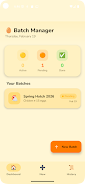
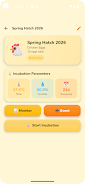
The app models each set of routine actions as a batch: a named collection of ordered steps that you can create, edit, and reuse. Each batch shows a clear progress indicator and a brief description for each step, so you always know what comes next. You advance a batch with a single tap or a swipe gesture and the app records checkpoints that make it easy to resume interrupted work. Batches can be saved as templates and duplicated when similar processes recur, allowing you to build a small library of reliable routines that reduce decision fatigue.
Controls and interaction
Controls were designed to be lightweight and predictable: tap to mark a step complete, long-press to edit a step, and swipe to reorder or archive a batch. The interface avoids buried menus so common actions remain within easy reach. Gentle prompts are configurable and operate locally, nudging you back to a paused batch without requiring an account. These simple gestures keep the learning curve low and let you maintain focus on the task itself rather than the tool.
Progression and habit tracking
Rather than gamified points, Bird Batch Manager emphasizes steady progression through visible checkpoints and optional streak counters that reward consistency. Each completed batch advances your daily progress bar; over time the app helps you identify which routines you complete reliably and which ones need adjustment. This structure supports habit formation: repeated completion reinforces routines, while the app highlights patterns so you can make practical changes rather than rely on memory alone.
Visual style and level structure
The visual language of the app is intentionally minimalist: high-contrast text, clear spacing, and subtle indicators for active, paused, and completed steps. Batches act like lightweight levels — a simple hierarchy of named sequences that can contain any number of steps. There are no distracting animations or complex charts; instead the design focuses attention on the next actionable item so you can progress through a batch quickly and with confidence.
Customization
You can tailor batches to your routines by renaming steps, adjusting step descriptions, and reordering stages. Templates let you save common patterns and apply them to new situations, while color accents and optional icons help you scan a list of batches at a glance. Customization is practical rather than deep: it keeps the app fast and easy to use while giving you enough control to reflect how you actually work.
Replay value and day-to-day use
Because Bird Batch Manager is designed for repetition, replay value comes from reuse rather than novelty. Templates and quick-duplicate controls let you run the same reliable sequence on different days or adapt a batch for slightly different contexts. Over weeks of use the library of batches becomes a personal toolkit that shortens decision time and increases the predictability of routine outcomes.
Accessibility and offline use
The app includes accessibility-friendly text sizes, clear contrast options, and simple touch targets so it can be used comfortably across a range of devices. Bird Batch Manager functions fully offline for creating, editing, and completing batches; local storage ensures that your routines and progress remain available without an internet connection, and all prompts and reminders are handled on-device.
Who this is for and limitations
Bird Batch Manager is well suited to individuals who manage household chores, study sessions, personal errands, or small business routines and prefer a calm, steady approach to productivity. It is not intended as a tool for complex project planning, heavy team collaboration, or enterprise workflow management. Power users looking for deep automation or advanced integrations may find the app intentionally lightweight; its strength lies in making everyday tasks predictable and manageable through clear steps and gentle, habitual progress tracking.
- No virus
- No advertising
- User protection
Information
- File size: 57.88 M
- Language: English
- Latest Version: 2.0
- Requirements: Android
- Votes: 168
- Package ID: com.managerbatching.batchmanager
- Developer: MEDIA WHIZZ LIMITED
Screenshots






















Explore More
Make your house a home with our selection of innovative apps. Discover programs to simplify cleaning, organize closets, and manage home maintenance. Take the hassle out of chores and keep your space running smoothly. Design, visualize, and renovate like a pro using our augmented reality and 3D modeling tools. Enhance security and monitor your property 24/7 with our connected home tech.

Scary sound effects

カウシェ

Baby songs free Nursery rhymes
Kaspersky Password Manager

Kidcare – Parental Control App

OTT Navigator IPTV

MTS Link

Origin Energy Gas Internet LPG