Introduction
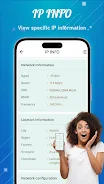
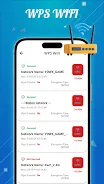
WiFi Commander is a compact, user-focused WiFi utility that surfaces essential network information quickly and clearly for everyday troubleshooting. WiFi Commander places the details you need at the top — IP configuration, local gateway and DNS, nearby access points that advertise WPS, and an at-a-glance signal assessment — so you can identify weak links or dead zones without wading through complex menus. The app is designed for homeowners, small-office users, and anyone who wants a reliable, low-overhead tool to understand and improve their wireless connection.
Key Features
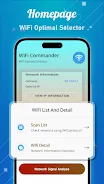
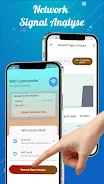
The dashboard groups the most important items into a single view: current IP and subnet, gateway and DNS entries, network SSID and BSSID, and a clear RSSI-based signal indicator. Scanning focuses on the local RF environment and highlights networks that support the WPS protocol so you can diagnose compatibility or security concerns. A connection details screen shows full WiFi status including link speed, frequency band, channel, and whether the connection is 2.4 GHz or 5 GHz. The built-in signal meter provides both instantaneous readings and a short-term trend so you can walk a space to locate weaker areas. All of these functions are implemented with performance in mind to keep CPU and battery use minimal.
How It Works
WiFi Commander performs on-device scans of nearby access points and reads the device's current network parameters; it does not require an Internet connection to show most diagnostics, so it works offline while inspecting local conditions. Scans are manual by default to preserve battery life, with an option to refresh results quickly when you need an updated view. Results are presented in plain language and organized into logical sections that match common troubleshooting workflows: identify the network, verify addressing, inspect link quality, and check for protocol or channel issues.
Controls and Navigation
Interaction is straightforward: tap the dashboard tiles to expand detailed values, use the refresh control to run a new scan, and long-press a value to copy it to the clipboard for use in notes or support tickets. The app avoids deep nesting; primary screens are reachable in one or two taps and a consistent back action takes you to the previous view. These simple controls reduce friction during on-the-fly troubleshooting and make the app approachable for non-technical users while still useful to more experienced administrators.
Visual Style and Accessibility
The design favors clear typography, color-coded signal indicators, and a compact layout that fits small screens without losing readability. WiFi Commander includes options for larger text sizes and a high-contrast visual mode to improve visibility for users with low vision. Icons and labels are chosen to be descriptive rather than decorative so information can be parsed quickly in noisy environments or while walking through a building.
Customization and Settings
Settings let you adjust scan behavior and display preferences to match your needs: choose whether scans are manual or periodic, set a polling interval that balances responsiveness and battery life, and select measurement units that fit your region or workflow. You can tailor the signal graph smoothing and the threshold values that define weak, moderate, and strong link quality, so the app's indicators align with the performance expectations for your devices and environment.
User Experience, Replay Value, and Offline Use
Because WiFi Commander is focused on diagnostic clarity rather than one-time novelty, it provides high replay value — you can use it daily to check hotspot performance, verify router adjustments, or confirm improvements after changing channel or placement. The app's lightweight footprint means it stays ready without slowing the device, and most functionality is available offline since scans and local status do not depend on cloud services. This makes WiFi Commander a practical companion during setup, moves, or routine network checks.
Limitations
The app intentionally limits its scope to core diagnostics: it is not a full professional network analyzer and does not include advanced packet capture, long-term logging to external servers, or network management functions for enterprise access points. Instead, WiFi Commander focuses on rapid, clear information you can act on immediately. If you require deep protocol analysis or management of large-scale deployments, specialist tools remain the appropriate choice.
Who Should Use It
WiFi Commander is well suited to users who want a fast, no-friction way to view IP details, detect WPS-capable networks, inspect connection attributes, and measure signal strength. It bridges the gap between simple signal apps and heavy professional suites by offering targeted diagnostics in a compact, accessible package, making everyday wireless problem solving faster and less stressful.
- No virus
- No advertising
- User protection
Information
- File size: 63.36 M
- Language: English
- Latest Version: 1.0.1
- Requirements: Android
- Votes: 159
- Package ID: com.names.commander.wifie
- Developer: Mama Group
Screenshots
















Explore More
Equip yourself with our all-in-one toolbox app for everyday tasks and projects. Instantly convert between units, calculate tips, scan documents, manage files, and more with handy productivity tools. Includes a level, compass, QR code reader, ruler, speedometer, decibel meter, and flashlight. Save frequently used tools to your customizable dashboard for one-tap access. Track billable hours, wages, budgets, and invoices. Annotate screenshots, magnify labels, and sign PDFs on the go.

myJersey

Training Feel

7 Bussid Private Bus Mod

1win

Iwan fals Paling Lengkap

CZUR

The Doylo

Radio You FM 106.9