Introduction
Not a Clock: Aesthetic Widgets places elegant analog timepieces on your Android home screen with a minimalist, design-focused approach. Not a Clock: Aesthetic Widgets gives you a curated library of hand-crafted analog faces—glassmorphic panes, vintage industrial bezels, and pared-back modern dials—designed to act as a visual anchor rather than a flashy distraction. The app is built to be battery conscious and easy to use, so you get refined style without a heavy performance cost.
What the app does
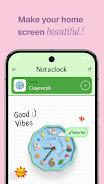
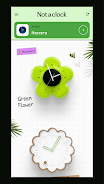
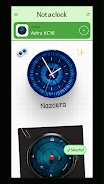
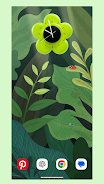
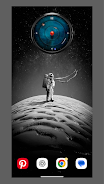
Not a Clock: Aesthetic Widgets focuses on converting empty home screen real estate into a tasteful display of analog clocks. Each widget is a static, high-definition artwork that displays time with subtle animations and smooth anti-aliased rendering where appropriate. Widgets are placed like any standard Android widget: long-press an empty area on the home screen, choose Widgets, select the clock face you want, and drop it into position. A one-tap setup flow lets you preview size and placement before finalizing so you can quickly experiment with layouts.
Controls and interaction
Interaction is intentionally simple to keep the experience low-friction. Tap a clock to open a compact settings panel where you can adjust size, opacity, or whether a seconds hand is shown. Long-pressing a placed widget enters resize mode of your launcher so you can scale the clock to suit columns and grid spacing. A dedicated in-app editor lets you fine-tune color accents, shadow depth, and bezel finish without requiring advanced design skills. There are no complex gestures to learn, and most adjustments are one-handed.
Visual style and customization
The visual palette ranges from translucent glass-like faces and muted Scandinavian minimalism to weathered metal and vintage industrial frames. Each style is supplied as a high-resolution asset optimized for modern OLED and high-DPI displays, with variants tuned for dark and light home screen backgrounds. Customization covers size, contrast, accent color and bezel treatments, and you can save custom combinations to quickly swap looks when you change wallpapers or themes. The goal is an uncluttered, museum-quality centerpiece rather than an overcrowded instrument cluster.
Progression and collection structure
Instead of traditional game progression, the app uses a collection model: you start with a starter set of several handcrafted faces and can unlock the full gallery with an optional one-time Pro purchase. Available faces are organized into curated collections and categories so you can browse by aesthetic, era, or material feel. Periodic updates add new curated sets so the gallery grows over time; these additions are mentioned in the app update notes so you know what new designs have been added.
Performance, battery and offline behavior
Not a Clock: Aesthetic Widgets emphasizes energy efficiency by using optimized rendering that minimizes CPU and GPU use while still delivering crisp visuals. Because widgets are primarily static and do not rely on continuous network access, they continue to display accurately when your device is offline. Background resource use is intentionally low, and the app exposes a small battery impact profile in system battery settings so users can confirm power behavior on their device.
Compatibility and user experience
The app is designed to work with most popular Android launchers and supports placement on home screens and compatible lock screens where the platform allows widgets. Installation includes a short guided tour that explains placement, resizing, and the settings panel for accessibility. Text labels, contrast options, and touch targets are sized to be usable on smaller screens, and the simple interaction model supports one-handed control. If a launcher limits widget functionality, the app provides troubleshooting tips in the settings area.
Accessibility and replay value
Accessibility is considered through clear visuals, adjustable contrast levels, and large touch targets in the settings editor. Replay value comes from regular creative updates and the ease of swapping faces to change the look of your device quickly. Because each installed face is lightweight and offline-friendly, you can experiment with different combinations without worrying about data or battery drain.
What you get and optional upgrade
The free version offers a selection of core clock faces so you can try basic styles and test compatibility with your setup. An optional one-time Pro purchase unlocks the entire gallery and removes access restrictions; this is a single purchase rather than a subscription. The app does not require sign-in for basic use and avoids intrusive permissions, requesting only what is necessary to place and display widgets correctly. If you appreciate a simple, artful alternative to digital clock clutter, Not a Clock: Aesthetic Widgets provides a stable, design-led way to make your home screen feel intentional and refined.
- No virus
- No advertising
- User protection
Information
- File size: 14.00 M
- Language: English
- Latest Version: 1.0.6
- Requirements: Android
- Votes: 229
- Package ID: com.ansar.notaclock
- Developer: Madebyanzu
Screenshots
















Explore More
Be prepared and plan your days better with our new weather app. Get real-time hyperlocal forecasts, customizable alerts and widgets, and detailed hourly projections. Beautiful photo backgrounds change dynamically based on conditions. Intuitive radar and satellite imagery help you visualize storms and patterns. Get humidity, precipitation probability, pollen count, and other useful data at a glance. Save favorite locations like home, work, or travel destinations for quick access.

KUIC Mobile Music

Peloton

skateable

WITAL

Nature Path Guide

Park Ranger

Melvine

Glassify - Widgets & Themes