
Introduction
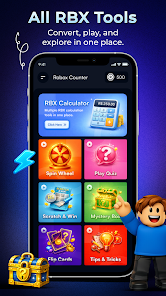
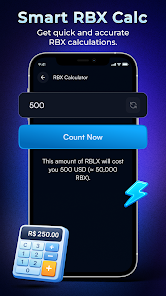
Robox Counter : RBX Calc is a compact companion app designed for quick RBX value estimation, simple conversions and short practice sessions. Robox Counter : RBX Calc presents a clean, focused interface that combines a fast converter, a practical calculator, a short quiz module and a flip-card memory exercise so users can check values, sharpen recall and review brief strategy tips without friction.
Key Features
The core tools are presented clearly: a converter that accepts a range of RBX inputs and returns estimated values in seconds, a calculator-style entry pad for on-the-fly arithmetic, a modular quiz section with multiple short question sets, and a flip-card mini-game for memory practice. Each feature is intentionally lightweight so the app opens quickly and stays responsive on a wide range of Android devices. The Tips & Tricks area summarizes practical, beginner-friendly strategies and context notes so users can make more informed decisions while playing or planning.
How It Works
The converter supports direct numeric input and simple unit adjustment; type values into the calculator pad or paste amounts from other apps and get an immediate estimate. Quizzes are organized into short rounds with a handful of questions to encourage repeated practice rather than long study sessions. The flip-card exercise shows a small set of items or values, flips them over and asks you to recall positions, building short-term memory through brief repetitions. All modules include clear on-screen prompts and brief explanatory hints so first-time users can start without a tutorial.
Controls and Interaction
Controls are deliberately simple: tap to enter numbers, swipe horizontally to move between quiz questions, and tap cards to flip them. The calculator interface features large, high-contrast buttons and a single-line display for fast reading. Quizzes use touch-friendly answer areas and immediate feedback on correctness so you can learn from mistakes. The flip-card game responds to both tap and keyboard input on devices that support external keyboards, making basic interaction accessible across hardware types.
Progression and Challenge
The app organizes practice into short sessions that can be completed in a few minutes, and difficulty modes let you increase the complexity of quiz items or the number of cards in memory rounds. Local progress tracking shows your recent bests and completion streaks so you can measure improvement without any online account. Robox Counter : RBX Calc encourages incremental progression: start with easy conversions and short quizzes, then enable higher difficulty settings and longer memory sets when you are ready to challenge yourself.
Visual Style and Customization
Visual design is minimal and functional: muted backgrounds, clear typefaces and strong contrast ensure readability during quick checks or longer practice periods. Users can toggle a compact layout for smaller screens or a spacious layout for tablets, and basic appearance settings allow adjustments to font size and button scale. These small customizations help the interface remain comfortable across device sizes and personal preferences.
Replay Value and Structure
Replay value comes from randomized quiz questions, multiple difficulty tiers and the short-session design that invites frequent repetition. Levels are not long-form stages but structured rounds and sets that can be replayed with different item pools. This makes the app useful both for immediate value checks and for repeated practice over time, supporting steady improvement without large time commitments.
Accessibility and Offline Use
Accessibility is addressed through large tap targets, adjustable text size and clear contrast options; brief on-screen hints guide new users through each module. The app runs fully offline for core features — conversions, the calculator, flip-card practice and most quiz content — so you can use Robox Counter : RBX Calc on the go without a network connection. No sign-in is required and personal progress is stored locally on the device.
Limitations and Intended Use
This is an independent, fan-made utility and is not affiliated with any official game company or platform. It is intended for informational and entertainment purposes only rather than as a transactional or account management tool. The app does not perform online trades, manage accounts or interact with external services; its focus is practical estimation, basic skill practice and lightweight reference.
Technical Notes
The app is optimized for modern Android releases and aims to be lightweight to preserve battery and memory. If you experience layout issues on older hardware, switching to the compact layout or reducing text size usually improves performance. Regular small updates add question pools and minor refinements without changing the app’s simple, offline-first philosophy.
Getting Started
Open the converter to try a quick estimate, use the calculator for rapid checks, run a short quiz round to test knowledge and play a couple of flip-card rounds to warm up memory skills. With quick sessions, adjustable difficulty and straightforward controls, Robox Counter : RBX Calc is built to fit into short breaks and on-the-go value checks while remaining easy to understand and use.
- No virus
- No advertising
- User protection
Information
- File size: 28.00 M
- Language: English
- Latest Version: 1.0
- Requirements: Android
- Votes: 485
- Package ID: com.counter.calculator.getrbx.calculation.dailycou
- Developer: Mr Harsh Jain
Screenshots



















Explore More
Discover a world of entertainment with our immersive apps. Access movies, TV shows, music, books, and more from your favorite platforms. Get recommendations personalized to your tastes to find hidden gems. Learn fascinating trivia, go behind-the-scenes, and connect with other fans. Try augmented and virtual reality demos from the hottest studios.
View more