Introduction
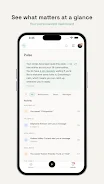
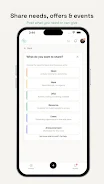
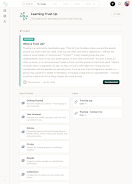
Trust Up is a community-focused sharing app that helps groups coordinate exchanges and support each other without strangers or opaque algorithms. It lets members post needs and offers within trusted circles—neighbors, classmates, coworkers or co-op groups—so people can gift, lend, trade, rent, sell or collaborate under terms they set. Users download Trust Up to simplify neighborhood tool sharing, organize carpools and mutual aid, or manage shared resources at work or in local groups. The interface and features prioritize private, circle-based coordination so communities can arrange exchanges on their own terms.
Key Features
⭐ Connect only with people you know by organizing offers and requests inside trusted circles.
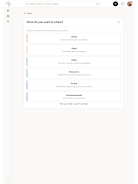
⭐ Post needs and offers with customizable terms for gift, trade, lend, borrow, rent, sell, or collaboration.
⭐ Private-by-design data handling so your circles and conversations stay under community control.
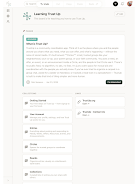
⭐ Group coordination tools to manage shared resources, volunteer lists or rotating responsibilities.
⭐ No algorithmic feed—visibility is determined by your circles, not a black-box ranking system.
Advantages
✅ Trust Up keeps exchanges within known groups, which reduces the risk of dealing with strangers and builds accountability.
✅ Flexible exchange types support everything from mutual aid to neighborhood sharing to professional collaboration.
✅ Privacy-first approach means your data and circles remain under your control rather than being monetized or surfaced by algorithms.
✅ Simple coordination tools make it easy for parents, neighbors, coworkers or local organizations to organize resources and volunteers.
Disadvantages
❎ Functionality is limited to people within your circles, so the pool of available offers may be smaller than open marketplaces.
❎ The app relies on active participation from community members—usefulness drops if a circle is inactive.
❎ Not designed for anonymous transactions, which may limit some types of exchanges or impulse listings.
- No virus
- No advertising
- User protection
Information
- File size: 6.25 M
- Language: English
- Latest Version: 4.4
- Requirements: Android
- Votes: 306
- Package ID: app.trustup.trustupapp
- Developer: Trust Up L3C
Screenshots


















Explore More
Equip yourself with our all-in-one toolbox app for everyday tasks and projects. Instantly convert between units, calculate tips, scan documents, manage files, and more with handy productivity tools. Includes a level, compass, QR code reader, ruler, speedometer, decibel meter, and flashlight. Save frequently used tools to your customizable dashboard for one-tap access. Track billable hours, wages, budgets, and invoices. Annotate screenshots, magnify labels, and sign PDFs on the go.
View more