Introduction
NCheck Standard is a biometric attendance and personnel management application built to register employees, record time and simplify payroll-ready reporting using face, fingerprint and iris recognition. The app focuses on reliable clock-ins, preventing buddy-punching and giving administrators clear attendance summaries, while supporting location-aware check-ins and liveness verification so the captured record represents a present person rather than a photo or spoof. Designed for daily operational use, NCheck Standard aims to replace manual timesheets and reduce errors that can creep into payroll processes.
Key features and how they work in practice
Biometric enrollment in NCheck Standard supports three modalities: facial templates, fingerprints and iris patterns, and organizations can choose one or combine several for multi-factor verification. The facial recognition flow includes a short liveness check to confirm the subject is a live person and can handle multiple faces appearing in the camera view to avoid workflow interruptions in busy corridors. Location tagging records GPS coordinates at check-in and check-out so on-site and remote activity can be validated. Attendance logs include basic metadata—timestamp, biometric modality used and location—so supervisors have a reliable audit trail.
User flows and controls
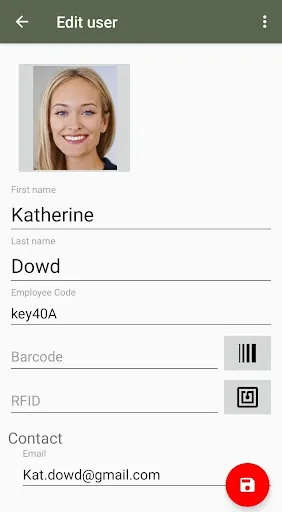
The user interface is optimized around simple interactions: employees enroll with guided prompts that explain how to position the face, place a finger, or align the eye for iris capture. Check-ins are initiated with one tap and visual indicators confirm successful recognition or provide immediate feedback if the capture failed, including suggestions like improving lighting or cleaning the sensor. Administrators control access levels through role settings that determine who can enroll staff, review exceptions, or export reports. Session timeouts, retry limits and configurable grace periods let organizations balance security and convenience.
Deployment, progression and rollout
Rolling NCheck Standard out across a site typically starts with a pilot group to validate camera placement, network connectivity and enrollment throughput. Once core templates are captured, administrators can progressively enroll remaining employees in phases to avoid long queues. The app supports staged adoption where fingerprint-only sites can later enable face or iris recognition without disrupting already enrolled users. Progression tools include bulk template management and status dashboards that show enrollment completion by department, helping IT and HR coordinate a smooth transition.
Interface, visual style and level structure
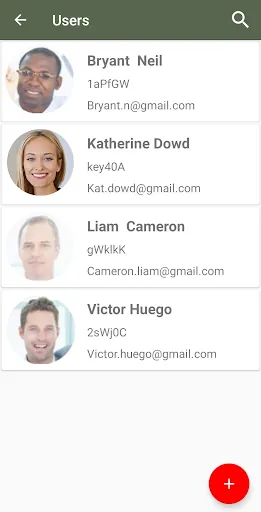
The app adopts a clean, business-oriented visual style with high-contrast text, card-based attendance lists and simple charts that summarize hours and exceptions. Dashboards present working hours, overtime and leave balances in an at-a-glance layout while detail screens allow drilling into daily records. Permission tiers separate regular employees from managers and system administrators, so sensitive functions like template deletion or payroll export remain restricted to authorized roles.
Customization and policy controls
NCheck Standard provides configurable parameters that align attendance behavior with company policy: you can adjust check-in windows, require multi-modal verification for high-security areas, define geofenced locations for permitted check-ins, and set thresholds for what constitutes overtime or lateness. Notification settings let HR receive alerts on repeated no-shows or suspicious patterns, and custom fields allow the app to tag records with department codes or job types for downstream processing.
Reporting, integrations and offline behavior
Reporting exports are designed for payroll teams and include summary reports of worked hours, overtime, vacation and sick leave in common formats so they can be imported into payroll systems. The app caches attendance records locally when connectivity is limited and performs secure synchronization once the device is back online, ensuring minimal disruption during network outages. Export tools include date-range filters, employee-level detail and exception reports to streamline reconciliation tasks.
Accessibility, reliability and daily use
Attention to accessibility includes readable fonts, clear status messages and camera prompts that reduce friction during enrollment for users with limited technical experience. Daily reliability is supported by retry guidance, environmental recommendations and the option to choose the best biometric modality for a specific workplace—fingerprint for controlled gates, face for high-throughput lobbies, or iris for high-security areas. Regular backups and audit logs help administrators trace and resolve discrepancies quickly.
Limitations, privacy considerations and best practices
Like any biometric system, initial enrollment takes time for large workforces, and recognition performance can be affected by factors such as poor lighting, damaged sensors or obstructive eyewear. Organizations should communicate data-handling policies clearly, implement retention and encryption standards and obtain appropriate consent when collecting biometric identifiers. Practical tips include scheduling staggered enrollment sessions, positioning cameras to avoid backlight, and maintaining sensors to preserve accuracy over time.
- No virus
- No advertising
- User protection
Information
- File size: 269.10 M
- Language: English
- Latest Version: 5.1.46.304
- Requirements: Android
- Votes: 164
- Package ID: com.neurotec.ncheck.standard
- Developer: Neurotechnology Lab
Screenshots
















Explore More
Equip yourself with our all-in-one toolbox app for everyday tasks and projects. Instantly convert between units, calculate tips, scan documents, manage files, and more with handy productivity tools. Includes a level, compass, QR code reader, ruler, speedometer, decibel meter, and flashlight. Save frequently used tools to your customizable dashboard for one-tap access. Track billable hours, wages, budgets, and invoices. Annotate screenshots, magnify labels, and sign PDFs on the go.

Board Game Stats

MEXC Global: BTC, ETH, Gamefi

Text Art - Write Text On Photo

MERA PROXY PRO

Domino's Pizza Sri Lanka

Hatekhori Shongkha

Halloween Photo Editor -Makeup

Connecting - Friends Near Me