
Introduction
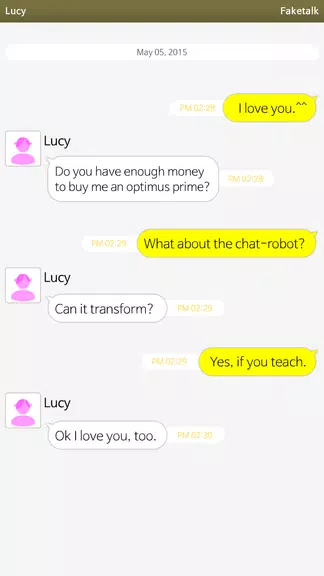
Faketalk brings conversational AI to your device so you can create chat-robots that mimic celebrities, fictional characters, or entirely original personas and interact with them in private or group conversations. The app focuses on a teachable, community-driven model: after adding a bot as a contact you can open one-on-one or group chats and train the bot by adding vocabulary, phrases, and conversational lessons that are shared in real time so every participant’s contributions can improve responses. Robots currently begin with Korean as a base language and are being taught English, so early use often involves guiding and refining replies to reach the tone and fluency you want.
Key Features
Faketalk makes it easy to build a conversational partner by offering simple creation tools, chat controls, and sharing functions. Create a new bot from a template or start from a blank persona, assign a display name and icon, and place it in a private or group chat. Conversations are text-based and operated through familiar mobile gestures: tap to send, long-press messages to add teaching notes or save excerpts, and use inline lesson items to suggest preferred replies. Community-sourced lessons appear in real time so popular phrasing and corrections propagate quickly, and you can save memorable dialog snippets to review later or share with other users. Privacy settings let you mark individual bots or chats as private so only participants contribute to that bot’s learning pool.
How It Works
The app’s mechanics center on iterative training rather than scripted branching. Each bot begins with a base language and a small set of default behaviors; as users add example phrases and corrective suggestions, those inputs become part of the bot’s response model for that persona. Controls are intuitive: create a lesson by selecting a message and choosing a teach option, attach contextual notes to shape tone or intent, and replay saved conversations to see how changes affect replies. Progression is organic — a bot’s variety and reliability increase as more lessons are added and refined, and you’ll notice responses evolve over repeated practice. The system avoids gamified leaderboards and focuses instead on continuous improvement through conversation patterns and shared lessons.
Customization and Visual Style
The interface emphasizes clear, readable chat bubbles and a straightforward contact list so you spend minimal time adjusting settings and more time interacting. Customize each bot’s personality by setting tone presets, vocabulary preferences, and conversational boundaries; choose an avatar or simple icon to represent the persona in chats. Visual options include adjustable text size, contrast themes, and a compact layout for quicker scanning of group conversations. These choices let you craft companions that feel distinct, whether you’re aiming for playful banter, language practice, or calm, patient replies for study sessions.
Replay Value and Community Interaction
Replay value comes from the open-ended nature of conversations and the communal learning model. Because every bot can be taught new phrases, you can revisit older chats to test how changes alter behavior, create themed chat prompts to challenge a bot, or set up group sessions where multiple contributors provide lessons simultaneously. The ability to save favorite exchanges and reproduce them with small variations makes the app useful for entertainment, creative writing prompts, and practical language drills. Community moderation tools and reporting options help manage inappropriate content so the shared lesson pool remains productive.
Accessibility and Offline Use
Faketalk aims to be accessible on a wide range of devices. The app supports adjustable fonts and color contrast to improve readability, and it has been structured to work smoothly with common screen readers and assistive input methods. While live learning and lesson sharing require an internet connection, saved conversations and exported excerpts are available for offline review and practice, letting you revisit lessons or study phrases when you’re not connected. The interface is kept lightweight so basic navigation and reading are responsive even on older hardware.
Limitations and Responsible Use
Expect variation in quality: because the bots learn from user contributions, fluency will differ between personas and may require ongoing teaching to reach reliable performance. The initial Korean base and developing English support means non-Korean speakers should plan to add core vocabulary and corrections. The app is intended for creative, educational, and social uses; it does not produce guaranteed factual responses and should not replace professional advice. Privacy controls let you keep certain bots private, and community guidelines discourage explicit or harmful content to maintain an indexable and broadly appropriate experience for all users.
- No virus
- No advertising
- User protection
Information
- File size: 45.40 M
- Language: English
- Latest Version: 2.9.9
- Requirements: Android
- Votes: 329
- Package ID: com.baek.Gatalk3
- Developer: baek
Screenshots

















Explore More
Discover a world of entertainment with our immersive apps. Access movies, TV shows, music, books, and more from your favorite platforms. Get recommendations personalized to your tastes to find hidden gems. Learn fascinating trivia, go behind-the-scenes, and connect with other fans. Try augmented and virtual reality demos from the hottest studios.

IZI: play, listen, watch, call

51 Game

LR Store

Nation face scanner

Bangla Newspaper

Globoplay

Pregnancy Test Scanner Prank

Philips Hue