


Introduction
Home Design AI - Room Planner puts a virtual design studio in your pocket, using AI to transform photos of your rooms, exteriors and gardens into realistic, editable concepts. Upload a picture and instantly explore new layouts, color palettes, furniture swaps and landscaping ideas so you can preview renovations or stage a property before spending time or money. It’s aimed at homeowners, renters and design professionals who want to test bold ideas risk-free, compare multiple versions, and share polished visuals with family or contractors to speed decisions and reduce surprises.
Key Features
⭐ Home Design AI - Room Planner generates AI-powered makeovers from a single photo, producing realistic design concepts for living rooms, kitchens, bedrooms and offices.
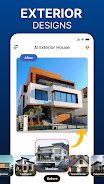
⭐ Exterior & Landscape Designer to visualize new siding, patios, landscaping and curb appeal changes in context.
⭐ Garden & Outdoor Retreat tools to arrange plants, pathways and outdoor furniture for a balanced outdoor living space.
⭐ Style Match Technology that analyzes an inspiration image and adapts its look to your room’s dimensions and lighting.
⭐ Selective editing and object-aware swaps let you try new sofas, wall colors, flooring or décor elements individually.
⭐ Real-time visualization with photorealistic previews and the ability to save and compare multiple design versions side-by-side.
Advantages
✅ Home Design AI - Room Planner helps you make decisions faster by letting you see high-quality previews before you buy or renovate.
✅ Experiment risk-free with layouts, palettes and furnishings so you can refine ideas without costly mistakes.
✅ Useful for professionals—interior designers and real estate agents can create mood boards, virtual staging and client presentations quickly.
✅ All designs are saved to a personal cloud archive, so you can track projects, revisit past concepts and share progress with collaborators.
Disadvantages
❎ Results depend on the quality, angle and lighting of the photos you upload, so imperfect images may produce less accurate previews.
❎ AI-generated concepts are a fast way to explore ideas but may require further refinement or professional input for structural or complex architectural changes.
- No virus
- No advertising
- User protection
Information
- File size: 67.00 M
- Language: English
- Latest Version: 2.1
- Requirements: Android
- Votes: 248
- Package ID: com.glc.housedesign.interiorai.homeai.aidesign.dec
- Developer: GameChief FZ-LLC
Screenshots





















Explore More
Equip yourself with our all-in-one toolbox app for everyday tasks and projects. Instantly convert between units, calculate tips, scan documents, manage files, and more with handy productivity tools. Includes a level, compass, QR code reader, ruler, speedometer, decibel meter, and flashlight. Save frequently used tools to your customizable dashboard for one-tap access. Track billable hours, wages, budgets, and invoices. Annotate screenshots, magnify labels, and sign PDFs on the go.

MEXC Global: BTC, ETH, Gamefi

Text Art - Write Text On Photo

MERA PROXY PRO

Domino's Pizza Sri Lanka

Hatekhori Shongkha

Halloween Photo Editor -Makeup

Connecting - Friends Near Me

Cartola





















