


Introduction
All Video downloader & Player is a versatile Android utility that helps you find, save, and watch videos from a variety of public sources. The app combines a streamlined download manager with an integrated media player, letting users organize files and play multiple formats without leaving the interface.
What the App Does
All Video downloader & Player simplifies the process of capturing videos you have permission to save, offering a browser, one-tap download controls, and an internal player. Its focus is on convenience: queued downloads, background transfers, and a tidy library that keeps files accessible and well labeled.
User Interface and Workflow
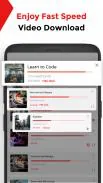
The interface emphasizes clarity. A built-in browser is paired with quick-action buttons so users can preview a clip and start a download with minimal taps. Tabs separate downloads, completed items, and the media library, making it straightforward to manage active tasks and locate saved content.
Download Management
Download tools are a main strength. The app supports multiple concurrent downloads, pause and resume, and automatic retry for interrupted transfers. You can set download limits for cellular data, schedule large downloads for Wi-Fi only, and prioritize specific files so the most important videos finish first.
Supported Formats and Playback
All Video downloader & Player plays a wide range of common video and audio formats without requiring external codecs. Subtitles can be loaded alongside videos, playback speed is adjustable, and a lock-screen player prevents accidental taps. The player includes basic gesture controls for volume and seek, plus playlist support for continuous viewing.
Organization and File Handling
Organizing saved media is simple: create folders, rename files, and tag favorites. The app offers a built-in scanner that detects newly downloaded videos on the device and imports them into the library. File management tools include batch selection, share actions, and an easy way to move media between internal storage and an SD card.
Performance and Resource Use
Designed for efficiency, the app minimizes battery and memory impact while downloading or playing videos. Background downloads continue reliably when the screen is off, and the transfer engine adapts to available bandwidth to reduce interruptions. On low-end devices the app scales back animations to keep operations smooth.
Privacy and Permissions
All Video downloader & Player requests only the permissions needed for its functions, such as storage access for saving files and network permission for downloads. The privacy options let you clear history and remove temporary files, and you can restrict the app to a private folder to prevent media from appearing in other gallery apps.
Customization and Settings
A concise settings panel lets you control download behavior, playback preferences, and UI themes. Choose a dark mode for nighttime viewing, set default subtitle languages, and configure where files are stored. For advanced users there are options to adjust the number of worker threads for downloads and to enable a proxy.
How to Get Started
- Open the built-in browser and navigate to a public video page you have the right to save.
- Tap the download button that appears or use the share menu to add a link to the download queue.
- Monitor progress in the Downloads tab and find completed files in the Library.
- Use the player to watch, add subtitles, or create playlists.
Who Benefits Most
This app is useful for anyone who needs a compact, all-in-one tool for saving and playing owned or freely available videos on Android. Content creators, educators compiling reference clips, and users who prefer offline access to personal video collections will find the feature set convenient and time-saving.
Final Notes
All Video downloader & Player balances functionality with ease of use, packing download scheduling, robust playback, and organized file handling into a single Android application. Keep usage within legal and copyright guidelines, and the app becomes a practical addition to device media workflows.
- No virus
- No advertising
- User protection
Information
- File size: 17.50 M
- Language: English
- Latest Version: 1.0.109
- Requirements: Android
- Votes: 152
- Package ID: com.mediastudio.allvideodownloader.downloadvideosh
Screenshots























Explore More
Discover and share the hottest events around with our intuitive apps. Find local concerts, festivals, shows, and more based on your unique interests. Create customizable calendars of upcoming events to coordinate schedules with friends. Purchase tickets seamlessly from our integrated platforms. Check real-time transit schedules to plan your trip. Access maps, directions, and parking information for any venue.

Board Game Stats

Bloomberg Connects

Metro Micro

TVSMILES

Tax Calculator India 2024-2025

OnDjoss

Park4Me

TryController





























