
Introduction
Family Space helps parents coordinate schedules, set digital boundaries, and monitor device use across children with a single, easy-to-use dashboard. It centralizes family calendars, screen-time controls, and location sharing while keeping privacy options clear and configurable for each household member.
What the app does for your household
At its core, Family Space combines parental controls with everyday organization tools. The app helps families reduce friction around screen time and commitments by offering synchronized calendars, task assignments, and gentle device limits. It’s designed to be approachable for caregivers who want control without micromanaging, and flexible enough for teens who need autonomy.
Primary capabilities
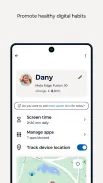
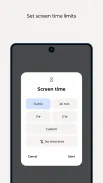
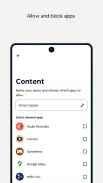
- Screen-time management: Create device schedules, pause access remotely, and set app-specific limits to encourage offline activities.
- Family calendar: Shared events and reminders keep everyone on the same page—assign chores, plan appointments, and track extracurriculars.
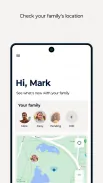
- Location check-ins: View approximate locations for safety, with opt-in settings so older children can retain privacy when appropriate.
- Activity reporting: Receive summaries of screen use by app category, which helps identify distracting patterns and set realistic rules.
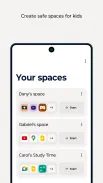
- Profiles per child: Tailor settings by age or device; different rules can apply to younger children and teens.
How it works day-to-day
Installation is straightforward: an admin account is created by a parent or guardian who then invites other family members. Once devices are linked, rules propagate centrally. The daily workflow centers on the dashboard—quick toggles for lockouts, a visual timeline of upcoming events, and notifications that highlight exceptions or unusual activity.
Integration with existing tools
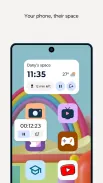
Family Space connects with common calendar apps and supports notifications that integrate with the lock screen. It doesn’t replace all family software needs, but it minimizes app switching by consolidating the most requested parental-control and scheduling features into one place.
User interface and performance
The app’s interface favors clarity over complexity. Icons and color-coded timelines communicate status at a glance. Performance is generally smooth on modern devices, with low battery overhead when location services are active. Settings are grouped logically, so administrators can apply global changes or tweak individual profiles without hunting through menus.
Privacy and controls
Privacy is addressed through explicit consent flows and granular toggles. Location sharing, browser history summaries, and app-level restrictions can be enabled or disabled independently. Parents can set temporary overrides—for example, allowing extra screen time for homework or family travel—without altering long-term rules.
Tips for first-time users
- Start with simple rules: schedule device-free dinners and a short evening cutoff to see how the family adapts.
- Use the activity reports once a week rather than daily; too much data can create friction.
- Invite older children to help set their own limits within agreed boundaries to increase buy-in.
- Test location settings together so everyone understands what’s visible and when.
Common setup pitfalls
Problems typically stem from device permissions—make sure background location and notification access are allowed where required. Also, consider staggered rollout: apply limits to one device first to resolve configuration quirks before adding multiple profiles.
Why families adopt it
Family Space earns trust because it blends practical scheduling tools with non-punitive monitoring. It reduces the number of arguments about screen time by making expectations explicit and measurable. For busy households, the shared calendar and quick remote controls are often the most valued elements.
Getting started
Download and create an account, then add the primary caregiver as the administrator. Invite family members via email or SMS and follow on-screen prompts to assign devices and choose preset rules. Adjustments can always be made later as routines evolve.
For families looking to balance safety, privacy, and convenience, Family Space is a pragmatic choice that streamlines coordination without undermining trust. Its clear interface and focused feature set make day-to-day family management simpler and less stressful.
- No virus
- No advertising
- User protection
Information
- File size: 32.50 M
- Language: English
- Latest Version: 3.1.18.6
- Requirements: Android
- Votes: 84
- Package ID: com.motorola.spaces
- Developer: Motorola Mobility LLC.
Screenshots
















Explore More
Make your house a home with our selection of innovative apps. Discover programs to simplify cleaning, organize closets, and manage home maintenance. Take the hassle out of chores and keep your space running smoothly. Design, visualize, and renovate like a pro using our augmented reality and 3D modeling tools. Enhance security and monitor your property 24/7 with our connected home tech.

Scary sound effects

カウシェ

Baby songs free Nursery rhymes

Kaspersky Password Manager

Kidcare – Parental Control App

OTT Navigator IPTV

MTS Link

Origin Energy Gas Internet LPG