


Introduction
PDF Converter is a compact Android tool that converts documents, images, and web pages into high-quality PDF files quickly and reliably. Designed for mobile productivity, it supports batch processing, OCR, and cloud sync so you can create, merge, and optimize PDFs directly from your phone with minimal effort.
Key features and conversion tools
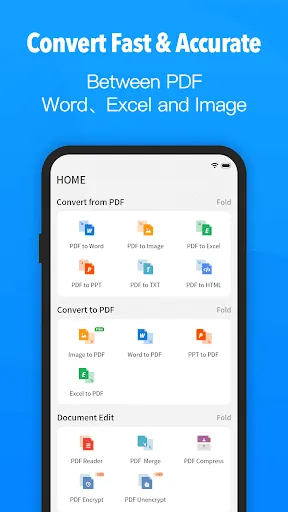
PDF Converter provides a broad set of conversion options that make it simple to transform different file types into portable, searchable PDFs. Use the app to convert Word, Excel, PowerPoint, images (JPG, PNG), and plain text into PDF format. The tool also supports HTML-to-PDF and can generate PDF versions of web pages you capture from your browser. Built-in OCR (optical character recognition) turns scanned images into editable, selectable text for easy copying and searching.
How the workflow fits into daily use
Workflows are designed for speed and clarity. Select single files or entire folders, choose conversion settings, then run batch jobs to process multiple documents at once. A simple preview step lets you confirm page order, orientation, and margins before saving. For scanned documents you can crop, rotate, and enhance contrast in-app, then run OCR to extract editable text. Export and share finished PDFs via email or messaging apps directly from the app interface.
Document management and editing
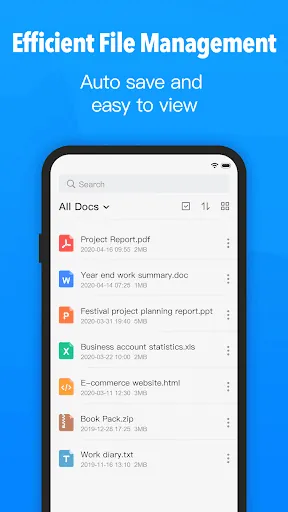
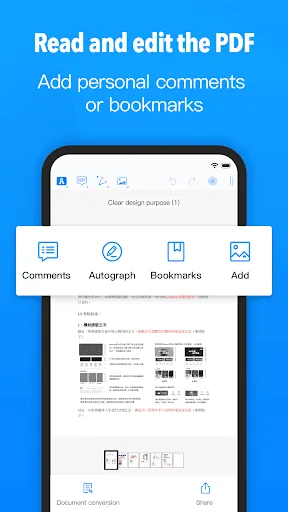
Beyond conversion, PDF Converter includes tools to refine and organize PDFs. Combine several files into one document, split large PDFs into smaller parts, or reorder pages with a tap. Compress PDFs to reduce file size for sharing while preserving readable quality. Add metadata like title and author, apply password protection or permissions to restrict printing and copying, and append digital signatures to authenticate documents when needed.
Integration and cloud compatibility
The app synchronizes with common cloud services so your documents remain accessible across devices. Connect to Google Drive, Dropbox, OneDrive, and other providers to import sources or save results directly to the cloud. Cloud integration enables automated backup and frees up local storage, making it easy to work on documents from multiple locations without manual file transfers.
User interface and accessibility
PDF Converter’s interface balances functionality with approachability. Menus are organized by task—convert, edit, manage—so even new users can locate tools quickly. Contextual help and simple prompts guide common tasks like scanning a receipt or compressing a large brochure. Accessibility options, including adjustable font sizes and clear icons, improve usability for varied screen sizes and viewing preferences.
Performance, compatibility, and security
Conversion is optimized for mobile processors to minimize wait times and preserve battery life. Many features work offline, allowing you to create and edit PDFs without an internet connection. The app supports a wide range of Android versions and device configurations, with fallbacks for older devices to ensure reliability. Security features include local-only processing for sensitive documents and optional encryption when saving or sharing files.
Practical examples and use cases
Professionals can scan receipts and convert them to searchable expense reports, students can compile lecture notes into one PDF, and small business owners can assemble contracts and invoices for digital distribution. The batch conversion capability is particularly helpful when you need to process dozens of pages at once, while OCR is useful for extracting quotes or references from printed sources.
Getting started and tips for best results
To begin, grant the app access to storage and camera, then try converting a single document to get familiar with the settings. For clearer OCR results, scan documents on a flat, well-lit surface and choose high-resolution capture. When sharing, use compression settings selectively to balance file size and readability. Consider enabling cloud sync to keep an archive of converted files and free up device space.
Upgrade options and support
A free tier typically covers basic conversions and light editing, while an optional premium subscription unlocks advanced features such as unlimited batch processing, higher compression quality, and ad-free operation. Built-in feedback and support channels let you report issues or request specific feature improvements. Regular updates address compatibility with new Android releases and refine conversion accuracy.
PDF Converter is a practical, purpose-built app for anyone who needs reliable PDF creation and management on Android. With its combination of conversion formats, editing utilities, and cloud connectivity, it streamlines document workflows without overwhelming casual or professional users.
- No virus
- No advertising
- User protection
Information
- File size: 110.70 M
- Language: English
- Latest Version: 1.0
- Requirements: Android
- Votes: 289
- Package ID: com.pdfreader.viewdocuments.convert.compressdocume
- Developer: Dong Qi Technology
Screenshots
















Explore More
Streamline operations and maximize productivity with our innovative business apps. Manage contacts, schedule meetings, and route calls seamlessly. Collaborate on documents and projects in real-time. Track inventory, finances, and analytics to inform smart decisions. Build customized proposals, invoices, and contracts to win clients. Stay on top of emails, tasks, and passwords for efficient work.

Tax Calculator India 2024-2025

ScanPro

Park4Me

7punches: Simple Time Clocking

69ers

Airble

MaaS360 MDM for Android

Hong Kong Flight Info





























