


Introduction
Bluetooth Audio Widget Battery delivers a compact, glanceable way to monitor the battery levels of Bluetooth headsets, earbuds, and speakers from your home screen. This widget combines real-time battery readouts, quick access controls, and customizable appearance to streamline everyday audio management on Android devices.
Overview of the utility
Designed for users who frequently switch Bluetooth audio gear, Bluetooth Audio Widget Battery puts important device metrics front and center. Instead of diving into settings or a companion app, you get instant visibility of remaining charge, connection status, and simple toggles right from your launcher. It’s a lightweight tool that focuses on utility and speed.
Main capabilities
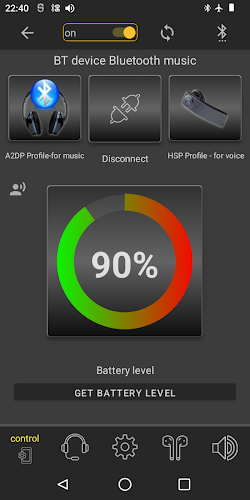
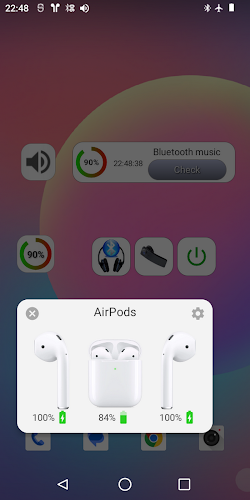
- Real-time battery levels — The widget displays percentage values for paired devices so you can plan charging and avoid mid-session drain.
- Multiple device support — Track earbuds, headphones, smartwatches, and speakers individually with separate tiles.
- Quick actions — Access play/pause, skip, or device disconnect directly via widget controls when available.
- Customizable size and style — Resize widgets and pick color accents or transparent backgrounds to match your home screen.
- Low-battery alerts — Optional notifications warn you when a device drops below a set threshold.
How it works in daily use
After placing the widget on your home screen, it automatically polls connected Bluetooth audio devices and updates their battery values. Polling frequency is tuned to balance responsiveness and battery life: values refresh often enough to stay useful without unnecessary background activity. Tapping a device tile usually opens Android’s device details or audio route chooser for deeper controls.
Interface and performance
The interface prioritizes clarity. Bold numerals and small icons make it easy to differentiate left/right buds or host device charge at a glance. On recent Android releases the widget leverages system APIs to fetch battery information, keeping resource use minimal. Animation is subtle, avoiding distracting transitions while still conveying connection changes smoothly.
Customization and personalization
Customization options let you tailor the widget to your workflow. Choose between compact and expanded layouts, hide labels to save space, or set color codes for specific devices. For users with multiple sets of earbuds, assigning distinct colors helps prevent confusion when both are in range.
Compatibility and technical notes
Compatibility depends on how each Bluetooth device exposes battery data. Most modern earbuds and headphones support the relevant profiles, but some legacy or very inexpensive devices may not report battery levels reliably. The app provides compatibility guidance within settings and flags devices that cannot share battery information.
User tips and best practices
- Place a compact widget on your primary home screen for one-tap visibility.
- Enable low-battery notifications for critical devices like hearing aids or in-ear monitors.
- Give each device a clear name inside Android’s Bluetooth settings to make identification easier.
- Adjust the widget polling interval if you notice any battery overhead; a longer interval reduces background activity.
Installation and setup
Installation is straightforward: add the widget through the usual long-press home screen flow, grant any required permissions, and select the devices you want to display. Bluetooth Audio Widget Battery guides you through initial setup and checks for permission issues that could prevent battery readouts.
Troubleshooting and support
If a device doesn’t show battery data, first ensure it’s connected and supports battery reporting. Restarting Bluetooth or re-pairing the device often resolves transient issues. The app also includes an in-app diagnostic mode to surface API-related limitations imposed by the Android version or device firmware.
For users who manage many wireless peripherals, Bluetooth Audio Widget Battery reduces friction and keeps essential information visible. It’s a practical addition for commuters, content creators, and anyone who relies on Bluetooth audio for daily tasks.
- No virus
- No advertising
- User protection
Information
- File size: 7.44 M
- Language: English
- Latest Version: 4.0
- Requirements: Android
- Votes: 442
- Package ID: mag.com.bluetoothwidget.free
- Developer: magdelphi
Screenshots
















Explore More
Make your house a home with our suite of helpful home apps. Discover clever tools to organize closets, streamline chores, and simplify cooking. Take the stress out of cleaning and maintenance with handy checklists and schedules. Enhance security and control appliances and lighting with our smart home integrations. Design, visualize, and renovate like a pro using our 3D planning software.

Metro Micro

All Recovery - Photos & Videos

Tax Calculator India 2024-2025

ClassPass: Fitness, Spa, Salon

OnDjoss

Park4Me

Scary sound effects

Home Workouts - Lose Weight





























