Introduction
Kawaii Photo Stickers & Editor is a playful photo editing app that helps you turn ordinary selfies into cute, shareable images. With a focus on soft, dreamy face filters, anime-style stickers and a wide range of playful emojis, the app makes it easy to add personality to portraits and social posts. Users can apply blush effects, sparkle accents and animal stickers, then fine-tune color, brightness and contrast to get the look they want. Whether you want a subtle kawaii glow or an over-the-top cartoon makeover, Kawaii Photo Stickers & Editor combines simple tools with creative assets to speed up editing and inspire new ideas.
Key Features
⭐ Kawaii face filters that add blush, sparkle and softening effects to portraits.
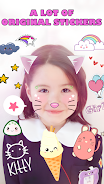
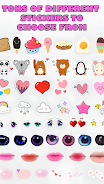
⭐ Extensive anime sticker library with chibi characters, magic icons and playful emojis.
⭐ Cute filters and effects for adjusting brightness, contrast and saturation to polish your images.
⭐ Hearts, animal stickers and funny faces to layer charming accents over any photo.
⭐ Large collection of kawaii assets and customization options in Kawaii Photo Stickers & Editor for personalized results.
Advantages
✅ Intuitive interface makes it easy for anyone to create cute edits without a steep learning curve.
✅ Fast adjustments and one-tap filters speed up the editing workflow.
✅ Extensive sticker and filter variety helps you craft a unique aesthetic for social posts.
✅ Designed for quick edits, Kawaii Photo Stickers & Editor lets you produce shareable images in minutes.
Disadvantages
❎ Focused on cute and playful styles, so it may not suit professional or natural-looking retouching.
❎ Users seeking advanced, studio-grade editing tools may find the options limited compared with dedicated photo editors.
❎ A large sticker library can feel overwhelming if you prefer a minimal, subtle look.
- No virus
- No advertising
- User protection
Information
- File size: 48.82 M
- Language: English
- Latest Version: 2.0.7
- Requirements: Android
- Votes: 441
- Package ID: kawaii.camera.bestphotoapps
- Developer: Hairstyle Photo Apps
Screenshots




















Explore More
Equip yourself with our all-in-one toolbox app for everyday tasks and projects. Instantly convert between units, calculate tips, scan documents, manage files, and more with handy productivity tools. Includes a level, compass, QR code reader, ruler, speedometer, decibel meter, and flashlight. Save frequently used tools to your customizable dashboard for one-tap access. Track billable hours, wages, budgets, and invoices. Annotate screenshots, magnify labels, and sign PDFs on the go.

MEXC Global: BTC, ETH, Gamefi

Text Art - Write Text On Photo

MERA PROXY PRO

Domino's Pizza Sri Lanka

Hatekhori Shongkha

Halloween Photo Editor -Makeup

Connecting - Friends Near Me

Cartola