Introduction
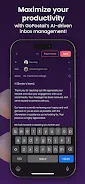
Postal is an AI-powered email assistant that speeds up how you read, write and organize messages, so your inbox stops being a daily time sink. It generates draft replies in seconds, suggests tones, and adapts to your edits to sound more like you. Smart filters automatically sort mail into categories like likely-to-reply, read-only, and spam-ready, and a dashboard lets you bulk review, delete, or recover messages. If you want to regain time and keep attention on what matters, Postal offers automation and simple controls that make clearing and responding to email far faster.
Key Features
⭐ AI-generated responses that produce draft replies in seconds, with options to edit or regenerate instantly.
⭐ Tone selection and prompt-based composition so you can match the message style to the situation.
⭐ Personalized learning that adapts to your edits so replies gradually reflect your voice.
⭐ Smart Filters that automatically organize mail into categories like Response Waiting, No Response / Read, and Spam / Ready to Delete.
⭐ Bulk actions from the Filters tab or dashboard to delete, review, or recover messages quickly.
⭐ Dashboard-driven prioritization that highlights emails you’re most likely to respond to, keeping focus on what matters.
Advantages
✅ Postal saves time by automating drafting and sorting, reducing the manual load of daily email.
✅ Helps you stay focused by surfacing high-priority messages and grouping low-value mail for quick review.
✅ Easy-to-use interface with bulk controls makes inbox maintenance faster and less stressful.
✅ Learns from your edits to improve tone and consistency over time, giving more personalized replies.
✅ Built-in recovery and review tools reduce the risk of losing important emails during cleanup.
Disadvantages
❎ AI-generated replies may require editing at first to match your exact tone and preferences.
❎ Automated filters can group messages that still need manual review, so occasional oversight is necessary.
❎ The system improves with use, so benefits increase gradually as the assistant learns from your edits.
- No virus
- No advertising
- User protection
Information
- File size: 98.04 M
- Language: English
- Latest Version: 1.0.0
- Requirements: Android
- Votes: 353
- Package ID: com.nullanon.postal
- Developer: Digital Prodigee LLC
Screenshots





















Explore More
Equip yourself with our all-in-one toolbox app for everyday tasks and projects. Instantly convert between units, calculate tips, scan documents, manage files, and more with handy productivity tools. Includes a level, compass, QR code reader, ruler, speedometer, decibel meter, and flashlight. Save frequently used tools to your customizable dashboard for one-tap access. Track billable hours, wages, budgets, and invoices. Annotate screenshots, magnify labels, and sign PDFs on the go.

1xSlots Casino

NeoSpin Casino

LifePad

SocialTech VPN

Desire by Lovehoney

888bets moçambique Apk

TogelUp

HOMETOGEL